
TEAMGROUP T-FORCE G70 Pro
Affordable Gen 4 Performance That Actually Delivers
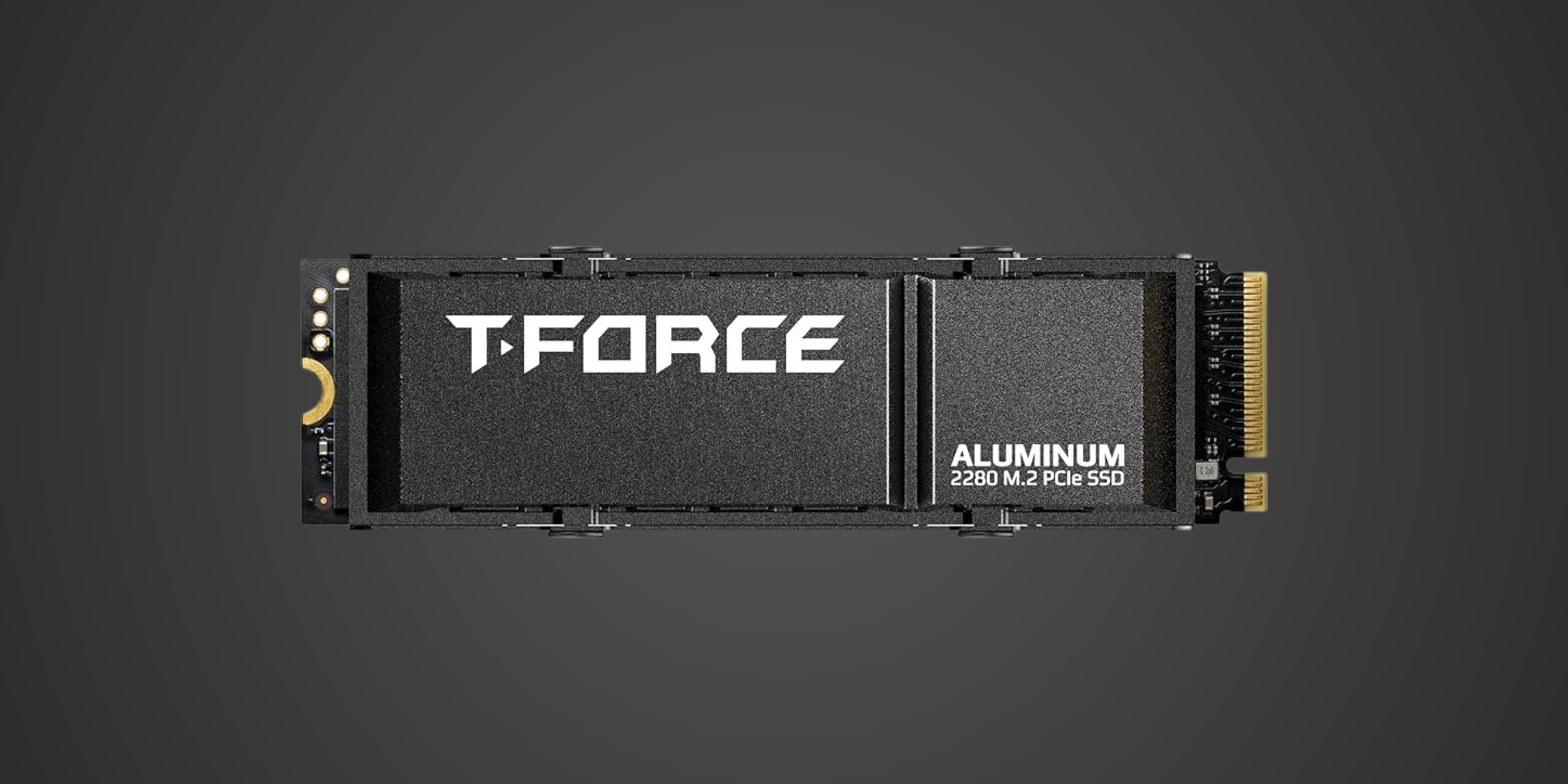
Table of Contents
Introduction
If you've been shopping for a PCIe Gen 4 NVMe SSD and feel overwhelmed by the flood of brands making wild performance claims, the TEAMGROUP T-FORCE G70 Pro deserves a closer look. This drive targets gamers upgrading from aging SATA drives, PC builders seeking strong price-to-performance ratios, and PlayStation 5 owners needing internal expansion storage without breaking the bank. Built on the PCIe 4.0 x4 interface and positioned squarely in the mid-range market segment, the G70 Pro challenges bigger-name brands by delivering flagship-level speeds at mainstream prices. TEAMGROUP may not flood your YouTube feed with ads, but this manufacturer has been quietly producing vertically-integrated storage solutions since 1997, and the G70 Pro represents their latest effort to prove you don't need to spend Samsung money to get Samsung-like performance.
Product Overview
The T-FORCE G70 Pro comes in the standard M.2 2280 form factor, making it compatible with virtually every modern motherboard and the PS5's internal expansion slot. Under the hood sits an InnoGrit IG5236 "Rainier" controller, a less common choice than the ubiquitous Phison E18 but one that delivers comparable performance at a lower price point. This quad-core ARM Cortex-R5 controller manages eight flash channels running at 1200 MT/s, ensuring data flows smoothly between the NAND and your system.
Speaking of NAND, TEAMGROUP equips the G70 Pro with 128-layer TLC (Triple-Level Cell) 3D NAND from YMTC or Micron depending on the batch. TLC strikes the sweet spot between performance, endurance, and cost, storing three bits per cell for excellent reliability without the performance compromises of cheaper QLC designs. Unlike many budget drives, the G70 Pro includes dedicated DRAM cache, with the 2TB model packing a 2GB DDR4-3200 chip from Micron or a similar chip from Nanya on the 1TB variant. This DRAM cache acts as a high-speed directory for your data, dramatically improving random read performance and system responsiveness compared to DRAM-less alternatives that rely solely on Host Memory Buffer.
The drive also leverages a pseudo-SLC cache, temporarily treating TLC cells as faster SLC cells to absorb burst writes. On the 2TB model, this cache spans an impressive 644GB before writes drop to the native TLC speed of around 2000 MB/s. Capacity options range from 512GB all the way to 4TB, with the 1TB and 2TB variants hitting the mainstream sweet spot for gaming and general use.
TEAMGROUP offers the G70 Pro with two cooling options: an ultra-thin 0.5-1mm graphene thermal pad designed for laptops and PS5 compatibility, or an aluminum alloy heatsink for desktop installations. The graphene pad looks like a stylish sticker and keeps the total drive height at just 3.7mm, well within the PS5's 11.25mm clearance restriction. The aluminum heatsink provides more substantial cooling for sustained workloads but requires verification against your motherboard's GPU and M.2 slot clearance.
Performance & Real World Speed
TEAMGROUP rates the G70 Pro for sequential speeds of up to 7400 MB/s read and 6800 MB/s write, though some early firmware batches fell slightly short of the read specification. TEAMGROUP has since acknowledged this issue and confirmed retail units meet the advertised performance. These speeds place the G70 Pro firmly in the upper echelon of PCIe Gen 4 drives, matching or exceeding many more expensive alternatives from household names.
But what do those numbers mean when you're actually using the drive? If you're upgrading from a SATA SSD that tops out around 550 MB/s, you'll notice game loading times dropping dramatically, with large open-world titles that previously took 30-40 seconds to load now appearing in 8-12 seconds. Windows boot times shrink from 15-20 seconds down to 5-8 seconds, and the overall system feels noticeably snappier with applications launching almost instantly. Moving large video files that once crawled along at SATA speeds now complete in a fraction of the time, turning a 50GB project transfer from a 90-second ordeal into a 10-second task.
For content creators working with 4K video timelines, the G70 Pro handles real-time scrubbing and effects previews without stuttering, keeping your workflow smooth even with multiple high-bitrate streams. Gamers installing massive 150GB titles will appreciate sequential write speeds that maintain above 2000 MB/s even after the SLC cache fills, meaning you're not waiting hours for that new release to finish copying. The drive also supports DirectStorage API, Microsoft's technology that lets games load assets directly from the SSD to the GPU, bypassing CPU bottlenecks for potentially faster load times in supported titles.
Random read and write performance sits around 1 million IOPS and 789K IOPS respectively in benchmark conditions, translating to excellent responsiveness when opening multiple small files, launching applications, or navigating complex folder structures. This is where the DRAM cache shines, keeping frequently accessed file locations instantly available rather than forcing the controller to search through NAND every time you need a file.
Thermal Management
PCIe Gen 4 drives push significantly more data than older Gen 3 models, and that increased activity generates substantial heat. Under sustained workloads, the G70 Pro's controller and NAND chips can climb into the 70-80°C range without active cooling, which triggers thermal throttling to protect the components. When throttling kicks in, performance drops noticeably as the drive tries to cool down, turning your high-speed Gen 4 investment into something that performs more like a Gen 3 drive until temperatures stabilize.
The included graphene thermal pad helps dissipate heat more effectively than bare PCB, but it's designed primarily for space-constrained environments like laptops and the PS5 where larger heatsinks won't fit. In desktop systems with good airflow, the graphene pad works adequately for moderate workloads like gaming and general use. However, if you regularly hammer the drive with sustained writes, such as video rendering, large file transfers, or professional workloads, you'll want more robust cooling.
That's where the optional aluminum alloy heatsink comes in. This two-piece design clamps onto both sides of the drive with screws, providing significantly better thermal dissipation than the graphene pad alone. Installation takes about two minutes and requires removing the protective film from the included thermal pad, then sandwiching the drive between the heatsink halves and tightening the screws evenly. The aluminum heatsink keeps temperatures 15-20°C lower under sustained load, maintaining peak performance during intensive tasks.
Before purchasing the aluminum heatsink variant, verify clearance in your system. Some motherboards position the primary M.2 slot directly under the GPU, and larger heatsinks may not fit once your graphics card is installed. Measure the available vertical space and check the heatsink dimensions to avoid compatibility surprises. Most motherboards also include their own M.2 heatsinks, which typically work well with the G70 Pro if you prefer to skip the included cooling.
For PS5 owners, the graphene pad version is mandatory since Sony's internal expansion slot has strict dimensional requirements. The 3.7mm height with graphene pad fits comfortably within Sony's 11.25mm maximum, and the PS5's limited airflow actually benefits from the wider heat-spreading properties of graphene compared to thicker aluminum blocks that might trap heat in the confined space.
Compatibility
The G70 Pro uses the standard M.2 Key M physical connector and requires a motherboard M.2 slot with PCIe 4.0 x4 connectivity. Fortunately, PCIe is backward compatible, so you can install this drive in older PCIe 3.0 x4 slots without issues, though performance will be capped at Gen 3 speeds of around 3500 MB/s. Most motherboards from 2019 onward support PCIe 4.0, especially those built on AMD's Ryzen 3000-series platforms or Intel's 11th-generation Core processors and newer. Your motherboard BIOS needs NVMe support for bootability, but this has been standard since around 2015, so it's rarely an issue with modern systems.
Operating system support spans Windows 10 and 11, Linux distributions with kernel 4.4 or newer, and macOS 10.13 High Sierra or later if you're installing in a Mac with PCIe slots or via an adapter. The drive ships unformatted, so you'll need to initialize and partition it through your operating system's disk management utility on first installation.
Power consumption is reasonable for a high-performance Gen 4 drive, typically pulling 5-7 watts under load and dropping below 1 watt in idle states. Any modern power supply with PCIe power connectors handles this without concern, and the drive draws its power through the M.2 slot itself with no additional cables required.
For PlayStation 5 internal expansion, the G70 Pro meets Sony's technical requirements with some important considerations. The drive achieves the mandatory minimum 5500 MB/s read speed with headroom to spare, sitting comfortably above Sony's threshold at up to 7400 MB/s. The M.2 2280 form factor fits perfectly in the PS5's dedicated expansion slot, and with the graphene thermal pad installed, the total height stays well within Sony's 11.25mm maximum clearance. The heatsink is mandatory for PS5 installation since Sony requires cooling on all expansion drives and the console won't recognize or properly format a bare drive without thermal management. The G70 Pro works flawlessly for storing and playing PS5 games directly from the expansion slot, effectively giving you double the usable storage without any performance difference compared to the internal drive.
However, this drive is absolutely not compatible with Xbox Series X or S internal expansion. Microsoft's consoles use a proprietary connector system that only works with Seagate's official Storage Expansion Cards, which connect via a dedicated port on the back of the console. Standard M.2 NVMe drives like the G70 Pro physically cannot connect to Xbox consoles internally. You can use the G70 Pro for external storage via a USB enclosure, but it will only run Xbox One backward-compatible games from that external connection. Xbox Series X/S optimized games must run from either the internal SSD or an official Seagate expansion card.
Strengths & Weaknesses
The G70 Pro's greatest strength lies in its impressive price-to-performance ratio, consistently matching or exceeding drives that cost 20-30% more while delivering nearly identical real-world speeds. Sequential performance genuinely competes with flagship models from Samsung and Western Digital, making expensive alternatives harder to justify unless you need specific features like better thermal solutions or longer warranties. The inclusion of dedicated DRAM cache at this price point stands out as a significant advantage over competing DRAM-less drives that save a few dollars at the cost of system responsiveness and sustained performance.
Endurance ratings prove generous across the capacity range, with the 2TB model rated for 1480 TBW and the 4TB variant jumping to an impressive 2960 TBW. This means the 2TB drive could theoretically sustain writing 400GB per day for ten years before reaching its rated lifespan, far exceeding typical consumer usage patterns. TEAMGROUP backs this confidence with a five-year warranty, matching industry leaders and providing peace of mind for long-term reliability.
The dual cooling options add flexibility often missing at this price point. Budget-conscious buyers can skip the aluminum heatsink and rely on motherboard cooling or the graphene pad for lighter workloads, while enthusiasts pushing sustained workloads get substantial thermal management included in the box. This flexibility extends to PS5 compatibility, where the graphene variant fits perfectly within Sony's restrictive dimensional requirements without requiring separate heatsink purchases.
Real-world performance testing confirms the drive maintains its speed claims better than many competitors. The large SLC cache handles burst workloads effectively, and even post-cache write speeds of around 2000 MB/s remain respectable compared to drives that crater to SATA-like speeds once their smaller caches fill. Random performance driven by the DRAM cache delivers the snappy system responsiveness that separates premium drives from budget alternatives, making the G70 Pro feel quick in everyday use rather than just on benchmarks.
However, the G70 Pro isn't without compromises. The InnoGrit controller, while competent and cost-effective, lacks the extensive real-world validation and firmware maturity of established Phison or Samsung controllers. Early batches experienced firmware issues that caused slightly lower-than-advertised read speeds, though TEAMGROUP addressed this and guarantees retail units perform correctly. Still, buyers accustomed to the proven track record of E18-based drives might prefer that peace of mind despite the higher cost.
Thermal performance without additional cooling sits firmly in the adequate-but-not-exceptional category. The graphene pad helps, but sustained workloads will trigger throttling without proper airflow or a more substantial heatsink solution. Enthusiasts planning heavy professional use would benefit from verifying their motherboard's cooling solution or opting for the aluminum heatsink variant. The included aluminum heatsink itself, while effective, adds bulk that may cause clearance issues in compact builds or specific motherboard layouts where the M.2 slot sits beneath the GPU.
Market positioning reveals the G70 Pro's competitive landscape. Against the Samsung 990 Pro, the G70 Pro trades Samsung's brand recognition and proven reliability for a 20-25% lower price with nearly identical performance numbers. The WD Black SN850X offers marginally better sustained write performance but costs more without providing proportional benefits for typical gaming and consumer workloads. The Crucial P5 Plus sits as the closest competitor, matching the G70 Pro's value proposition while using a Micron controller with different performance characteristics, essentially making the choice between them a wash based on current pricing.
TEAMGROUP's relative obscurity compared to household names might concern buyers who prioritize brand recognition, though the company's 25-plus years of manufacturing experience and vertical integration should provide reasonable confidence. Customer support and RMA processes receive less coverage than major brands, potentially complicating warranty claims if issues arise, though the five-year warranty itself matches industry standards.
Verdict: Should You Buy It?
Buy this if:
- You're upgrading from a SATA SSD or older PCIe Gen 3 drive and want to experience legitimate Gen 4 performance gains without paying flagship prices
- You're building a gaming or workstation PC and prioritize strong price-to-performance over brand recognition
- You need to expand PS5 internal storage and want a drive that meets Sony's requirements while costing less than more expensive alternatives
- You value the flexibility of choosing between graphene pad or aluminum heatsink cooling based on your specific installation requirements
- Your budget sits in the $85-150 range for 1-2TB capacities and you want the best performance available at those price points
Skip this if:
- You already own a comparable PCIe Gen 4 drive from the past two years and the upgrade would provide minimal real-world benefits
- Better deals currently exist from Samsung, Western Digital, or Crucial at your desired capacity due to sales or promotions
- You require proven firmware maturity and prefer the extensive real-world validation of Phison E18-based drives despite the price premium
- Your system has severe M.2 clearance restrictions and you can't accommodate even the graphene pad variant
- You need PCIe Gen 5 speeds for specific professional workflows like uncompressed 8K video editing where bandwidth genuinely matters