
SanDisk WD Blue SN5100
Gen 5 on the Label, Gen 4 in Your System
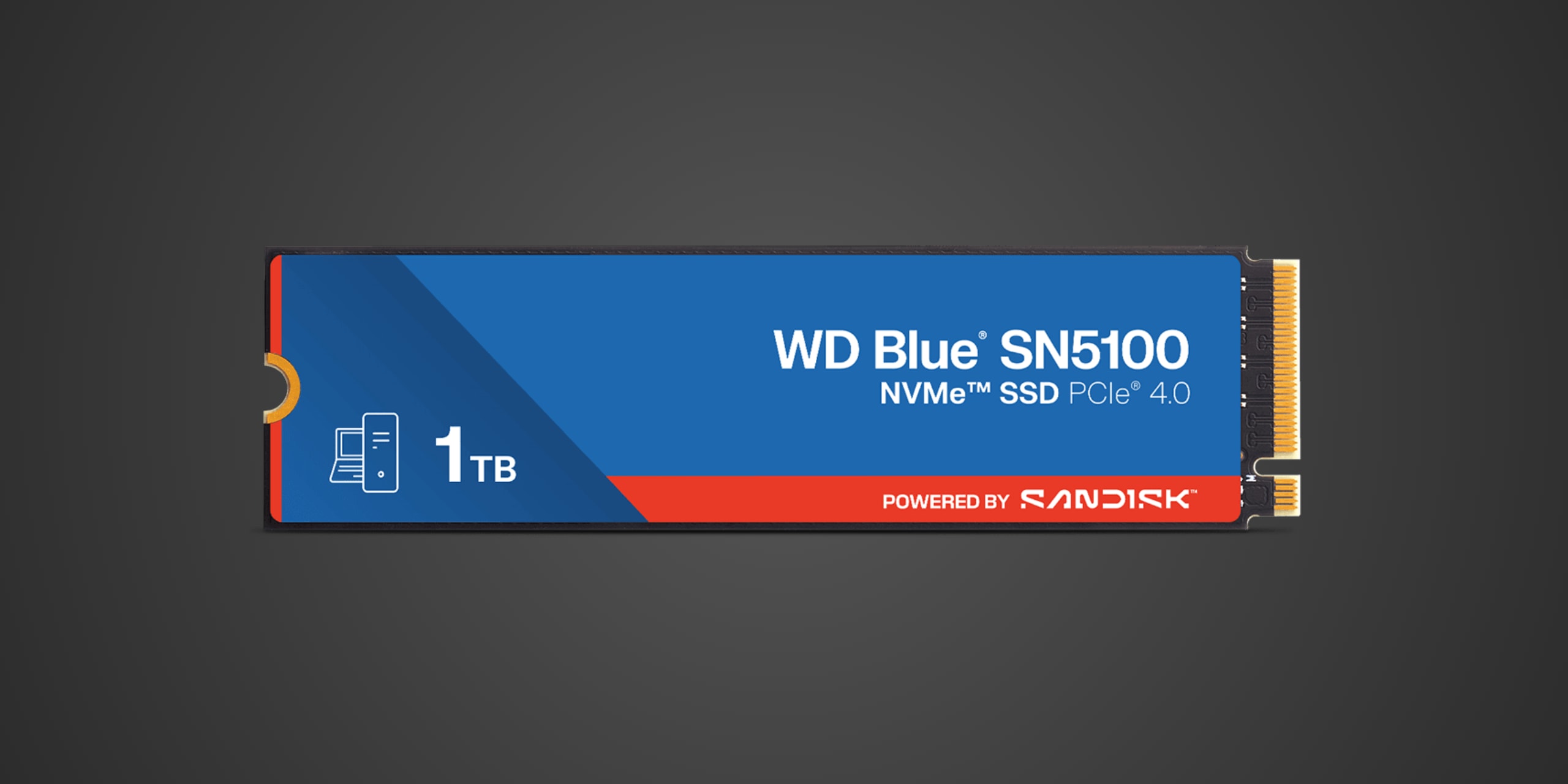
Table of Contents
Introduction
The WD Blue SN5100 targets mainstream PC users looking to upgrade from aging SATA drives or older PCIe Gen 3 SSDs without breaking the bank. This M.2 NVMe drive occupies an interesting position in Western Digital's lineup—it's a PCIe Gen 5 x4 interface drive that delivers Gen 4-level performance at a more accessible price point. If you're building a budget gaming rig, upgrading a work laptop, or simply want faster boot times and application loading without spending flagship money, the SN5100 deserves consideration as a practical workhorse drive rather than a performance champion.
Product Overview
The WD Blue SN5100 arrives in the standard M.2 2280 form factor, making it compatible with the vast majority of desktop motherboards and laptop upgrade slots. Western Digital leverages a PCIe 5.0 x4 interface here, though the drive's actual performance characteristics land it firmly in Gen 4 territory—a cost-saving approach that maintains backward compatibility while keeping manufacturing expenses in check.
Inside, you'll find a SanDisk-designed controller paired with BiCS TLC NAND flash memory. Western Digital doesn't equip the SN5100 with dedicated DRAM cache, instead relying on Host Memory Buffer technology that borrows a small portion of your system RAM to manage drive operations. This design choice keeps costs down but can impact performance in certain write-intensive scenarios, particularly when the drive nears capacity.
The drive ships without any pre-installed heatsink, arriving as a bare M.2 stick with a thin label. Capacity options include 500GB, 1TB, and 2TB variants, giving you flexibility to match your storage needs and budget. The minimalist approach makes sense for a value-oriented product, though it does place thermal management responsibilities squarely on your motherboard or aftermarket cooling solution.
Performance & Real World Speed
Western Digital rates the SN5100 at up to 5500 MB/s sequential read and 4500 MB/s sequential write speeds for the 1TB model, with the 2TB variant reaching up to 5700 MB/s read. These numbers position the drive as a competent Gen 4 performer rather than a Gen 5 powerhouse, but that's perfectly acceptable given the competitive pricing.
In practical terms, you'll notice substantial improvements over SATA SSDs when booting Windows—expect around 10-15 seconds from power button to desktop instead of the 20-30 seconds typical of SATA drives. Game installations from Steam or Epic Games Store will complete noticeably faster, and launching large titles like Cyberpunk 2077 or Microsoft Flight Simulator will shave off precious seconds compared to older storage technology.
Large file transfers benefit from the improved sequential speeds, making the SN5100 a solid choice for content creators working with 4K video footage or high-resolution photo libraries. The drive handles typical everyday workloads—web browsing, document editing, light gaming—without breaking a sweat. Where you'll notice the lack of DRAM cache is during sustained writes that exceed the SLC cache buffer, such as transferring hundreds of gigabytes of data at once. Performance can dip to around 1000-1500 MB/s once the cache fills, which is still respectable but represents a significant drop from peak speeds.
For DirectStorage-enabled gaming, the SN5100 meets the minimum 4000 MB/s requirement, positioning it adequately for future titles that leverage this API for faster asset streaming. However, enthusiasts seeking absolute maximum frame time consistency might prefer drives with DRAM cache for more predictable performance during demanding gaming sessions.
Thermal Management
Gen 5 interface drives operating at Gen 4 speeds generate moderate heat under load—less than flagship Gen 5 drives pushing 12000+ MB/s, but still enough to warrant attention. The SN5100 can reach temperatures approaching 70-80°C during sustained operations if left uncooled, which may trigger thermal throttling and temporarily reduce performance to protect the NAND and controller.
Fortunately, most modern motherboards include M.2 heatsinks that provide adequate cooling for drives in this performance class. If your board features a heatsink covering the M.2 slot, you should experience stable temperatures and consistent performance. Desktop builds with good airflow will further help manage heat, especially if you have case fans providing general circulation across the motherboard area.
Laptop installations present more of a thermal challenge due to confined spaces and limited airflow. The SN5100 isn't the most power-efficient drive on the market, so ultrabook users might occasionally encounter throttling during heavy workloads. That said, typical laptop usage patterns—web browsing, productivity apps, occasional gaming—won't push the drive hard enough to cause thermal issues in most scenarios.
If you're planning to use this drive in a PlayStation 5, you'll need to add an aftermarket M.2 heatsink since the SN5100 doesn't include one. However, there's a more fundamental compatibility issue to address first, which we'll cover in the next section.
Compatibility
The WD Blue SN5100 works with any modern motherboard featuring an M.2 slot that supports PCIe NVMe drives. The key M connector matches standard M.2 slots, and PCIe 5.0 drives are fully backward compatible with PCIe 4.0 and 3.0 motherboards—you'll simply operate at the speed of the older interface. Installation is straightforward: insert the drive at a slight angle into the M.2 slot, press down, and secure with the provided standoff screw.
BIOS compatibility is excellent across Windows, Linux, and macOS systems with M.2 NVMe support. The drive boots reliably and works as both a primary OS drive and secondary storage. Windows 10 and 11 users get native NVMe driver support, while macOS compatibility depends on your Mac model's M.2 slot type—check your specific model before purchasing for Hackintosh builds.
Regarding PlayStation 5 compatibility, here's where things get problematic: the WD Blue SN5100 does not meet Sony's requirements for internal expansion storage. While the drive technically fits the M.2 2280 form factor and could physically install in the PS5's expansion slot, its rated 5500 MB/s read speed falls right at Sony's minimum threshold, and real-world performance may dip below the required 5500 MB/s under certain conditions. Sony explicitly recommends drives with 5500 MB/s or faster speeds, with 7000+ MB/s being the sweet spot for optimal PS5 performance. More importantly, you'd need to add an aftermarket heatsink that keeps total height under 11.25mm, adding complexity and cost. For PS5 internal expansion, you're better served by dedicated gaming drives like the Samsung 990 Pro, WD Black SN850X, or other drives specifically marketed for PS5 compatibility with higher sustained speeds.
As for Xbox Series X/S, this drive cannot be used for internal storage expansion. Microsoft's consoles require proprietary Seagate Storage Expansion Cards exclusively for internal expansion of Series X|S optimized games. You could theoretically use the SN5100 in an external USB NVMe enclosure to store Xbox One backward compatible games, but you cannot play Series X|S optimized titles from external storage, making this an impractical solution.
For external console storage using a USB enclosure, both PlayStation and Xbox consoles would recognize the drive for storing and playing previous-generation games, though this defeats the purpose of purchasing an internal NVMe drive when cheaper external SSDs accomplish the same goal more cost-effectively.
Strengths & Weaknesses
The SN5100's most compelling attribute is its value proposition in the budget NVMe segment. Western Digital delivers genuine Gen 4-level performance at prices that undercut many competing drives, making it an attractive option for system builders watching every dollar. The drive provides meaningful performance improvements over SATA SSDs and older PCIe Gen 3 drives, particularly for boot times, application launches, and game loading—exactly the scenarios where average users notice storage speed most.
Capacity options covering 500GB to 2TB give you flexibility to match your needs, and the standard M.2 2280 form factor ensures broad compatibility with desktops and laptops. The three-year warranty provides reasonable coverage for a budget-oriented product, though it falls short of the five-year warranties offered by premium competitors. Western Digital's reputation for reliability generally holds up in this product tier, with the SN5100 representing a sensible choice for non-critical storage where catastrophic failure wouldn't result in irreplaceable data loss.
The absence of DRAM cache represents the drive's most significant technical compromise. While Host Memory Buffer technology works adequately for everyday tasks, you'll encounter performance degradation during sustained write operations once the SLC cache fills. Power users who frequently move large files, work with video editing timelines, or run write-intensive applications will notice these slowdowns more than casual users. The drive's endurance rating, typically around 600 TBW for the 1TB model, sits in the middle of the pack—acceptable for typical consumer workloads but lower than DRAM-equipped alternatives.
Thermal characteristics require attention, particularly in systems without adequate motherboard M.2 cooling or laptops with restricted airflow. The bare drive design saves costs but pushes thermal management responsibility onto the end user. Competition from drives like the Crucial P3 Plus, Kingston NV2, and TeamGroup MP34 creates a crowded budget NVMe marketplace where specific pricing and availability often matter more than minor performance differences.
The drive's positioning right at Sony's minimum PS5 speed threshold makes it a questionable choice for PlayStation 5 expansion, especially when drives with more performance headroom cost only marginally more. For PC use, however, the SN5100 delivers exactly what budget-conscious builders need: solid everyday performance without unnecessary features or inflated prices.
Verdict: Should You Buy It?
Buy this if:
- You're upgrading from a SATA SSD or mechanical hard drive and want noticeable improvements in boot times and application loading without spending premium prices
- You're building a budget gaming PC or home office system where storage speed matters but flagship performance isn't required
- Your motherboard includes adequate M.2 heatsink coverage and you won't need to purchase additional cooling
- You primarily use your PC for everyday tasks—web browsing, productivity software, gaming, media consumption—rather than sustained write-intensive professional workloads
- Current pricing makes the SN5100 competitive with or cheaper than comparable DRAM-less Gen 4 drives from other manufacturers
Skip this if:
- You're looking for PlayStation 5 internal expansion storage—faster drives with more performance headroom make better sense for Sony's console
- You regularly perform sustained large file transfers or video editing work where DRAM cache provides meaningful performance consistency
- You already own a comparable Gen 4 drive and the upgrade would offer minimal real-world benefits
- Your system lacks adequate M.2 cooling and you're unwilling to purchase an aftermarket heatsink
- Competing drives with DRAM cache are available at similar prices, offering better sustained write performance and longer endurance ratings