
diySSD
  • Product
    Catalog Buyer Guides Out of Stock
  • Pricing
    All Retailers Amazon Best Buy B&H Manufacturer Newegg
  • Blog
    Posts
  • Support
    FAQ

Product

Catalog Buyer Guides Out of Stock

Pricing

All Retailers Amazon Best Buy B&H Manufacturer Newegg

Blog

Posts

Support

FAQ
/* ========================================================================== DIYSSD NAVIGATION - CSS VARIABLES ========================================================================== */ :root { /* Charcoal Scale */ --charcoal-050: #f5f5f5; --charcoal-100: #e6e6e6; --charcoal-200: #cccccc; --charcoal-300: #adadad; --charcoal-500: #7a7a7a; --charcoal-700: #565656; --charcoal-800: #474747; --charcoal-900: #3a3a3a; --charcoal-950: #2c2c2c; /* Accent Colors - WCAG AA Compliant */ --ocean-blue: #245270; --ocean-blue-rgb: 36, 82, 112; --terracotta: #c7522a; --golden-sand: #e5b363; --forest-green: #5d8a66; --dusty-plum: #8b5a8b; /* Accessibility */ --focus-ring-color: var(--ocean-blue); --focus-ring-width: 3px; --focus-ring-offset: 2px; --touch-target-min: 44px; /* Transitions */ --transition-speed: 0.2s; --transition-easing: cubic-bezier(0.4, 0, 0.2, 1); } /* Reduced Motion Support */ @media (prefers-reduced-motion: reduce) { :root { --transition-speed: 0.01ms; } * { animation-duration: 0.01ms !important; animation-iteration-count: 1 !important; transition-duration: 0.01ms !important; scroll-behavior: auto !important; } } /* ========================================================================== NAVIGATION CONTAINER ========================================================================== */ .diyssd-nav-container { position: relative; width: 100%; background: #ffffff; border-bottom: 1px solid var(--charcoal-200); z-index: 1000; } /* ========================================================================== MAIN NAVIGATION ========================================================================== */ .diyssd-nav { display: flex; align-items: center; justify-content: space-between; max-width: 1440px; margin: 0 auto; padding: 0.75rem 1.5rem; height: 4rem; background: #ffffff; /* Performance: GPU acceleration for smoother rendering */ transform: translateZ(0); backface-visibility: hidden; } /* ========================================================================== LOGO SECTION ========================================================================== */ .diyssd-nav-left { flex: 1; display: flex; align-items: center; min-width: 0; } .diyssd-logo { font-family: "Oswald", sans-serif; font-weight: 800; font-size: 36px; color: #2d5a7b; text-decoration: none; display: block; /* Performance: Prevent paint on hover */ will-change: opacity; } .diyssd-logo:hover { opacity: 0.8; } .diyssd-logo:focus-visible { outline: var(--focus-ring-width) solid var(--focus-ring-color); outline-offset: var(--focus-ring-offset); border-radius: 4px; } /* ========================================================================== MENU CONTAINER ========================================================================== */ .diyssd-nav-right { flex: 0 0 auto; display: flex; align-items: center; gap: 0.75rem; height: 100%; } /* ========================================================================== DESKTOP MENU ========================================================================== */ .diyssd-desktop-menu { display: none; align-items: center; gap: 0rem; list-style: none; margin: 0; padding: 0; height: 100%; } @media (min-width: 769px) { .diyssd-desktop-menu { display: flex; } } /* ========================================================================== MENU ITEMS ========================================================================== */ .diyssd-menu-item { position: relative; display: flex; align-items: center; height: 100%; /* Performance: Can't use contain here as it breaks dropdown positioning */ } .diyssd-menu-link { display: flex; align-items: center; padding: 0.75rem 1rem; min-height: var(--touch-target-min); color: var(--charcoal-900); text-decoration: none; font-size: 0.9375rem; font-weight: 500; white-space: nowrap; border-radius: 4px; transition: all var(--transition-speed) var(--transition-easing); cursor: pointer; /* Performance: Hint for background color changes */ will-change: background-color, color; } .diyssd-menu-link:hover { color: var(--ocean-blue); background-color: var(--charcoal-050); } .diyssd-menu-link:focus { outline: none; } .diyssd-menu-link:focus-visible { outline: var(--focus-ring-width) solid var(--focus-ring-color); outline-offset: calc(var(--focus-ring-offset) * -1); } .diyssd-menu-link.has-dropdown::after { content: "▼"; margin-left: 0.5rem; font-size: 0.625rem; transition: transform var(--transition-speed) var(--transition-easing); display: inline-block; /* Performance: Use transform for rotation */ will-change: transform; } .diyssd-menu-item:hover .diyssd-menu-link.has-dropdown::after { transform: rotate(180deg); } /* ========================================================================== MENU DIVIDER ========================================================================== */ .diyssd-menu-divider { width: 1px; height: 1.5rem; background-color: var(--charcoal-200); margin: 0; } /* ========================================================================== DROPDOWN MENU ========================================================================== */ .diyssd-dropdown { position: absolute; top: calc(100% + 0.5rem); left: 50%; min-width: 200px; background: #ffffff; border-radius: 8px; box-shadow: 0 4px 12px rgba(0, 0, 0, 0.15); padding: 0.5rem; opacity: 0; visibility: hidden; /* Performance: Use transform for animation instead of top/left */ transform: translateX(-50%) translateY(-8px); transition: opacity var(--transition-speed) var(--transition-easing), visibility var(--transition-speed) var(--transition-easing), transform var(--transition-speed) var(--transition-easing); z-index: 1001; /* Performance: GPU acceleration */ will-change: opacity, transform; backface-visibility: hidden; } .diyssd-menu-item:hover .diyssd-dropdown { opacity: 1; visibility: visible; transform: translateX(-50%) translateY(0); } .diyssd-dropdown-link { display: flex; align-items: center; padding: 0.75rem; min-height: var(--touch-target-min); color: var(--charcoal-900); text-decoration: none; font-size: 0.875rem; font-weight: 500; border-radius: 4px; transition: all var(--transition-speed) var(--transition-easing); /* Performance: Hint for hover state */ will-change: background-color, color; } .diyssd-dropdown-link:hover { color: var(--ocean-blue); background-color: var(--charcoal-050); } .diyssd-dropdown-link:focus { outline: none; } .diyssd-dropdown-link:focus-visible { outline: var(--focus-ring-width) solid var(--focus-ring-color); outline-offset: calc(var(--focus-ring-offset) * -1); } .diyssd-dropdown-link:active { background-color: var(--charcoal-050); } .diyssd-dropdown-link.active { color: var(--terracotta); background-color: rgba(199, 82, 42, 0.08); font-weight: 600; } /* ========================================================================== MOBILE TOGGLE BUTTON ========================================================================== */ .diyssd-mobile-toggle { display: flex; flex-direction: column; justify-content: space-around; width: var(--touch-target-min); height: var(--touch-target-min); padding: 0.75rem; background: transparent; border: none; cursor: pointer; border-radius: 4px; transition: background-color var(--transition-speed) var(--transition-easing); /* Performance: Hint for background changes */ will-change: background-color; } .diyssd-mobile-toggle:hover { background-color: var(--charcoal-050); } .diyssd-mobile-toggle:focus { outline: none; } .diyssd-mobile-toggle:focus-visible { outline: var(--focus-ring-width) solid var(--focus-ring-color); outline-offset: calc(var(--focus-ring-offset) * -1); } .diyssd-mobile-toggle span { display: block; width: 100%; height: 2px; background-color: var(--charcoal-900); border-radius: 2px; transition: all var(--transition-speed) var(--transition-easing); /* Performance: GPU acceleration for transforms */ will-change: transform, opacity; backface-visibility: hidden; } .diyssd-mobile-toggle.active span:nth-child(1) { transform: translateY(7px) rotate(45deg); } .diyssd-mobile-toggle.active span:nth-child(2) { opacity: 0; } .diyssd-mobile-toggle.active span:nth-child(3) { transform: translateY(-7px) rotate(-45deg); } @media (min-width: 769px) { .diyssd-mobile-toggle { display: none; } } /* ========================================================================== MOBILE OVERLAY ========================================================================== */ .diyssd-mobile-overlay { position: fixed; top: 0; left: 0; width: 100%; height: 100%; background-color: rgba(0, 0, 0, 0.5); opacity: 0; visibility: hidden; transition: opacity var(--transition-speed) var(--transition-easing), visibility var(--transition-speed) var(--transition-easing); z-index: 1001; /* Performance: GPU acceleration */ will-change: opacity; backface-visibility: hidden; } .diyssd-mobile-overlay.active { opacity: 1; visibility: visible; } @media (min-width: 769px) { .diyssd-mobile-overlay { display: none; } } /* ========================================================================== MOBILE MENU ========================================================================== */ .diyssd-mobile-menu { position: fixed; top: 0; right: 0; width: 85%; max-width: 320px; height: 100%; background: #ffffff; /* Performance: Use transform instead of right property */ transform: translateX(100%); transition: transform var(--transition-speed) var(--transition-easing); z-index: 1002; overflow-y: auto; box-shadow: -4px 0 12px rgba(0, 0, 0, 0.15); /* Performance: GPU acceleration */ will-change: transform; backface-visibility: hidden; /* Performance: Enable hardware scrolling */ -webkit-overflow-scrolling: touch; } .diyssd-mobile-menu.active { transform: translateX(0); } @media (min-width: 769px) { .diyssd-mobile-menu { display: none; } } /* ========================================================================== MOBILE HEADER ========================================================================== */ .diyssd-mobile-header { display: flex; align-items: center; justify-content: flex-end; padding: 0.6rem 1rem; border-bottom: 1px solid var(--charcoal-200); } .diyssd-mobile-close { display: flex; align-items: center; justify-content: center; width: var(--touch-target-min); height: var(--touch-target-min); padding: 0; background: transparent; border: none; cursor: pointer; border-radius: 4px; font-size: 1.5rem; color: var(--charcoal-900); transition: background-color var(--transition-speed) var(--transition-easing); /* Performance: Hint for background changes */ will-change: background-color; } .diyssd-mobile-close:hover { background-color: var(--charcoal-050); } .diyssd-mobile-close:focus { outline: none; } .diyssd-mobile-close:focus-visible { outline: var(--focus-ring-width) solid var(--focus-ring-color); outline-offset: calc(var(--focus-ring-offset) * -1); } /* ========================================================================== MOBILE CONTENT ========================================================================== */ .diyssd-mobile-content { padding: 1rem; } .diyssd-mobile-section { margin-bottom: 1rem; } .diyssd-mobile-section:last-child { margin-bottom: 0; } .diyssd-mobile-heading { font-size: 0.75rem; font-weight: 600; text-transform: uppercase; letter-spacing: 0.05em; color: var(--charcoal-500); margin: 0 0 0.5rem 0; } .diyssd-mobile-divider { height: 1px; background-color: var(--charcoal-200); margin-bottom: 0.75rem; } .diyssd-mobile-link { display: flex; align-items: center; padding: 0 0.75rem; /* margin-bottom: 0.25rem; */ min-height: var(--touch-target-min); color: var(--charcoal-900); text-decoration: none; font-size: 0.875rem; font-weight: 500; border-radius: 4px; transition: all var(--transition-speed) var(--transition-easing); /* Performance: Hint for interactive states */ will-change: background-color, color, transform; } .diyssd-mobile-link:hover { color: var(--ocean-blue); background-color: var(--charcoal-050); } .diyssd-mobile-link:focus { outline: none; } .diyssd-mobile-link:focus-visible { outline: var(--focus-ring-width) solid var(--focus-ring-color); outline-offset: calc(var(--focus-ring-offset) * -1); } .diyssd-mobile-link:active { background-color: var(--charcoal-050); /* Performance: Use transform for visual feedback */ transform: translateX(2px); } .diyssd-mobile-link.active { color: var(--terracotta); background-color: rgba(199, 82, 42, 0.08); font-weight: 600; } /* ========================================================================== UTILITY CLASSES ========================================================================== */ body.diyssd-menu-open { overflow: hidden; } @media (prefers-contrast: high) { .diyssd-nav { border-bottom-width: 2px; } .diyssd-menu-link:focus-visible, .diyssd-dropdown-link:focus-visible, .diyssd-mobile-link:focus-visible { outline-width: 4px; } }
Advertisement

SanDisk Desk Drive Review

Desktop Backup Gets the SSD Treatment
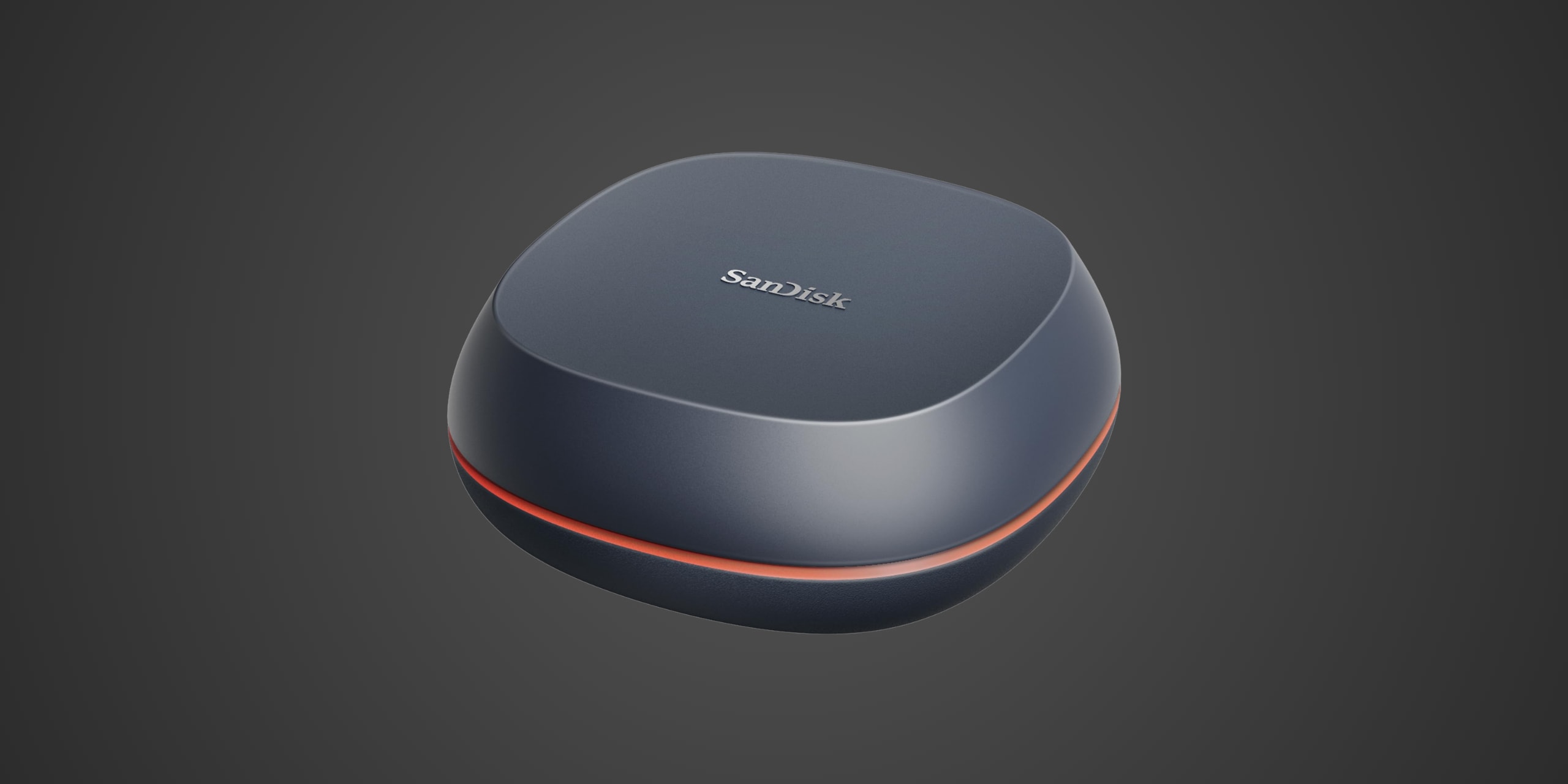
1000 MB/s USB 3.2 Gen 2 Speed | Up to 8TB Desktop Capacity | Time Machine Ready with Acronis Backup
/* Global reset for consistent box-sizing */ * { box-sizing: border-box; } /* Container for the entire TOC component */ .toc-embed-wrapper .toc-container { max-width: 800px; margin: 40px auto; } /* Individual collapsible item styling */ .toc-embed-wrapper .toc-item { background: #fff; border-radius: 16px; box-shadow: 0 4px 12px rgba(0, 0, 0, 0.1); margin-bottom: 18px; overflow: hidden; /* Prevents content from breaking border radius */ transition: box-shadow 0.2s ease; /* Smooth hover effect */ } /* Hover effect for entire item */ .toc-embed-wrapper .toc-item:hover { box-shadow: 0 6px 20px rgba(0, 0, 0, 0.15); } /* Toggle button styling - removes default button appearance */ .toc-embed-wrapper .toc-toggle { background: none; border: none; width: 100%; display: flex; justify-content: space-between; align-items: center; font-size: 1.15rem; font-weight: 500; cursor: pointer; padding: 24px 28px; outline: none; color: #1a1a1a; transition: background-color 0.2s ease; } /* Button hover state */ .toc-embed-wrapper .toc-toggle:hover { background-color: #e2e1df; } /* Keyboard focus accessibility - only visible when navigating with tab */ .toc-embed-wrapper .toc-toggle:focus-visible { outline: 2px solid #007acc; outline-offset: -2px; } /* Question text styling */ .toc-embed-wrapper .toc-question { flex: 1; /* Takes up remaining space */ font-weight: 400; text-align: left; margin: 0; } /* Plus/minus icon styling */ .toc-embed-wrapper .toc-icon { font-size: 1.8rem; font-weight: 300; transition: transform 0.3s ease, color 0.2s ease; /* Smooth rotation and color change */ margin-left: 20px; color: #666; flex-shrink: 0; /* Prevents icon from shrinking */ width: 24px; text-align: center; } /* Icon state when expanded - rotates 45deg to create X from + */ .toc-embed-wrapper .toc-toggle[aria-expanded="true"] .toc-icon { transform: rotate(45deg); color: #28a745; /* Green color when open */ } /* Answer content container - hidden by default */ .toc-embed-wrapper .toc-answer { padding: 0 28px 24px 28px; font-size: 1rem; color: #444; line-height: 1.6; display: none; /* Hidden by default */ animation: slideDown 0.3s ease-out; /* Smooth entrance animation */ } /* Show class for JavaScript toggle */ .toc-embed-wrapper .toc-answer.show { display: block; } /* Slide down animation for smooth reveal */ @keyframes slideDown { from { opacity: 0; transform: translateY(-10px); } to { opacity: 1; transform: translateY(0); } } /* Main ordered list styling (1, 2, 3...) */ .toc-embed-wrapper .toc-answer ol { list-style-type: none; /* Remove default numbering */ padding-left: 0; /* Remove default padding */ margin: 0.8em 0; /* Vertical spacing */ counter-reset: main-counter; /* Counter for main items */ } /* Main list items (h2 headers) */ .toc-embed-wrapper .toc-answer > ol > li { counter-increment: main-counter; position: relative; } .toc-embed-wrapper .toc-answer > ol > li::before { content: counter(main-counter) ". "; color: #007acc; font-weight: 600; margin-right: 0.5em; } /* Nested ordered list styling (x.1, x.2, x.3...) */ .toc-embed-wrapper .toc-answer ol ol { list-style-type: none; /* Remove default lettering */ padding-left: 2.2em; /* Additional indentation for hierarchy */ margin: 0.6em 0; /* Tighter spacing for nested items */ counter-reset: sub-counter; /* Counter for sub-items */ } /* Sub-list items (h3 headers) */ .toc-embed-wrapper .toc-answer ol ol li { counter-increment: sub-counter; position: relative; } .toc-embed-wrapper .toc-answer ol ol li::before { content: counter(main-counter) "." counter(sub-counter) " "; color: #28a745; font-weight: 500; margin-right: 0.5em; } /* Main list item spacing */ .toc-embed-wrapper .toc-answer li { margin: 0.6em 0; padding-left: 0.3em; /* Small padding for better text alignment */ } /* Nested list item spacing - tighter than main items */ .toc-embed-wrapper .toc-answer ol ol li { margin: 0.4em 0; } /* TOC link styling */ .toc-embed-wrapper .toc-answer a { text-decoration: none; color: #444; transition: color 0.2s ease; } .toc-embed-wrapper .toc-answer a:hover { color: #007acc; text-decoration: underline; } /* Remove default list marker styling since we're using custom numbering */ /* Empty state styling */ .toc-embed-wrapper .toc-empty { padding: 20px 28px; color: #888; font-style: italic; text-align: center; } /* Responsive design for mobile devices */ @media (max-width: 768px) { .toc-embed-wrapper .toc-container { margin: 20px auto; padding: 0 16px; /* Side padding on mobile */ } .toc-embed-wrapper .toc-toggle { padding: 20px 22px; /* Reduced padding on mobile */ font-size: 1.1rem; /* Slightly smaller font */ } .toc-embed-wrapper .toc-answer { padding: 0 22px 20px 22px; /* Matched reduced padding */ font-size: 0.95rem; /* Smaller text on mobile */ } .toc-embed-wrapper .toc-icon { font-size: 1.6rem; /* Smaller icon on mobile */ margin-left: 16px; } } /* Scroll offset for sticky header - adjust -80px to match your menubar height */ .toc-embed-wrapper .toc-answer a[href^="#"] { scroll-margin-top: 76px; /* Adjust this value to match your sticky menubar height */ } /* Alternative: Add offset to the target headers themselves */ h2, h3 { scroll-margin-top: 76px; /* Adjust this value to match your sticky menubar height */ }

Introduction

If you're tired of sluggish external hard drives cluttering your workspace while crawling through backups at dial-up speeds, the SanDisk Desk Drive might be exactly what your desk has been begging for. This desktop external SSD targets users who want the massive capacity traditionally reserved for spinning hard drives but with the speed and reliability that only solid-state storage can deliver. Think content creators managing sprawling 4K video libraries, photographers drowning in RAW files, gamers expanding their collection beyond their internal drive's limits, or anyone using Apple Time Machine who'd rather not wait an eternity for backups to complete.

The Desk Drive operates via USB 3.2 Gen 2, which means you're getting that sweet 10 Gbps connection delivering up to 1000 MB/s read speeds and 900 MB/s writes. Available in 4TB and 8TB capacities, this drive sits in an interesting middle ground between portable SSDs that sacrifice capacity for pocketability and traditional desktop HDDs that offer lots of space but torture you with transfer times. SanDisk positions this as a hard drive replacement for the modern age, and it comes with an AC power adapter to prove it's serious about staying put on your desk.

Product Overview

The SanDisk Desk Drive measures 3.91 inches by 3.91 inches by 1.58 inches and weighs just 268 grams, making it compact enough to slip into almost any workspace without dominating your desktop real estate. The design is distinctive with its pod-like shape featuring concave front and back panels, a look that's polarizing but undeniably modern. The enclosure appears to be primarily plastic construction, which keeps the weight down but doesn't scream premium the way an aluminum chassis might.

You'll find a USB-C port on the rear alongside the power connector, and SanDisk thoughtfully includes both a USB-C cable and a USB-C to USB-A adapter for maximum compatibility. The AC power adapter is mandatory for operation, which is unusual for a 10 Gbps drive but speaks to SanDisk's commitment to consistent performance and perhaps lessons learned from previous external SSDs that suffered power delivery issues. There's also a Kensington Security Slot for those working in shared office environments where expensive storage has a habit of walking away.

The drive ships formatted in exFAT, meaning you can plug it into Windows or macOS without reformatting, though Mac users running Time Machine or those wanting optimal performance on a single platform might want to reformat to NTFS or APFS respectively. Capacity options include 4TB and 8TB, with whispers of a future 16TB version that would truly cement this as a serious backup solution. The specific controller chipset and NAND configuration aren't publicly disclosed, which is typical for consumer external drives where the focus is on user experience rather than component specifications.

Performance & Real World Speed

SanDisk rates the Desk Drive at up to 1000 MB/s sequential read and 900 MB/s sequential write speeds, which represents the theoretical ceiling of what USB 3.2 Gen 2's 10 Gbps bandwidth can deliver. In practice, these are solid numbers that translate to meaningful real-world benefits. Moving a 100 GB folder of 4K video footage would take roughly two minutes compared to the 10-plus minutes you'd suffer through with a traditional 5400 RPM external hard drive. For photographers ingesting several hundred RAW files from a shoot, you're looking at seconds rather than the nail-biting wait that makes you question your career choices.

Professional reviews confirm the drive performs well in sequential transfers for a 10 Gbps USB SSD, though results in random 4K operations show the typical inconsistency you'd expect from external SSDs using USB bridge controllers. This means everyday tasks like loading software projects with thousands of small files might not feel quite as snappy as sequential file transfers, but it's still light years ahead of hard drive performance.

For gamers, the Desk Drive can absolutely serve as extended storage for your Steam library or console game collection. Modern game installations routinely exceed 100 GB, and the Desk Drive's speed means you won't face punishing load times. That said, if you're playing directly from the drive, you might notice slightly longer initial loads compared to an internal NVMe SSD, but once assets are cached, gameplay should be smooth. The drive doesn't support DirectStorage on PC since that requires NVMe protocol, but for simple capacity expansion, it does the job admirably.

Apple Time Machine users will appreciate that the drive works seamlessly out of the box, and backup operations complete in a fraction of the time compared to traditional external drives. For Windows users, the included Acronis True Image for Western Digital software provides automatic backup scheduling, giving you that set-it-and-forget-it peace of mind that your work is protected without constant manual intervention.

One consideration is sustained performance. Testing with large 2TB writes showed the drive's performance waffled between 250 MB/s and 900 MB/s, suggesting some intelligent caching at work. For most users copying even large video projects, you won't hit these thresholds, but if you're regularly moving terabytes of data, expect some performance variation as the drive manages its cache.

Build Quality & Durability

The Desk Drive's construction is functional rather than luxurious. The plastic enclosure feels solid enough but doesn't convey the same premium vibe as metal-clad competitors. That said, this is a desktop drive meant to live next to your computer, not survive being tossed in a backpack, so build robustness takes a backseat to thermal management and stable performance. The concave design is clever, allowing air circulation around the drive while creating a distinctive aesthetic that either elevates your workspace or looks like a slightly squashed spaceship, depending on your taste.

Some users report the drive runs quite hot during extended use, which isn't shocking given that you're packing SSD components into a relatively compact enclosure with external power enabling higher performance modes. The heat dissipates when the system sleeps, but if thermal management concerns you, placing the drive on a surface with good airflow or even adding an aftermarket heatsink as some enthusiasts have done can keep temperatures more comfortable. SanDisk doesn't publish operating temperature specifications beyond the standard 0°C to 35°C range, but the fact that heat is noticeable suggests the components are working hard.

SanDisk backs the Desk Drive with a three-year limited warranty, which is standard for consumer external drives and provides reasonable peace of mind. Western Digital's ownership of SanDisk means you're dealing with one of the storage industry's major players, so warranty support should be accessible if issues arise. The included cables feel decent quality, and the USB-C connection has proven reliable across testing, with no reports of flaky connections that plague cheaper external drives.

The Kensington Security Slot is a thoughtful addition for office environments, though most home users won't touch it. The power adapter requirement means you're tethered to an outlet, which reduces portability but ensures consistent power delivery that USB bus power simply can't match for sustained high-performance operation. This design choice prioritizes reliability over convenience, which makes sense for a drive marketed as a permanent backup solution rather than portable storage.

Compatibility

The Desk Drive is refreshingly straightforward when it comes to compatibility. It works with Windows 10 and newer, plus macOS 14 and up, though the exFAT formatting means older operating systems should work fine as long as they support USB 3.2. The USB-C connection with included USB-A adapter covers virtually every modern computer, and backward compatibility with older USB 3.0 and even USB 2.0 ports means the drive will work even if you don't have the latest ports, albeit at reduced speeds.

For console gamers, the Desk Drive functions as external storage for PlayStation 4, PlayStation 5, Xbox One, and Xbox Series X/S systems. On PS5, you can store and play PS4 games directly from the drive at SSD speeds, which is a massive upgrade over the sluggish external HDDs many gamers currently use. However, PS5 games can only be stored on the Desk Drive, not played from it, since Sony requires those titles to run from the internal SSD or compatible PCIe 4.0 NVMe expansion drive. Xbox Series X/S follows similar rules: you can store and play Xbox One games from the Desk Drive, but Series X/S optimized titles can only be stored externally and must be moved to internal storage or a proprietary Seagate Expansion Card to play.

The exFAT formatting means cross-platform compatibility without reformatting, though power users might want to reformat to NTFS for Windows-only setups or APFS for Mac-exclusive use to squeeze out slightly better performance and enable platform-specific features. Linux users should have no issues with exFAT support in modern distributions, and the drive requires no special drivers since it uses standard USB mass storage protocols.

USB 3.2 Gen 2 requires a compatible host controller to hit full speeds, but the drive will negotiate down gracefully to whatever your system supports. If you're plugging into an older USB 3.0 port, expect speeds capped around 500 MB/s rather than the full 1000 MB/s. The drive draws power entirely from the included AC adapter, so there are no power delivery concerns with USB ports that sometimes struggle to provide adequate juice for high-performance external SSDs.

Strengths & Weaknesses

The Desk Drive's most compelling strength is its combination of high capacity and solid-state speed at a price point that, while not cheap, makes sense for users who genuinely need both attributes. At an MSRP of $699 for 8TB, it's positioned about $100 above competitors like the Samsung T5 Evo, but you're getting roughly double the performance in most workloads. The 4TB model's pricing around $299-$320 represents better value in the competitive landscape where 4TB external SSDs cluster between $200-$400 depending on speed tier and features.

Performance-wise, the Desk Drive delivers on its 10 Gbps promise with sequential speeds that consistently hover near the 1000 MB/s mark, making it genuinely four times faster than desktop hard drives as SanDisk claims. For users migrating from traditional external HDDs, the speed improvement is immediately noticeable and transforms backup operations from lengthy interruptions into quick background tasks. The included backup software and native Time Machine compatibility remove friction from actually using the drive for its intended purpose rather than leaving it to gather dust.

The compact footprint genuinely does maximize desk space compared to traditional desktop drives, and the unique pod design stands out visually even if it won't win unanimous aesthetic approval. The three-year warranty and Western Digital's backing provide solid credibility, and the Kensington Security Slot addresses enterprise and office use cases that most consumer drives ignore.

However, the weaknesses are worth considering carefully. The external power requirement, while ensuring consistent performance, eliminates any portability advantage and means you're dealing with yet another wall wart in your cable management situation. The drive runs noticeably warm during sustained use, which isn't ideal for longevity concerns and has prompted some users to add aftermarket cooling solutions. The plastic construction feels pedestrian compared to premium aluminum-clad competitors, and while functionality matters more than aesthetics, you're paying premium pricing for what looks and feels decidedly mid-range.

Price-per-gigabyte math doesn't favor the Desk Drive against building your own solution. You can assemble a comparable 4TB setup using a Thunderbolt 4 enclosure and quality NVMe drive for around $280, saving money while gaining even faster 40 Gbps performance. The convenience and warranty of a pre-built solution carry value, but the DIY route offers better performance per dollar if you're comfortable with assembly.

Competition is fierce in this space. The Samsung T5 Evo offers 8TB at lower prices with bus-powered portability, though it sacrifices about half the speed. Crucial's X10 Pro delivers 20 Gbps USB 3.2 Gen 2x2 performance but caps out at 4TB. SanDisk's own Extreme and Extreme Pro portable lines offer similar or better speed with ruggedized builds and actual portability, though they don't reach 8TB capacity. For users who need maximum capacity and desktop speeds, the Desk Drive occupies a legitimate niche, but it's a narrow one.

The lack of RAID options or dual-drive configurations means no built-in redundancy, so this is strictly single-point-of-failure storage. For critical backup needs, you'd still want to follow the 3-2-1 rule with additional backup copies. The drive's performance in random 4K operations lags behind its sequential prowess, meaning workloads heavy on small files won't see the same dramatic improvements over HDDs that large file transfers enjoy.

Verdict: Should You Buy It?

Buy this if: you're replacing an aging external hard drive and want dramatically faster backups without sacrificing capacity, you work with large video or photo files and need quick access to archived projects, you're using Apple Time Machine and would appreciate backups that don't derail your workflow, you want 8TB of desktop SSD storage and don't mind the premium over DIY solutions, or you value the convenience and warranty of a pre-built solution from a major brand. The Desk Drive makes particular sense for Mac users who want plug-and-play Time Machine compatibility and Windows users who'll actually use the included Acronis backup software to automate protection.

Skip this if: portability matters at all since the AC adapter requirement kills any mobility, you already have fast USB-C portable SSDs and would be better served by multiple smaller drives for flexibility, you're comfortable building your own external SSD with an enclosure and NVMe drive for better price-to-performance, you need absolute maximum speed and should be looking at Thunderbolt 4 or USB 3.2 Gen 2x2 options instead, or you're trying to stay under $200 for 4TB storage where slower options or even quality external hard drives make more financial sense for less demanding workloads.

Advertisement
About
Privacy
Terms
© 2024, 2025 - All Rights Reserved
Brand Logo Icon | DIY SSD