diySSD
  • Product
    Catalog Buyer Guides Out of Stock
  • Pricing
    All Retailers Amazon Best Buy B&H Manufacturer Newegg
  • Blog
    Posts
  • Support
    FAQ

Product

Catalog Buyer Guides Out of Stock

Pricing

All Retailers Amazon Best Buy B&H Manufacturer Newegg

Blog

Posts

Support

FAQ
/* ========================================================================== DIYSSD NAVIGATION - CSS VARIABLES ========================================================================== */ :root { /* Charcoal Scale */ --charcoal-050: #f5f5f5; --charcoal-100: #e6e6e6; --charcoal-200: #cccccc; --charcoal-300: #adadad; --charcoal-500: #7a7a7a; --charcoal-700: #565656; --charcoal-800: #474747; --charcoal-900: #3a3a3a; --charcoal-950: #2c2c2c; /* Accent Colors - WCAG AA Compliant */ --ocean-blue: #245270; --ocean-blue-rgb: 36, 82, 112; --terracotta: #c7522a; --golden-sand: #e5b363; --forest-green: #5d8a66; --dusty-plum: #8b5a8b; /* Accessibility */ --focus-ring-color: var(--ocean-blue); --focus-ring-width: 3px; --focus-ring-offset: 2px; --touch-target-min: 44px; /* Transitions */ --transition-speed: 0.2s; --transition-easing: cubic-bezier(0.4, 0, 0.2, 1); } /* Reduced Motion Support */ @media (prefers-reduced-motion: reduce) { :root { --transition-speed: 0.01ms; } * { animation-duration: 0.01ms !important; animation-iteration-count: 1 !important; transition-duration: 0.01ms !important; scroll-behavior: auto !important; } } /* ========================================================================== NAVIGATION CONTAINER ========================================================================== */ .diyssd-nav-container { position: relative; width: 100%; background: #ffffff; border-bottom: 1px solid var(--charcoal-200); z-index: 1000; } /* ========================================================================== MAIN NAVIGATION ========================================================================== */ .diyssd-nav { display: flex; align-items: center; justify-content: space-between; max-width: 1440px; margin: 0 auto; padding: 0.75rem 1.5rem; height: 4rem; background: #ffffff; /* Performance: GPU acceleration for smoother rendering */ transform: translateZ(0); backface-visibility: hidden; } /* ========================================================================== LOGO SECTION ========================================================================== */ .diyssd-nav-left { flex: 1; display: flex; align-items: center; min-width: 0; } .diyssd-logo { font-family: "Oswald", sans-serif; font-weight: 800; font-size: 36px; color: #2d5a7b; text-decoration: none; display: block; /* Performance: Prevent paint on hover */ will-change: opacity; } .diyssd-logo:hover { opacity: 0.8; } .diyssd-logo:focus-visible { outline: var(--focus-ring-width) solid var(--focus-ring-color); outline-offset: var(--focus-ring-offset); border-radius: 4px; } /* ========================================================================== MENU CONTAINER ========================================================================== */ .diyssd-nav-right { flex: 0 0 auto; display: flex; align-items: center; gap: 0.75rem; height: 100%; } /* ========================================================================== DESKTOP MENU ========================================================================== */ .diyssd-desktop-menu { display: none; align-items: center; gap: 0rem; list-style: none; margin: 0; padding: 0; height: 100%; } @media (min-width: 769px) { .diyssd-desktop-menu { display: flex; } } /* ========================================================================== MENU ITEMS ========================================================================== */ .diyssd-menu-item { position: relative; display: flex; align-items: center; height: 100%; /* Performance: Can't use contain here as it breaks dropdown positioning */ } .diyssd-menu-link { display: flex; align-items: center; padding: 0.75rem 1rem; min-height: var(--touch-target-min); color: var(--charcoal-900); text-decoration: none; font-size: 0.9375rem; font-weight: 500; white-space: nowrap; border-radius: 4px; transition: all var(--transition-speed) var(--transition-easing); cursor: pointer; /* Performance: Hint for background color changes */ will-change: background-color, color; } .diyssd-menu-link:hover { color: var(--ocean-blue); background-color: var(--charcoal-050); } .diyssd-menu-link:focus { outline: none; } .diyssd-menu-link:focus-visible { outline: var(--focus-ring-width) solid var(--focus-ring-color); outline-offset: calc(var(--focus-ring-offset) * -1); } .diyssd-menu-link.has-dropdown::after { content: "▼"; margin-left: 0.5rem; font-size: 0.625rem; transition: transform var(--transition-speed) var(--transition-easing); display: inline-block; /* Performance: Use transform for rotation */ will-change: transform; } .diyssd-menu-item:hover .diyssd-menu-link.has-dropdown::after { transform: rotate(180deg); } /* ========================================================================== MENU DIVIDER ========================================================================== */ .diyssd-menu-divider { width: 1px; height: 1.5rem; background-color: var(--charcoal-200); margin: 0; } /* ========================================================================== DROPDOWN MENU ========================================================================== */ .diyssd-dropdown { position: absolute; top: calc(100% + 0.5rem); left: 50%; min-width: 200px; background: #ffffff; border-radius: 8px; box-shadow: 0 4px 12px rgba(0, 0, 0, 0.15); padding: 0.5rem; opacity: 0; visibility: hidden; /* Performance: Use transform for animation instead of top/left */ transform: translateX(-50%) translateY(-8px); transition: opacity var(--transition-speed) var(--transition-easing), visibility var(--transition-speed) var(--transition-easing), transform var(--transition-speed) var(--transition-easing); z-index: 1001; /* Performance: GPU acceleration */ will-change: opacity, transform; backface-visibility: hidden; } .diyssd-menu-item:hover .diyssd-dropdown { opacity: 1; visibility: visible; transform: translateX(-50%) translateY(0); } .diyssd-dropdown-link { display: flex; align-items: center; padding: 0.75rem; min-height: var(--touch-target-min); color: var(--charcoal-900); text-decoration: none; font-size: 0.875rem; font-weight: 500; border-radius: 4px; transition: all var(--transition-speed) var(--transition-easing); /* Performance: Hint for hover state */ will-change: background-color, color; } .diyssd-dropdown-link:hover { color: var(--ocean-blue); background-color: var(--charcoal-050); } .diyssd-dropdown-link:focus { outline: none; } .diyssd-dropdown-link:focus-visible { outline: var(--focus-ring-width) solid var(--focus-ring-color); outline-offset: calc(var(--focus-ring-offset) * -1); } .diyssd-dropdown-link:active { background-color: var(--charcoal-050); } .diyssd-dropdown-link.active { color: var(--terracotta); background-color: rgba(199, 82, 42, 0.08); font-weight: 600; } /* ========================================================================== MOBILE TOGGLE BUTTON ========================================================================== */ .diyssd-mobile-toggle { display: flex; flex-direction: column; justify-content: space-around; width: var(--touch-target-min); height: var(--touch-target-min); padding: 0.75rem; background: transparent; border: none; cursor: pointer; border-radius: 4px; transition: background-color var(--transition-speed) var(--transition-easing); /* Performance: Hint for background changes */ will-change: background-color; } .diyssd-mobile-toggle:hover { background-color: var(--charcoal-050); } .diyssd-mobile-toggle:focus { outline: none; } .diyssd-mobile-toggle:focus-visible { outline: var(--focus-ring-width) solid var(--focus-ring-color); outline-offset: calc(var(--focus-ring-offset) * -1); } .diyssd-mobile-toggle span { display: block; width: 100%; height: 2px; background-color: var(--charcoal-900); border-radius: 2px; transition: all var(--transition-speed) var(--transition-easing); /* Performance: GPU acceleration for transforms */ will-change: transform, opacity; backface-visibility: hidden; } .diyssd-mobile-toggle.active span:nth-child(1) { transform: translateY(7px) rotate(45deg); } .diyssd-mobile-toggle.active span:nth-child(2) { opacity: 0; } .diyssd-mobile-toggle.active span:nth-child(3) { transform: translateY(-7px) rotate(-45deg); } @media (min-width: 769px) { .diyssd-mobile-toggle { display: none; } } /* ========================================================================== MOBILE OVERLAY ========================================================================== */ .diyssd-mobile-overlay { position: fixed; top: 0; left: 0; width: 100%; height: 100%; background-color: rgba(0, 0, 0, 0.5); opacity: 0; visibility: hidden; transition: opacity var(--transition-speed) var(--transition-easing), visibility var(--transition-speed) var(--transition-easing); z-index: 1001; /* Performance: GPU acceleration */ will-change: opacity; backface-visibility: hidden; } .diyssd-mobile-overlay.active { opacity: 1; visibility: visible; } @media (min-width: 769px) { .diyssd-mobile-overlay { display: none; } } /* ========================================================================== MOBILE MENU ========================================================================== */ .diyssd-mobile-menu { position: fixed; top: 0; right: 0; width: 85%; max-width: 320px; height: 100%; background: #ffffff; /* Performance: Use transform instead of right property */ transform: translateX(100%); transition: transform var(--transition-speed) var(--transition-easing); z-index: 1002; overflow-y: auto; box-shadow: -4px 0 12px rgba(0, 0, 0, 0.15); /* Performance: GPU acceleration */ will-change: transform; backface-visibility: hidden; /* Performance: Enable hardware scrolling */ -webkit-overflow-scrolling: touch; } .diyssd-mobile-menu.active { transform: translateX(0); } @media (min-width: 769px) { .diyssd-mobile-menu { display: none; } } /* ========================================================================== MOBILE HEADER ========================================================================== */ .diyssd-mobile-header { display: flex; align-items: center; justify-content: flex-end; padding: 0.6rem 1rem; border-bottom: 1px solid var(--charcoal-200); } .diyssd-mobile-close { display: flex; align-items: center; justify-content: center; width: var(--touch-target-min); height: var(--touch-target-min); padding: 0; background: transparent; border: none; cursor: pointer; border-radius: 4px; font-size: 1.5rem; color: var(--charcoal-900); transition: background-color var(--transition-speed) var(--transition-easing); /* Performance: Hint for background changes */ will-change: background-color; } .diyssd-mobile-close:hover { background-color: var(--charcoal-050); } .diyssd-mobile-close:focus { outline: none; } .diyssd-mobile-close:focus-visible { outline: var(--focus-ring-width) solid var(--focus-ring-color); outline-offset: calc(var(--focus-ring-offset) * -1); } /* ========================================================================== MOBILE CONTENT ========================================================================== */ .diyssd-mobile-content { padding: 1rem; } .diyssd-mobile-section { margin-bottom: 1rem; } .diyssd-mobile-section:last-child { margin-bottom: 0; } .diyssd-mobile-heading { font-size: 0.75rem; font-weight: 600; text-transform: uppercase; letter-spacing: 0.05em; color: var(--charcoal-500); margin: 0 0 0.5rem 0; } .diyssd-mobile-divider { height: 1px; background-color: var(--charcoal-200); margin-bottom: 0.75rem; } .diyssd-mobile-link { display: flex; align-items: center; padding: 0 0.75rem; /* margin-bottom: 0.25rem; */ min-height: var(--touch-target-min); color: var(--charcoal-900); text-decoration: none; font-size: 0.875rem; font-weight: 500; border-radius: 4px; transition: all var(--transition-speed) var(--transition-easing); /* Performance: Hint for interactive states */ will-change: background-color, color, transform; } .diyssd-mobile-link:hover { color: var(--ocean-blue); background-color: var(--charcoal-050); } .diyssd-mobile-link:focus { outline: none; } .diyssd-mobile-link:focus-visible { outline: var(--focus-ring-width) solid var(--focus-ring-color); outline-offset: calc(var(--focus-ring-offset) * -1); } .diyssd-mobile-link:active { background-color: var(--charcoal-050); /* Performance: Use transform for visual feedback */ transform: translateX(2px); } .diyssd-mobile-link.active { color: var(--terracotta); background-color: rgba(199, 82, 42, 0.08); font-weight: 600; } /* ========================================================================== UTILITY CLASSES ========================================================================== */ body.diyssd-menu-open { overflow: hidden; } @media (prefers-contrast: high) { .diyssd-nav { border-bottom-width: 2px; } .diyssd-menu-link:focus-visible, .diyssd-dropdown-link:focus-visible, .diyssd-mobile-link:focus-visible { outline-width: 4px; } }
Advertisement
raspberry official ssd kit product image | diy ssd

Raspberry Pi Official SSD Kit Review

First-Party Storage Finally Arrives

PCIe Gen 3.0 NVMe Performance | 256GB & 512GB Capacities | HAT+ Specification Compliant
/* Global reset for consistent box-sizing */ * { box-sizing: border-box; } /* Container for the entire TOC component */ .toc-embed-wrapper .toc-container { max-width: 800px; margin: 40px auto; } /* Individual collapsible item styling */ .toc-embed-wrapper .toc-item { background: #fff; border-radius: 16px; box-shadow: 0 4px 12px rgba(0, 0, 0, 0.1); margin-bottom: 18px; overflow: hidden; /* Prevents content from breaking border radius */ transition: box-shadow 0.2s ease; /* Smooth hover effect */ } /* Hover effect for entire item */ .toc-embed-wrapper .toc-item:hover { box-shadow: 0 6px 20px rgba(0, 0, 0, 0.15); } /* Toggle button styling - removes default button appearance */ .toc-embed-wrapper .toc-toggle { background: none; border: none; width: 100%; display: flex; justify-content: space-between; align-items: center; font-size: 1.15rem; font-weight: 500; cursor: pointer; padding: 24px 28px; outline: none; color: #1a1a1a; transition: background-color 0.2s ease; } /* Button hover state */ .toc-embed-wrapper .toc-toggle:hover { background-color: #e2e1df; } /* Keyboard focus accessibility - only visible when navigating with tab */ .toc-embed-wrapper .toc-toggle:focus-visible { outline: 2px solid #007acc; outline-offset: -2px; } /* Question text styling */ .toc-embed-wrapper .toc-question { flex: 1; /* Takes up remaining space */ font-weight: 400; text-align: left; margin: 0; } /* Plus/minus icon styling */ .toc-embed-wrapper .toc-icon { font-size: 1.8rem; font-weight: 300; transition: transform 0.3s ease, color 0.2s ease; /* Smooth rotation and color change */ margin-left: 20px; color: #666; flex-shrink: 0; /* Prevents icon from shrinking */ width: 24px; text-align: center; } /* Icon state when expanded - rotates 45deg to create X from + */ .toc-embed-wrapper .toc-toggle[aria-expanded="true"] .toc-icon { transform: rotate(45deg); color: #28a745; /* Green color when open */ } /* Answer content container - hidden by default */ .toc-embed-wrapper .toc-answer { padding: 0 28px 24px 28px; font-size: 1rem; color: #444; line-height: 1.6; display: none; /* Hidden by default */ animation: slideDown 0.3s ease-out; /* Smooth entrance animation */ } /* Show class for JavaScript toggle */ .toc-embed-wrapper .toc-answer.show { display: block; } /* Slide down animation for smooth reveal */ @keyframes slideDown { from { opacity: 0; transform: translateY(-10px); } to { opacity: 1; transform: translateY(0); } } /* Main ordered list styling (1, 2, 3...) */ .toc-embed-wrapper .toc-answer ol { list-style-type: none; /* Remove default numbering */ padding-left: 0; /* Remove default padding */ margin: 0.8em 0; /* Vertical spacing */ counter-reset: main-counter; /* Counter for main items */ } /* Main list items (h2 headers) */ .toc-embed-wrapper .toc-answer > ol > li { counter-increment: main-counter; position: relative; } .toc-embed-wrapper .toc-answer > ol > li::before { content: counter(main-counter) ". "; color: #007acc; font-weight: 600; margin-right: 0.5em; } /* Nested ordered list styling (x.1, x.2, x.3...) */ .toc-embed-wrapper .toc-answer ol ol { list-style-type: none; /* Remove default lettering */ padding-left: 2.2em; /* Additional indentation for hierarchy */ margin: 0.6em 0; /* Tighter spacing for nested items */ counter-reset: sub-counter; /* Counter for sub-items */ } /* Sub-list items (h3 headers) */ .toc-embed-wrapper .toc-answer ol ol li { counter-increment: sub-counter; position: relative; } .toc-embed-wrapper .toc-answer ol ol li::before { content: counter(main-counter) "." counter(sub-counter) " "; color: #28a745; font-weight: 500; margin-right: 0.5em; } /* Main list item spacing */ .toc-embed-wrapper .toc-answer li { margin: 0.6em 0; padding-left: 0.3em; /* Small padding for better text alignment */ } /* Nested list item spacing - tighter than main items */ .toc-embed-wrapper .toc-answer ol ol li { margin: 0.4em 0; } /* TOC link styling */ .toc-embed-wrapper .toc-answer a { text-decoration: none; color: #444; transition: color 0.2s ease; } .toc-embed-wrapper .toc-answer a:hover { color: #007acc; text-decoration: underline; } /* Remove default list marker styling since we're using custom numbering */ /* Empty state styling */ .toc-embed-wrapper .toc-empty { padding: 20px 28px; color: #888; font-style: italic; text-align: center; } /* Responsive design for mobile devices */ @media (max-width: 768px) { .toc-embed-wrapper .toc-container { margin: 20px auto; padding: 0 16px; /* Side padding on mobile */ } .toc-embed-wrapper .toc-toggle { padding: 20px 22px; /* Reduced padding on mobile */ font-size: 1.1rem; /* Slightly smaller font */ } .toc-embed-wrapper .toc-answer { padding: 0 22px 20px 22px; /* Matched reduced padding */ font-size: 0.95rem; /* Smaller text on mobile */ } .toc-embed-wrapper .toc-icon { font-size: 1.6rem; /* Smaller icon on mobile */ margin-left: 16px; } } /* Scroll offset for sticky header - adjust -80px to match your menubar height */ .toc-embed-wrapper .toc-answer a[href^="#"] { scroll-margin-top: 76px; /* Adjust this value to match your sticky menubar height */ } /* Alternative: Add offset to the target headers themselves */ h2, h3 { scroll-margin-top: 76px; /* Adjust this value to match your sticky menubar height */ }

Introduction

If you own a Raspberry Pi 5, you've probably already bumped into the storage dilemma—microSD cards are convenient but painfully slow, third-party NVMe adapters work but compatibility feels like playing storage roulette, and USB SSDs add latency you'd rather avoid. The Raspberry Pi Official SSD Kit arrives as the foundation's answer to this universal frustration, bundling their M.2 HAT+ adapter with a purpose-built NVMe drive designed specifically for the Pi 5's PCIe interface. Available in 256GB and 512GB capacities at $40 and $55 respectively, this officially licensed storage solution targets makers, developers, and hobbyists who refuse to play the constant compatibility shuffle game with third-party drives that may or may not work right out of the box.

Product Overview

The Raspberry Pi SSD Kit is built around a custom M.2 2230 form factor PCIe Gen 3.0 NVMe SSD, which is the same compact specification you'd find in Steam Deck or Microsoft Surface devices. This isn't just any drive slapped into a tiny package—it's specifically engineered to meet the Raspberry Pi Foundation's compatibility requirements while delivering performance that maxes out the Pi 5's single-lane PCIe 2.0 interface. The 256GB model delivers 40,000 IOPS for random reads and 70,000 IOPS for random writes, while the 512GB variant bumps those numbers to 50,000 and 90,000 IOPS respectively—performance that translates to boot times around 20 seconds and application launches that feel genuinely snappy compared to even the fastest microSD cards.

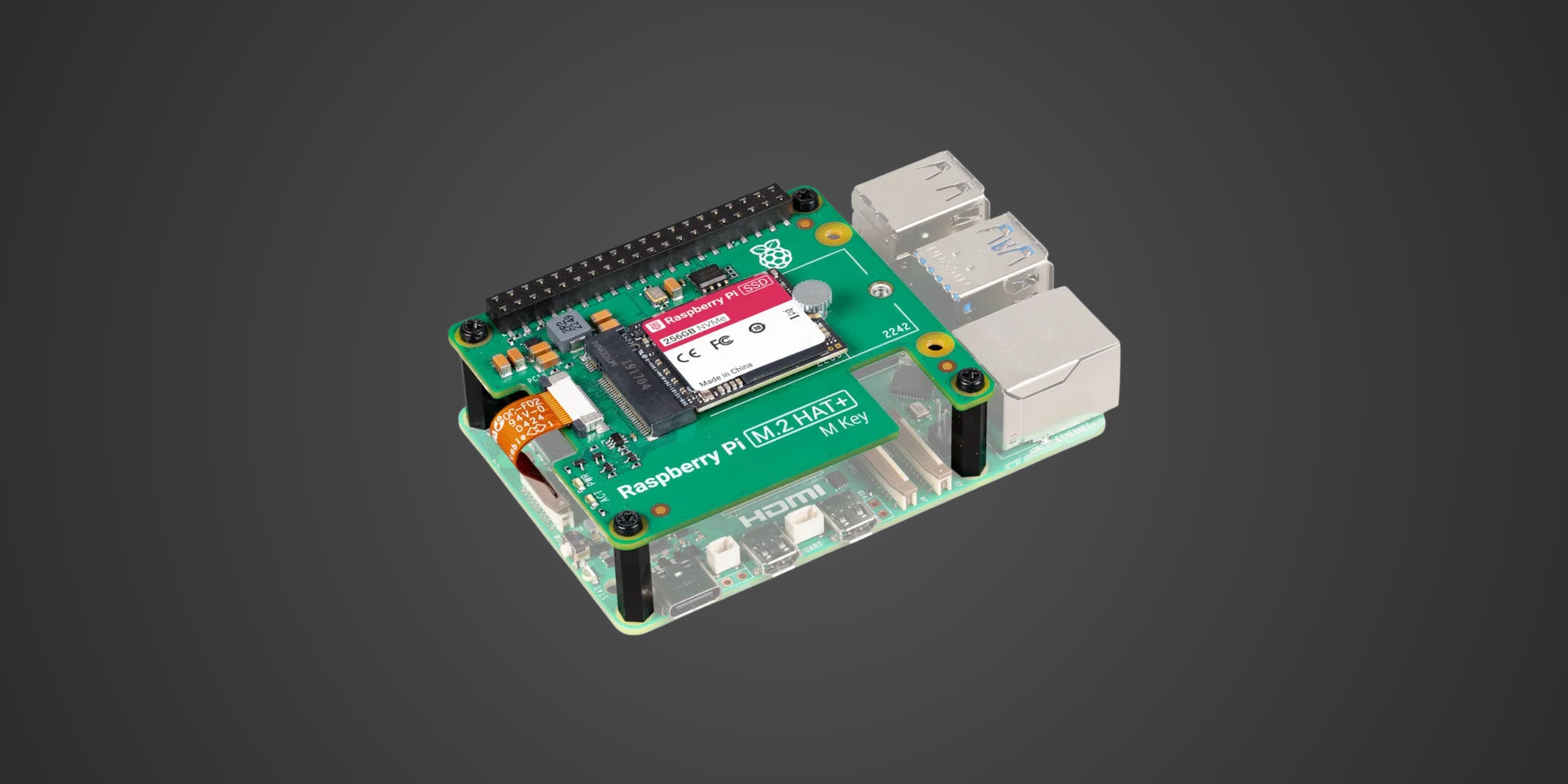
The drive measures a compact 30 x 22 millimeters, roughly the size of two postage stamps stacked together, and weighs practically nothing at under 5 grams. Raspberry Pi wraps this tiny powerhouse in their signature utilitarian aesthetic with minimal branding—no RGB lighting, no unnecessary heat spreaders, just a bare PCB designed to work reliably within the Pi 5's thermal envelope. The kit includes the M.2 HAT+ adapter board that converts from the Pi's proprietary 16-pin FPC connector to the standard M.2 M-key format, complete with a pre-attached ribbon cable, 16mm stacking header, threaded spacers, screws, and a knurled retention screw to secure the drive. Both the SSD and HAT+ conform to the new HAT+ specification, which means automatic detection by the latest Raspberry Pi OS with zero software configuration required.

The kits carry a limited warranty—Raspberry Pi commits to keeping both products in production until at least January 2032, which is about as close to a long-term compatibility guarantee as you'll find in the single-board computer world. That seven-plus-year production commitment matters when you're building projects meant to run for years rather than months, and it's a stark contrast to the third-party adapter market where boards appear and disappear based on component availability and manufacturer whims.

Performance & Real World Speed

Raspberry Pi doesn't publish fancy sequential read and write speeds measured in gigabytes per second because those numbers are ultimately limited by the Pi 5's single PCIe 2.0 lane, which tops out around 500 MB/s in ideal conditions. What they do specify are those IOPS numbers mentioned earlier—40,000 to 50,000 for random reads and 70,000 to 90,000 for random writes depending on capacity—which matter far more for the kinds of I/O-intensive workloads the Pi 5 typically handles. In real-world testing conducted by multiple reviewers using the dd command to read entire drives, PCIe Gen 3 enabled configurations achieved sequential read speeds around 837 MB/s, though the Pi 5's interface limits practical throughput to approximately 450-500 MB/s during sustained operations.

Boot times tell the real story here. The 256GB Raspberry Pi SSD boots to the Raspberry Pi OS desktop in approximately 19.92 seconds when configured for PCIe Gen 3 operation, which represents about a 3-second improvement over the foundation's new A2-rated microSD cards that clock in around 22.71 seconds. That's not the dramatic 3x to 4x speedup you might expect, and it's worth noting that boot time advantages are surprisingly modest because the bootloader still searches for microSD cards first before switching to NVMe storage. Application launch times show more impressive gains—reviewers report GIMP launching noticeably faster, LibreOffice opening in half the time compared to microSD, and Chromium becoming genuinely snappy rather than sluggish. The real benefits emerge during sustained I/O operations like compiling code, updating packages, or running Docker containers, where the higher IOPS translate to tangibly faster workflows.

Moving games back from the SSD to internal storage typically takes slightly longer than the reverse direction due to how the Pi's DMA handles PCIe transfers, but this minor asymmetry is imperceptible during normal use. Game boot times are where you might notice the only perceptible performance difference compared to microSD, though it remains subtle in practice—we're talking seconds rather than minutes. This minor delay is imperceptible during normal gameplay and certainly won't impact your experience once you're actually running applications. Features like auto-mounting and file system performance work identically whether you're booting from microSD or NVMe, and the foundation's integration means you won't encounter the occasional quirks that plague some third-party adapters.

Build Quality & Durability

The M.2 HAT+ connects to the Pi 5's PCIe interface through a flat S-shaped ribbon cable that's pre-attached to the adapter board—one end features 16 pins for the HAT+, the other features 18 pins for the Pi 5, with helpful labels to prevent incorrect installation. The included 16mm standoffs provide adequate clearance between the Active Cooler and M.2 HAT+, though multiple reviewers note this distance is carefully calibrated—go shorter and the retention screw thread touches the cooling fan, go longer and GPIO connectivity becomes flaky. The standoffs and machine screws are plastic rather than metal, which keeps costs down but means you shouldn't repeatedly install and remove the HAT+ as metal screwdrivers tend to wear plastic threads over time.

The HAT+ itself measures 65 x 58 millimeters and features mounting holes for both 2230 and 2242 form factor drives, though the kit only includes the shorter 2230 SSD. Raspberry Pi uses a green PCB with white silkscreen that matches their house aesthetic, and the board features activity and power LEDs that provide visual feedback during operation. Build quality inspires confidence—tight manufacturing tolerances, smooth ribbon cable connections, and component placement that suggests this board was designed for reliability rather than cutting manufacturing costs to the absolute minimum. The SSD itself is bare—no heat spreader, no decorative shroud—because the Pi 5's operating environment doesn't generate enough heat to require additional thermal management, and adding unnecessary metal would increase costs without improving performance.

Installation is refreshingly straightforward if you follow Raspberry Pi's documentation. You attach the spacers to the Pi 5 using the provided screws, press the stacking header onto the GPIO pins ensuring all 40 pins seat properly, connect the ribbon cable to the Pi's PCIe port with copper contacts facing inward, mount the SSD to the HAT+ using the retention screw, then secure the entire assembly with the standoffs. The whole process takes maybe ten minutes if you're careful, five if you've done it before. Removal is equally simple though you'll want to power down first to avoid potential data corruption—this isn't hot-swappable storage despite the M.2 connector suggesting otherwise.

While you rarely see the HAT+ once it's installed since it sits above the Pi 5 with the SSD facing down, the attention to detail and robust build suggest this is a product designed to last rather than a minimum viable product shipped just to claim first-party storage compatibility. The foundation's seven-year production commitment backs up this impression—they're planning to support this hardware through multiple OS releases and potential Pi 5 revisions.

Compatibility

The Raspberry Pi SSD Kit is specifically and exclusively designed for Raspberry Pi 5. This is an M.2 2230 NVMe drive bundled with a HAT+ adapter that only works with the Pi 5's PCIe interface, period. The HAT+ supports the 2230 form factor natively and will also accommodate 2242 drives if you purchase them separately, but it absolutely will not work with the longer 2280 drives commonly used in desktop PCs unless you get creative with zip ties and abandon the official mounting system—something reviewers have done but the foundation certainly doesn't recommend.

The installation process requires updating to the latest Raspberry Pi OS before connecting the hardware, as older bootloader versions don't properly detect NVMe storage. Once updated, the system automatically recognizes the drive when you power up—no manual partition configuration, no editing config files, no compiling kernel modules. You can use Raspberry Pi Imager to write an OS directly to the NVMe drive, then set the boot order in raspi-config to prioritize NVMe over microSD. The whole setup takes maybe fifteen minutes including the OS installation, and it genuinely works as advertised without the troubleshooting sessions that sometimes plague third-party adapters.

Critically, you need to understand what this kit can and cannot do. The M.2 HAT+ provides a single PCIe lane running at Gen 2.0 speeds officially, though you can force Gen 3.0 operation by adding a line to your boot configuration. This single lane means you cannot simultaneously connect multiple NVMe drives or add a PCIe switch to expand connectivity—the Pi 5 only exposes one PCIe lane total, and the HAT+ consumes it entirely. If you need both NVMe storage and another PCIe device like an AI accelerator, you'll need a specialized adapter with a PCIe switch like Pimoroni's NVMe Base Duo, but those boards typically force Gen 2.0 operation and cost more than the official solution.

The Raspberry Pi SSD is absolutely not compatible with Raspberry Pi 4, Raspberry Pi 3, or any earlier models. You cannot use this drive with a standard M.2-to-USB adapter on older Pis because while it would physically connect, the Pi 4's USB 3.0 interface is limited to about 300-350 MB/s of actual throughput—slower than the drive connected directly to the Pi 5's PCIe bus. This is Pi 5-exclusive hardware built to the foundation's specifications, and trying to use it elsewhere is wasting money on compatibility that doesn't exist.

Strengths & Weaknesses

The Raspberry Pi SSD Kit's greatest strength lies in its guaranteed compatibility and painless setup process. Transfer speeds are genuinely impressive given the single PCIe lane limitation, particularly when moving large files or running I/O-heavy workloads like database operations or containerized applications. The approximate 3-second boot time improvement over microSD is modest, but application responsiveness shows tangible gains—package updates complete faster, code compilation doesn't drag, and multitasking feels more fluid rather than bogged down by storage bottlenecks. The plug-and-play nature is beautifully simple—update your OS, connect the hardware, configure boot priority, and you're running from NVMe in minutes rather than debugging for hours.

At launch, the 256GB kit retailed for $40 while the 512GB version came in at $55, positioning these bundles as affordable entry points to NVMe storage for Pi owners. The foundation's pricing undercuts what you'd pay buying the M.2 HAT+ separately at $12 and adding a third-party 2230 drive, which typically cost $35-50 for 256GB and $50-70 for 512GB depending on brand and performance tier. More importantly, the kit eliminates compatibility risk—you're not gambling on whether your chosen drive plays nicely with the Pi 5's PCIe implementation or whether the adapter board routes power correctly. That peace of mind matters when you're building projects rather than collecting storage benchmarks, and the foundation's production commitment means you can buy multiple kits over the years knowing they'll work identically.

However, the Raspberry Pi SSD Kit isn't without notable limitations. The M.2 HAT+ completely blocks GPIO access unless you use the included 16mm stacking header, and even then, reviewers consistently report that GPIO connectivity is marginal at best—the 5V and ground pins make contact, but other pins don't reliably connect unless you push the header further down the Pi's GPIO pins, which then leaves almost no usable length for stacked HATs or jumper wires. If you need solid GPIO access, you're better off with Pimoroni's NVMe Base that mounts underneath the Pi 5 and leaves the top GPIO completely clear, even though it costs an extra $1.50 and uses a proprietary mounting system. The official solution prioritizes the Active Cooler compatibility over GPIO flexibility, which makes sense for most use cases but becomes limiting if you're building hardware projects that need both fast storage and extensive GPIO connectivity.

Capacity remains the elephant in the room—256GB and 512GB feel limiting in 2024 when even budget 2280 drives come in 1TB and 2TB flavors. The foundation does offer a standalone 1TB SSD that works with the M.2 HAT+, but it's sold separately rather than as a kit, and the 2230 form factor inherently limits capacity compared to longer drives. You're essentially trading maximum storage for guaranteed compatibility, which is a reasonable trade-off for projects that prioritize stability over raw capacity but feels restrictive if you're planning to run multiple large applications or store significant media libraries. The fundamental weakness affecting the entire Pi 5 storage ecosystem—both official and third-party solutions—is that single PCIe lane bottleneck. You're never getting enterprise-grade throughput regardless of how fast your drive theoretically performs, and you're always choosing between NVMe storage and other PCIe devices rather than using both simultaneously.

The official case compatibility situation borders on inadequate. The M.2 HAT+ will physically fit inside the Raspberry Pi Case for Pi 5, but only if you remove the lid and pop out the central fan insert, essentially defeating the purpose of having a case in the first place. The Active Cooler fits fine beneath the HAT+ thanks to those 16mm spacers, but you're running an open-air configuration unless you invest in a third-party case like HighPi Pro 5S that's designed to accommodate the HAT+ with the lid closed. This feels like an oversight—the foundation designed both products but didn't engineer the official case to work with the official storage expansion, forcing users to either run without a lid or buy aftermarket enclosures.

Verdict: Should You Buy It?

Buy this if: you own a Raspberry Pi 5 and need faster storage than microSD provides, particularly if you're running I/O-intensive applications like databases, Docker containers, or development environments where compile times and package updates matter, and you value guaranteed compatibility over maximum storage capacity or the lowest possible price, especially if you're building projects meant to run reliably for years rather than experimenting with bleeding-edge performance configurations.

Skip this if: you're comfortable researching third-party NVMe compatibility and can find faster 2280 drives paired with alternative adapter boards for similar money, particularly if you need GPIO access and would benefit from Pimoroni's under-board mounting approach, or if you only use your Pi 5 for lightweight tasks where microSD performance is perfectly adequate and the extra $30-40 could be better spent on other components, or if you require more than 512GB of storage and don't want to pay the premium for a standalone 1TB drive purchased separately from the adapter.

Advertisement
About
Privacy
Terms
© 2024, 2025 - All Rights Reserved
Brand Logo Icon | DIY SSD