
diySSD
  • Product
    Catalog Buyer Guides Out of Stock
  • Pricing
    All Retailers Amazon Best Buy B&H Manufacturer Newegg
  • Blog
    Posts
  • Support
    FAQ

Product

Catalog Buyer Guides Out of Stock

Pricing

All Retailers Amazon Best Buy B&H Manufacturer Newegg

Blog

Posts

Support

FAQ
/* ========================================================================== DIYSSD NAVIGATION - CSS VARIABLES ========================================================================== */ :root { /* Charcoal Scale */ --charcoal-050: #f5f5f5; --charcoal-100: #e6e6e6; --charcoal-200: #cccccc; --charcoal-300: #adadad; --charcoal-500: #7a7a7a; --charcoal-700: #565656; --charcoal-800: #474747; --charcoal-900: #3a3a3a; --charcoal-950: #2c2c2c; /* Accent Colors - WCAG AA Compliant */ --ocean-blue: #245270; --ocean-blue-rgb: 36, 82, 112; --terracotta: #c7522a; --golden-sand: #e5b363; --forest-green: #5d8a66; --dusty-plum: #8b5a8b; /* Accessibility */ --focus-ring-color: var(--ocean-blue); --focus-ring-width: 3px; --focus-ring-offset: 2px; --touch-target-min: 44px; /* Transitions */ --transition-speed: 0.2s; --transition-easing: cubic-bezier(0.4, 0, 0.2, 1); } /* Reduced Motion Support */ @media (prefers-reduced-motion: reduce) { :root { --transition-speed: 0.01ms; } * { animation-duration: 0.01ms !important; animation-iteration-count: 1 !important; transition-duration: 0.01ms !important; scroll-behavior: auto !important; } } /* ========================================================================== NAVIGATION CONTAINER ========================================================================== */ .diyssd-nav-container { position: relative; width: 100%; background: #ffffff; border-bottom: 1px solid var(--charcoal-200); z-index: 1000; } /* ========================================================================== MAIN NAVIGATION ========================================================================== */ .diyssd-nav { display: flex; align-items: center; justify-content: space-between; max-width: 1440px; margin: 0 auto; padding: 0.75rem 1.5rem; height: 4rem; background: #ffffff; /* Performance: GPU acceleration for smoother rendering */ transform: translateZ(0); backface-visibility: hidden; } /* ========================================================================== LOGO SECTION ========================================================================== */ .diyssd-nav-left { flex: 1; display: flex; align-items: center; min-width: 0; } .diyssd-logo { font-family: "Oswald", sans-serif; font-weight: 800; font-size: 36px; color: #2d5a7b; text-decoration: none; display: block; /* Performance: Prevent paint on hover */ will-change: opacity; } .diyssd-logo:hover { opacity: 0.8; } .diyssd-logo:focus-visible { outline: var(--focus-ring-width) solid var(--focus-ring-color); outline-offset: var(--focus-ring-offset); border-radius: 4px; } /* ========================================================================== MENU CONTAINER ========================================================================== */ .diyssd-nav-right { flex: 0 0 auto; display: flex; align-items: center; gap: 0.75rem; height: 100%; } /* ========================================================================== DESKTOP MENU ========================================================================== */ .diyssd-desktop-menu { display: none; align-items: center; gap: 0rem; list-style: none; margin: 0; padding: 0; height: 100%; } @media (min-width: 769px) { .diyssd-desktop-menu { display: flex; } } /* ========================================================================== MENU ITEMS ========================================================================== */ .diyssd-menu-item { position: relative; display: flex; align-items: center; height: 100%; /* Performance: Can't use contain here as it breaks dropdown positioning */ } .diyssd-menu-link { display: flex; align-items: center; padding: 0.75rem 1rem; min-height: var(--touch-target-min); color: var(--charcoal-900); text-decoration: none; font-size: 0.9375rem; font-weight: 500; white-space: nowrap; border-radius: 4px; transition: all var(--transition-speed) var(--transition-easing); cursor: pointer; /* Performance: Hint for background color changes */ will-change: background-color, color; } .diyssd-menu-link:hover { color: var(--ocean-blue); background-color: var(--charcoal-050); } .diyssd-menu-link:focus { outline: none; } .diyssd-menu-link:focus-visible { outline: var(--focus-ring-width) solid var(--focus-ring-color); outline-offset: calc(var(--focus-ring-offset) * -1); } .diyssd-menu-link.has-dropdown::after { content: "▼"; margin-left: 0.5rem; font-size: 0.625rem; transition: transform var(--transition-speed) var(--transition-easing); display: inline-block; /* Performance: Use transform for rotation */ will-change: transform; } .diyssd-menu-item:hover .diyssd-menu-link.has-dropdown::after { transform: rotate(180deg); } /* ========================================================================== MENU DIVIDER ========================================================================== */ .diyssd-menu-divider { width: 1px; height: 1.5rem; background-color: var(--charcoal-200); margin: 0; } /* ========================================================================== DROPDOWN MENU ========================================================================== */ .diyssd-dropdown { position: absolute; top: calc(100% + 0.5rem); left: 50%; min-width: 200px; background: #ffffff; border-radius: 8px; box-shadow: 0 4px 12px rgba(0, 0, 0, 0.15); padding: 0.5rem; opacity: 0; visibility: hidden; /* Performance: Use transform for animation instead of top/left */ transform: translateX(-50%) translateY(-8px); transition: opacity var(--transition-speed) var(--transition-easing), visibility var(--transition-speed) var(--transition-easing), transform var(--transition-speed) var(--transition-easing); z-index: 1001; /* Performance: GPU acceleration */ will-change: opacity, transform; backface-visibility: hidden; } .diyssd-menu-item:hover .diyssd-dropdown { opacity: 1; visibility: visible; transform: translateX(-50%) translateY(0); } .diyssd-dropdown-link { display: flex; align-items: center; padding: 0.75rem; min-height: var(--touch-target-min); color: var(--charcoal-900); text-decoration: none; font-size: 0.875rem; font-weight: 500; border-radius: 4px; transition: all var(--transition-speed) var(--transition-easing); /* Performance: Hint for hover state */ will-change: background-color, color; } .diyssd-dropdown-link:hover { color: var(--ocean-blue); background-color: var(--charcoal-050); } .diyssd-dropdown-link:focus { outline: none; } .diyssd-dropdown-link:focus-visible { outline: var(--focus-ring-width) solid var(--focus-ring-color); outline-offset: calc(var(--focus-ring-offset) * -1); } .diyssd-dropdown-link:active { background-color: var(--charcoal-050); } .diyssd-dropdown-link.active { color: var(--terracotta); background-color: rgba(199, 82, 42, 0.08); font-weight: 600; } /* ========================================================================== MOBILE TOGGLE BUTTON ========================================================================== */ .diyssd-mobile-toggle { display: flex; flex-direction: column; justify-content: space-around; width: var(--touch-target-min); height: var(--touch-target-min); padding: 0.75rem; background: transparent; border: none; cursor: pointer; border-radius: 4px; transition: background-color var(--transition-speed) var(--transition-easing); /* Performance: Hint for background changes */ will-change: background-color; } .diyssd-mobile-toggle:hover { background-color: var(--charcoal-050); } .diyssd-mobile-toggle:focus { outline: none; } .diyssd-mobile-toggle:focus-visible { outline: var(--focus-ring-width) solid var(--focus-ring-color); outline-offset: calc(var(--focus-ring-offset) * -1); } .diyssd-mobile-toggle span { display: block; width: 100%; height: 2px; background-color: var(--charcoal-900); border-radius: 2px; transition: all var(--transition-speed) var(--transition-easing); /* Performance: GPU acceleration for transforms */ will-change: transform, opacity; backface-visibility: hidden; } .diyssd-mobile-toggle.active span:nth-child(1) { transform: translateY(7px) rotate(45deg); } .diyssd-mobile-toggle.active span:nth-child(2) { opacity: 0; } .diyssd-mobile-toggle.active span:nth-child(3) { transform: translateY(-7px) rotate(-45deg); } @media (min-width: 769px) { .diyssd-mobile-toggle { display: none; } } /* ========================================================================== MOBILE OVERLAY ========================================================================== */ .diyssd-mobile-overlay { position: fixed; top: 0; left: 0; width: 100%; height: 100%; background-color: rgba(0, 0, 0, 0.5); opacity: 0; visibility: hidden; transition: opacity var(--transition-speed) var(--transition-easing), visibility var(--transition-speed) var(--transition-easing); z-index: 1001; /* Performance: GPU acceleration */ will-change: opacity; backface-visibility: hidden; } .diyssd-mobile-overlay.active { opacity: 1; visibility: visible; } @media (min-width: 769px) { .diyssd-mobile-overlay { display: none; } } /* ========================================================================== MOBILE MENU ========================================================================== */ .diyssd-mobile-menu { position: fixed; top: 0; right: 0; width: 85%; max-width: 320px; height: 100%; background: #ffffff; /* Performance: Use transform instead of right property */ transform: translateX(100%); transition: transform var(--transition-speed) var(--transition-easing); z-index: 1002; overflow-y: auto; box-shadow: -4px 0 12px rgba(0, 0, 0, 0.15); /* Performance: GPU acceleration */ will-change: transform; backface-visibility: hidden; /* Performance: Enable hardware scrolling */ -webkit-overflow-scrolling: touch; } .diyssd-mobile-menu.active { transform: translateX(0); } @media (min-width: 769px) { .diyssd-mobile-menu { display: none; } } /* ========================================================================== MOBILE HEADER ========================================================================== */ .diyssd-mobile-header { display: flex; align-items: center; justify-content: flex-end; padding: 0.6rem 1rem; border-bottom: 1px solid var(--charcoal-200); } .diyssd-mobile-close { display: flex; align-items: center; justify-content: center; width: var(--touch-target-min); height: var(--touch-target-min); padding: 0; background: transparent; border: none; cursor: pointer; border-radius: 4px; font-size: 1.5rem; color: var(--charcoal-900); transition: background-color var(--transition-speed) var(--transition-easing); /* Performance: Hint for background changes */ will-change: background-color; } .diyssd-mobile-close:hover { background-color: var(--charcoal-050); } .diyssd-mobile-close:focus { outline: none; } .diyssd-mobile-close:focus-visible { outline: var(--focus-ring-width) solid var(--focus-ring-color); outline-offset: calc(var(--focus-ring-offset) * -1); } /* ========================================================================== MOBILE CONTENT ========================================================================== */ .diyssd-mobile-content { padding: 1rem; } .diyssd-mobile-section { margin-bottom: 1rem; } .diyssd-mobile-section:last-child { margin-bottom: 0; } .diyssd-mobile-heading { font-size: 0.75rem; font-weight: 600; text-transform: uppercase; letter-spacing: 0.05em; color: var(--charcoal-500); margin: 0 0 0.5rem 0; } .diyssd-mobile-divider { height: 1px; background-color: var(--charcoal-200); margin-bottom: 0.75rem; } .diyssd-mobile-link { display: flex; align-items: center; padding: 0 0.75rem; /* margin-bottom: 0.25rem; */ min-height: var(--touch-target-min); color: var(--charcoal-900); text-decoration: none; font-size: 0.875rem; font-weight: 500; border-radius: 4px; transition: all var(--transition-speed) var(--transition-easing); /* Performance: Hint for interactive states */ will-change: background-color, color, transform; } .diyssd-mobile-link:hover { color: var(--ocean-blue); background-color: var(--charcoal-050); } .diyssd-mobile-link:focus { outline: none; } .diyssd-mobile-link:focus-visible { outline: var(--focus-ring-width) solid var(--focus-ring-color); outline-offset: calc(var(--focus-ring-offset) * -1); } .diyssd-mobile-link:active { background-color: var(--charcoal-050); /* Performance: Use transform for visual feedback */ transform: translateX(2px); } .diyssd-mobile-link.active { color: var(--terracotta); background-color: rgba(199, 82, 42, 0.08); font-weight: 600; } /* ========================================================================== UTILITY CLASSES ========================================================================== */ body.diyssd-menu-open { overflow: hidden; } @media (prefers-contrast: high) { .diyssd-nav { border-bottom-width: 2px; } .diyssd-menu-link:focus-visible, .diyssd-dropdown-link:focus-visible, .diyssd-mobile-link:focus-visible { outline-width: 4px; } }

ORICO 40Gbps USB4.0 NVMe Enclosure

Transform Your SSD Into Blazing-Fast Portable Storage
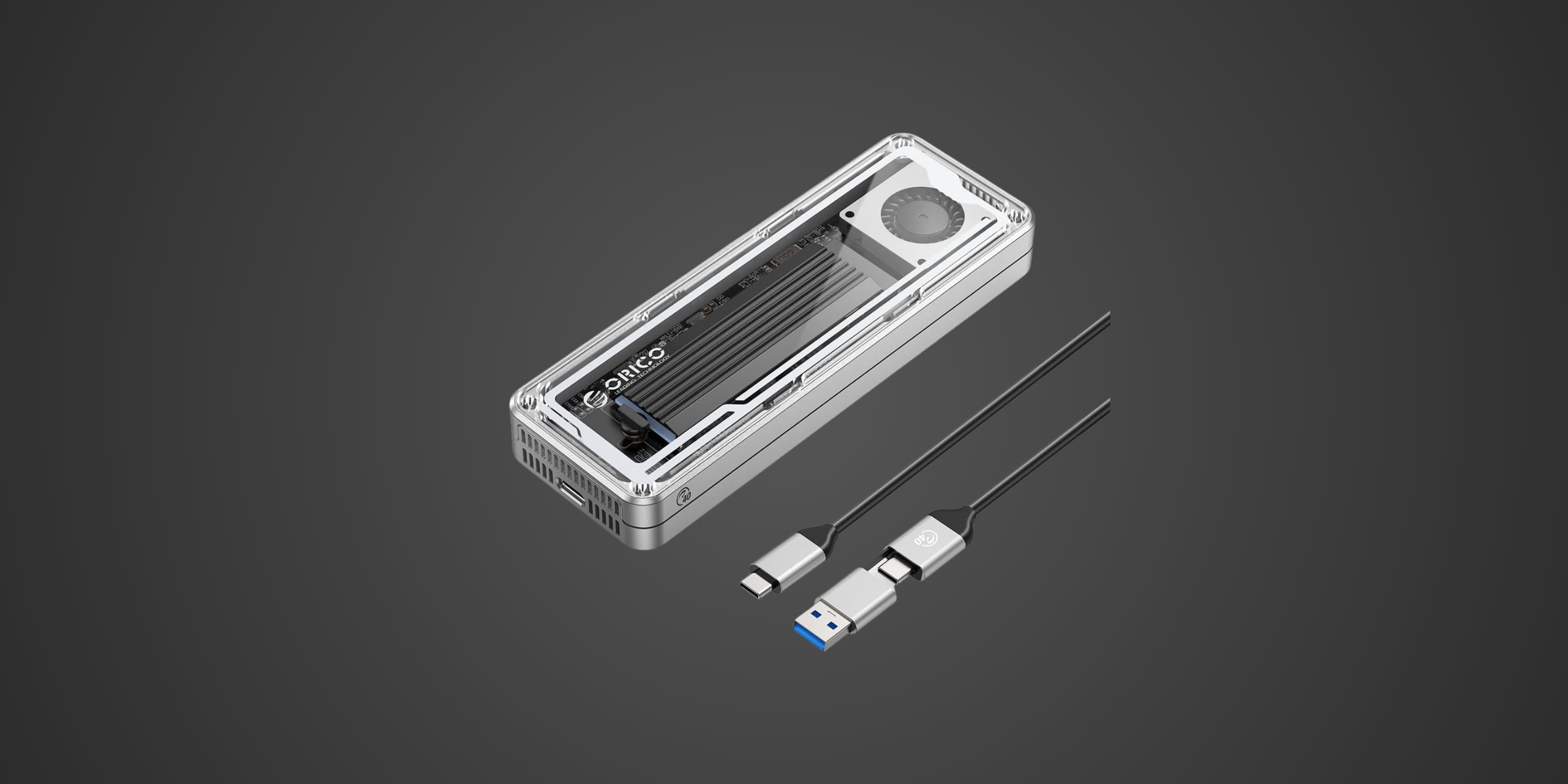
40Gbps USB4/Thunderbolt Speed | Premium Aluminum Construction | Intel JHL7740 Controller
photo of orico 40gbps nvme ssd enclosure | diySSD
/* Global reset for consistent box-sizing */ * { box-sizing: border-box; } /* Container for the entire TOC component */ .toc-embed-wrapper .toc-container { max-width: 800px; margin: 40px auto; } /* Individual collapsible item styling */ .toc-embed-wrapper .toc-item { background: #fff; border-radius: 16px; box-shadow: 0 4px 12px rgba(0, 0, 0, 0.1); margin-bottom: 18px; overflow: hidden; /* Prevents content from breaking border radius */ transition: box-shadow 0.2s ease; /* Smooth hover effect */ } /* Hover effect for entire item */ .toc-embed-wrapper .toc-item:hover { box-shadow: 0 6px 20px rgba(0, 0, 0, 0.15); } /* Toggle button styling - removes default button appearance */ .toc-embed-wrapper .toc-toggle { background: none; border: none; width: 100%; display: flex; justify-content: space-between; align-items: center; font-size: 1.15rem; font-weight: 500; cursor: pointer; padding: 24px 28px; outline: none; color: #1a1a1a; transition: background-color 0.2s ease; } /* Button hover state */ .toc-embed-wrapper .toc-toggle:hover { background-color: #e2e1df; } /* Keyboard focus accessibility - only visible when navigating with tab */ .toc-embed-wrapper .toc-toggle:focus-visible { outline: 2px solid #007acc; outline-offset: -2px; } /* Question text styling */ .toc-embed-wrapper .toc-question { flex: 1; /* Takes up remaining space */ font-weight: 400; text-align: left; margin: 0; } /* Plus/minus icon styling */ .toc-embed-wrapper .toc-icon { font-size: 1.8rem; font-weight: 300; transition: transform 0.3s ease, color 0.2s ease; /* Smooth rotation and color change */ margin-left: 20px; color: #666; flex-shrink: 0; /* Prevents icon from shrinking */ width: 24px; text-align: center; } /* Icon state when expanded - rotates 45deg to create X from + */ .toc-embed-wrapper .toc-toggle[aria-expanded="true"] .toc-icon { transform: rotate(45deg); color: #28a745; /* Green color when open */ } /* Answer content container - hidden by default */ .toc-embed-wrapper .toc-answer { padding: 0 28px 24px 28px; font-size: 1rem; color: #444; line-height: 1.6; display: none; /* Hidden by default */ animation: slideDown 0.3s ease-out; /* Smooth entrance animation */ } /* Show class for JavaScript toggle */ .toc-embed-wrapper .toc-answer.show { display: block; } /* Slide down animation for smooth reveal */ @keyframes slideDown { from { opacity: 0; transform: translateY(-10px); } to { opacity: 1; transform: translateY(0); } } /* Main ordered list styling (1, 2, 3...) */ .toc-embed-wrapper .toc-answer ol { list-style-type: none; /* Remove default numbering */ padding-left: 0; /* Remove default padding */ margin: 0.8em 0; /* Vertical spacing */ counter-reset: main-counter; /* Counter for main items */ } /* Main list items (h2 headers) */ .toc-embed-wrapper .toc-answer > ol > li { counter-increment: main-counter; position: relative; } .toc-embed-wrapper .toc-answer > ol > li::before { content: counter(main-counter) ". "; color: #007acc; font-weight: 600; margin-right: 0.5em; } /* Nested ordered list styling (x.1, x.2, x.3...) */ .toc-embed-wrapper .toc-answer ol ol { list-style-type: none; /* Remove default lettering */ padding-left: 2.2em; /* Additional indentation for hierarchy */ margin: 0.6em 0; /* Tighter spacing for nested items */ counter-reset: sub-counter; /* Counter for sub-items */ } /* Sub-list items (h3 headers) */ .toc-embed-wrapper .toc-answer ol ol li { counter-increment: sub-counter; position: relative; } .toc-embed-wrapper .toc-answer ol ol li::before { content: counter(main-counter) "." counter(sub-counter) " "; color: #28a745; font-weight: 500; margin-right: 0.5em; } /* Main list item spacing */ .toc-embed-wrapper .toc-answer li { margin: 0.6em 0; padding-left: 0.3em; /* Small padding for better text alignment */ } /* Nested list item spacing - tighter than main items */ .toc-embed-wrapper .toc-answer ol ol li { margin: 0.4em 0; } /* TOC link styling */ .toc-embed-wrapper .toc-answer a { text-decoration: none; color: #444; transition: color 0.2s ease; } .toc-embed-wrapper .toc-answer a:hover { color: #007acc; text-decoration: underline; } /* Remove default list marker styling since we're using custom numbering */ /* Empty state styling */ .toc-embed-wrapper .toc-empty { padding: 20px 28px; color: #888; font-style: italic; text-align: center; } /* Responsive design for mobile devices */ @media (max-width: 768px) { .toc-embed-wrapper .toc-container { margin: 20px auto; padding: 0 16px; /* Side padding on mobile */ } .toc-embed-wrapper .toc-toggle { padding: 20px 22px; /* Reduced padding on mobile */ font-size: 1.1rem; /* Slightly smaller font */ } .toc-embed-wrapper .toc-answer { padding: 0 22px 20px 22px; /* Matched reduced padding */ font-size: 0.95rem; /* Smaller text on mobile */ } .toc-embed-wrapper .toc-icon { font-size: 1.6rem; /* Smaller icon on mobile */ margin-left: 16px; } } /* Scroll offset for sticky header - adjust -80px to match your menubar height */ .toc-embed-wrapper .toc-answer a[href^="#"] { scroll-margin-top: 76px; /* Adjust this value to match your sticky menubar height */ } /* Alternative: Add offset to the target headers themselves */ h2, h3 { scroll-margin-top: 76px; /* Adjust this value to match your sticky menubar height */ }
Advertisement

Introduction

Are you sitting on a spare high-performance NVMe SSD and wondering how to turn it into portable powerhouse storage? The ORICO M234C3-U4 USB4.0 M.2 NVMe SSD Enclosure might be exactly what you need. This aluminum enclosure targets content creators, IT professionals, and power users who demand more than just basic external storage—they need genuine high-speed connectivity that can keep pace with modern workflows involving 4K video editing, massive file transfers, and professional backup solutions.

With USB4.0 and Thunderbolt 3/4 compatibility delivering a theoretical 40Gbps bandwidth, this enclosure positions itself in the premium tier of drive adapters. It accepts any standard M.2 2280 NVMe SSD up to 4TB capacity, essentially letting you build your own external SSD solution with the exact drive specifications you prefer. Whether you're looking to repurpose an internal drive or create a custom portable storage solution that rivals prebuilt external SSDs, this docking station offers the flexibility and performance to make it happen.

Product Overview

The ORICO M234C3-U4 measures a compact 107mm long by 50mm wide by 17mm thick, making it genuinely pocket-portable despite its premium capabilities. The enclosure features sand-blasted anodized aluminum construction available in three color options—gray, silver, and rose gold—giving it a professional aesthetic that matches modern laptop designs. The striped aluminum exterior isn't just for looks; it provides effective passive cooling through substantial thermal mass and surface area.

Under the hood, this enclosure employs an Intel JHL7740 Titan Ridge controller as its primary chip, which is essentially a Thunderbolt 3 controller adapted for USB4.0 bridging. This explains the enclosure's full 40Gbps capabilities and its compatibility across both Thunderbolt and USB4.0 ecosystems. Working alongside the Intel controller is a JMicron JMS583 bridge chip that translates NVMe protocols into USB connectivity, while a Cypress CYPD5126 controller manages USB Type-C power delivery and provides protection against over-voltage, under-voltage, over-current, and short circuits.

The enclosure supports M.2 2280 format NVMe SSDs exclusively—it won't work with SATA M.2 drives, only NVMe protocol drives with M-key connectors. Maximum supported capacity reaches 4TB, accommodating today's largest consumer NVMe drives. The package includes a USB4.0 certified cable with dual connectors (Type-C to Type-C, with a Type-A adapter), a thermal pad for SSD heat management, a black aluminum thermal fin cover, two mounting screws, and a user guide. The thermal pad provided in some units has arrived damaged, though this appears to be a packaging rather than design issue.

The enclosure operates entirely bus-powered, drawing its energy from the host device through the USB-C connection. It also supports USB Power Delivery passthrough up to 100W, meaning you can charge your laptop through the same cable while using the enclosure. An LED indicator near the Type-C port provides visual confirmation of drive activity. The enclosure implements UASP acceleration protocol, TRIM command support, SMART monitoring capability, and an intelligent 10-minute sleep mode that preserves SSD longevity during periods of inactivity.

Performance & Real World Speed

ORICO specifies this enclosure can achieve up to 40Gbps theoretical bandwidth when connected via USB4.0 or Thunderbolt 3/4 interfaces. In practical terms with a high-performance NVMe SSD installed, users can expect sequential read speeds reaching approximately 3100 MB/s and sequential write speeds around 2700-2900 MB/s based on testing with a Sabrent Rocket 4 Plus drive. These speeds represent roughly 70-75% of what the same drive would achieve when installed directly in a motherboard M.2 slot, which is impressive performance for an external solution.

Real-world file transfer scenarios demonstrate the enclosure's practical speed advantage over standard external drives. Reading a 97GB compressed file from the enclosure took approximately 46 seconds at an average speed of 2057 MB/s—that's transferring nearly 100GB in less than a minute. Writing that same file back to the enclosure achieved roughly 1700 MB/s average speed, completing in about 55 seconds. When copying a complex 167GB directory containing multiple files and subfolders, the enclosure maintained a 1550 MB/s average transfer rate, finishing the operation in under two minutes.

For content creators working with 4K and 8K video footage, these speeds translate to genuine real-time editing capability directly from the external drive. A single 4K ProRes 422 HQ video file typically requires about 700 MB/s sustained throughput—this enclosure provides more than double that headroom, allowing smooth timeline scrubbing and multi-stream playback without stuttering. For photographers managing massive RAW libraries or 3D artists shuttling project files between workstations, the enclosure eliminates the traditional "wait and watch the progress bar" frustration of external storage.

Gaming applications also benefit, though with some caveats. Installing Steam or Epic Games titles to this enclosure and playing directly from it works surprisingly well for most games, with load times approaching internal NVMe performance. However, the most demanding DirectStorage-enabled titles will still show measurable differences compared to internal installation. For console users expanding PlayStation 5 or Xbox storage via USB, this enclosure can store PS4 and Xbox One games for play directly from external storage, though next-gen optimized titles must remain on internal drives per console limitations.

It's important to understand these speeds require the full USB4.0 or Thunderbolt 3/4 connection. When connected to older USB 3.2 Gen 2 ports (10 Gbps), performance drops to roughly 1000 MB/s maximum. USB 3.2 Gen 1 ports (5 Gbps) further limit speeds to approximately 450-500 MB/s. The enclosure is not compatible with USB 2.0 at all—connecting it to USB 2.0 ports results in no recognition. This incompatibility with legacy USB standards is a significant limitation for users who might need backward compatibility.

Build Quality & Durability

The ORICO enclosure's aluminum alloy construction feels genuinely premium in hand, with substantial heft that conveys quality without being cumbersome. The sand-blasted anodizing provides an attractive matte finish that resists fingerprints and minor scratches better than glossy alternatives. The machining quality is excellent, with tight tolerances and smooth edges throughout—there are no sharp corners or rough surfaces that suggest cost-cutting measures.

The striped aluminum shell serves double duty as both aesthetic flourish and functional cooling solution. Those ridges increase surface area for better heat dissipation, working in conjunction with the included thermal pad and aluminum thermal fin to manage the considerable heat output of high-speed NVMe drives under sustained load. During real-world testing with ambient temperature at 31°C, the installed drive reached 63°C under heavy copy-paste operations—warm but within safe operating parameters and notably cooler than some competing enclosures that reach thermal throttling temperatures.

Cable quality deserves specific mention. The included USB4.0 certified cable features proper 40Gbps rating with the official symbol printed on the connector housing, confirming it meets full specification requirements. The cable measures 30cm in length, which is adequate for desktop use though some users might prefer a longer option for more flexible placement. The dual-connector design with both Type-C and Type-A ends provides versatility, though it's worth noting the Type-A connection limits you to USB 3.2 speeds rather than the full USB4.0/Thunderbolt capability.

ORICO backs the enclosure with a 5-year warranty, which signals confidence in the product's longevity and provides meaningful protection for what represents a significant investment. This extended warranty coverage distinguishes the product from budget alternatives that typically offer only one or two years of protection.

However, the build is not without minor compromises. The enclosure requires a small Phillips-head screwdriver for both installation and removal of drives—it's not a tool-free design. While the screws are small and easy to misplace, ORICO includes two spares, suggesting they're aware of this potential issue. Some units have arrived with torn thermal pads, indicating quality control or packaging issues during shipping rather than fundamental design flaws. The LED indicator, while functional, lacks any customization options and cannot be disabled for users who prefer minimal light pollution.

The enclosure's feet or base design is minimal, essentially relying on the aluminum case bottom for stability. On smooth surfaces this works adequately, but the enclosure can slide around more easily than designs with dedicated rubber feet or raised bases. For permanently positioned desktop use this matters little, but for portable applications it's a minor inconvenience.

Compatibility

From a PC compatibility perspective, the ORICO enclosure works seamlessly across Windows, macOS, and Linux operating systems with true plug-and-play functionality—no drivers or additional software required. The USB4.0/Thunderbolt connection negotiates automatically with host devices, falling back gracefully to lower speeds when connected to USB 3.2 Gen 2 or Gen 2x2 ports. The enclosure supports both MBR and GPT partition schemes, allowing drives up to the maximum 4TB capacity to be fully utilized regardless of operating system.

Host system requirements deserve careful consideration. To achieve the full 40Gbps performance, your computer must have either a USB4.0 port or a Thunderbolt 3/4 port. Many recent laptops and desktop motherboards include these high-speed ports, but plenty of systems still rely on standard USB 3.2 connectivity. Before purchasing, verify your device actually has the appropriate port type—it's typically marked with a lightning bolt symbol (Thunderbolt) or a "40" badge (USB4). Systems with only USB 3.2 Gen 2 (10 Gbps) or Gen 1 (5 Gbps) ports will function but deliver significantly reduced performance.

The critical incompatibility with USB 2.0 cannot be overstated. If you plug this enclosure into a USB 2.0 port, it simply won't work at all—no recognition, no drive mounting, nothing. This differs from most USB devices that maintain backward compatibility by operating at reduced speeds. For users with older systems or who need to access the drive on multiple computers with varying port types, this limitation could prove frustrating.

For NVMe SSD compatibility, the enclosure accepts standard M.2 2280 format drives with M-key connectors using NVMe protocol. This covers the vast majority of consumer NVMe SSDs from manufacturers like Samsung, Western Digital, Crucial, Sabrent, Corsair, and dozens of others. The enclosure works with both PCIe Gen 3 and Gen 4 drives, though obviously Gen 4 drives will show their full performance advantage. It does not support M.2 SATA drives—the enclosure is NVMe-only. Additionally, it only accommodates the standard 2280 length; shorter 2230, 2242, or 2260 drives won't mount securely, and longer 22110 drives won't physically fit.

For console gaming applications, the enclosure offers partial functionality. On PlayStation 5, this enclosure can serve as external storage for PS4 games, which can be both stored and played directly from the external drive at full performance. PS5 games can be stored on the external drive but must be transferred back to internal SSD storage for actual gameplay. On Xbox Series X|S, the enclosure similarly allows storage and playing of Xbox One titles from external storage, while optimized Series X|S games require internal storage or the proprietary Seagate Storage Expansion Card for full gameplay functionality.

Mobile device compatibility exists but with limitations. Recent iPad Pro models with Thunderbolt/USB-C ports can recognize and mount drives in this enclosure, making it viable for importing large photo and video libraries. Android devices with USB-C and USB OTG support can similarly access the enclosure, though whether it works depends heavily on specific device implementations and may require formatting the drive with exFAT filesystem for broadest compatibility.

Strengths & Weaknesses

The ORICO USB4.0 enclosure excels primarily in its genuine high-speed performance delivery. Testing confirms it actually delivers on the 40Gbps promise when properly connected, unlike some competitors that claim high speeds but bottleneck elsewhere in their design. The Intel Titan Ridge controller and JMicron bridge combination represents a premium chipset choice that enables sustained performance without the stuttering or speed drops that plague cheaper alternatives. For users who genuinely need to move massive files regularly or work directly from external storage, this enclosure eliminates the performance compromises traditionally associated with external drives.

Build quality stands as another clear strength. The aluminum construction feels professional and durable, the thermal management system effectively prevents throttling under sustained workloads, and the overall fit and finish suggest a product designed for serious users rather than casual consumers. The 5-year warranty backing reinforces this impression and provides meaningful long-term value protection. The included USB4.0 certified cable represents another thoughtful touch—many competing enclosures cheap out with USB 3.2 cables that can't deliver the full rated performance.

The flexibility to choose your own NVMe drive appeals strongly to enthusiasts and professionals. Rather than being locked into whatever NAND type, controller, and capacity a prebuilt external SSD offers, you can select exactly the drive specifications your workflow demands. Want a high-endurance MLC drive for constant write workloads? Install it. Prefer a massive 4TB capacity for video archive storage? It fits. This customization enables builds that prebuilt external SSDs simply cannot match.

However, the enclosure's limitations are equally significant. Price represents the primary obstacle—at current market rates, the enclosure alone costs as much as many complete external SSDs, and you still need to purchase a separate NVMe drive to populate it. For budget-conscious users, the total cost often exceeds alternatives unless you already own a spare NVMe drive you're repurposing. The value proposition only makes sense for specific use cases where the flexibility, performance, or customization justify the premium.

The complete lack of USB 2.0 compatibility proves surprisingly limiting in real-world scenarios. Many public computers, older systems, and various devices still rely on USB 2.0 ports, and this enclosure becomes entirely nonfunctional in those situations. Competitors offering graceful fallback to older USB standards provide greater versatility, even if at reduced speeds. The requirement for a screwdriver to access and swap drives eliminates the convenience of tool-free designs that allow quick drive changes on the go.

The thermal pad quality control issues mentioned in multiple user reports raise minor concerns about manufacturing consistency. While the thermal management system works effectively overall, receiving a damaged thermal pad out of the box creates a poor first impression and requires contacting support or purchasing a replacement—neither particularly appealing for a premium-priced product. The absence of any software control or monitoring utilities means you're relying entirely on operating system tools to track drive health and performance.

Compared directly to prebuilt external SSDs like Samsung T7 Shield or SanDisk Extreme Pro, the ORICO enclosure offers superior performance potential and customization at the cost of higher total price and more complex setup. Against competing enclosures from Sabrent, OWC, or Acasis, ORICO distinguishes itself through premium chipset selection and solid build quality, though specific advantages vary by exact model comparison. The enclosure makes most sense for users who prioritize absolute maximum performance over convenience or cost efficiency.

Verdict: Should You Buy It?

Buy this if:

  • You need genuine 40Gbps performance for professional workflows involving massive file transfers or direct editing from external storage

  • You already own a spare high-performance NVMe drive and want to repurpose it as portable storage

  • Your workflow requires better thermal management than standard external SSDs provide during sustained heavy usage

  • You have confirmed USB4.0 or Thunderbolt 3/4 connectivity on your primary workstations and don't need USB 2.0 backward compatibility

  • You want the flexibility to choose specific SSD specifications (endurance, capacity, controller type) rather than accepting prebuilt external SSD limitations

  • You're building a professional-grade external storage solution where performance and reliability justify premium pricing

  • The 5-year warranty coverage provides meaningful value for your use case

Skip this if:

  • Your budget is limited and complete external SSDs offer better total value for your performance needs

  • You primarily work with computers that have only standard USB 3.2 or older connectivity

  • You need guaranteed compatibility with USB 2.0 devices or legacy systems

  • Tool-free drive swapping matters significantly for your workflow

  • You prefer the simplicity of ready-to-use external SSDs without assembly requirements

  • Your file sizes and transfer frequency don't actually require 40Gbps performance

  • You need to use the storage across very different device types where broad compatibility outweighs maximum performance

Advertisement
About
Privacy
Terms
© 2024, 2025 - All Rights Reserved
Brand Logo Icon | DIY SSD