
diySSD
  • Product
    Catalog Buyer Guides Out of Stock
  • Pricing
    All Retailers Amazon Best Buy B&H Manufacturer Newegg
  • Blog
    Posts
  • Support
    FAQ

Product

Catalog Buyer Guides Out of Stock

Pricing

All Retailers Amazon Best Buy B&H Manufacturer Newegg

Blog

Posts

Support

FAQ
/* ========================================================================== DIYSSD NAVIGATION - CSS VARIABLES ========================================================================== */ :root { /* Charcoal Scale */ --charcoal-050: #f5f5f5; --charcoal-100: #e6e6e6; --charcoal-200: #cccccc; --charcoal-300: #adadad; --charcoal-500: #7a7a7a; --charcoal-700: #565656; --charcoal-800: #474747; --charcoal-900: #3a3a3a; --charcoal-950: #2c2c2c; /* Accent Colors - WCAG AA Compliant */ --ocean-blue: #245270; --ocean-blue-rgb: 36, 82, 112; --terracotta: #c7522a; --golden-sand: #e5b363; --forest-green: #5d8a66; --dusty-plum: #8b5a8b; /* Accessibility */ --focus-ring-color: var(--ocean-blue); --focus-ring-width: 3px; --focus-ring-offset: 2px; --touch-target-min: 44px; /* Transitions */ --transition-speed: 0.2s; --transition-easing: cubic-bezier(0.4, 0, 0.2, 1); } /* Reduced Motion Support */ @media (prefers-reduced-motion: reduce) { :root { --transition-speed: 0.01ms; } * { animation-duration: 0.01ms !important; animation-iteration-count: 1 !important; transition-duration: 0.01ms !important; scroll-behavior: auto !important; } } /* ========================================================================== NAVIGATION CONTAINER ========================================================================== */ .diyssd-nav-container { position: relative; width: 100%; background: #ffffff; border-bottom: 1px solid var(--charcoal-200); z-index: 1000; } /* ========================================================================== MAIN NAVIGATION ========================================================================== */ .diyssd-nav { display: flex; align-items: center; justify-content: space-between; max-width: 1440px; margin: 0 auto; padding: 0.75rem 1.5rem; height: 4rem; background: #ffffff; /* Performance: GPU acceleration for smoother rendering */ transform: translateZ(0); backface-visibility: hidden; } /* ========================================================================== LOGO SECTION ========================================================================== */ .diyssd-nav-left { flex: 1; display: flex; align-items: center; min-width: 0; } .diyssd-logo { font-family: "Oswald", sans-serif; font-weight: 800; font-size: 36px; color: #2d5a7b; text-decoration: none; display: block; /* Performance: Prevent paint on hover */ will-change: opacity; } .diyssd-logo:hover { opacity: 0.8; } .diyssd-logo:focus-visible { outline: var(--focus-ring-width) solid var(--focus-ring-color); outline-offset: var(--focus-ring-offset); border-radius: 4px; } /* ========================================================================== MENU CONTAINER ========================================================================== */ .diyssd-nav-right { flex: 0 0 auto; display: flex; align-items: center; gap: 0.75rem; height: 100%; } /* ========================================================================== DESKTOP MENU ========================================================================== */ .diyssd-desktop-menu { display: none; align-items: center; gap: 0rem; list-style: none; margin: 0; padding: 0; height: 100%; } @media (min-width: 769px) { .diyssd-desktop-menu { display: flex; } } /* ========================================================================== MENU ITEMS ========================================================================== */ .diyssd-menu-item { position: relative; display: flex; align-items: center; height: 100%; /* Performance: Can't use contain here as it breaks dropdown positioning */ } .diyssd-menu-link { display: flex; align-items: center; padding: 0.75rem 1rem; min-height: var(--touch-target-min); color: var(--charcoal-900); text-decoration: none; font-size: 0.9375rem; font-weight: 500; white-space: nowrap; border-radius: 4px; transition: all var(--transition-speed) var(--transition-easing); cursor: pointer; /* Performance: Hint for background color changes */ will-change: background-color, color; } .diyssd-menu-link:hover { color: var(--ocean-blue); background-color: var(--charcoal-050); } .diyssd-menu-link:focus { outline: none; } .diyssd-menu-link:focus-visible { outline: var(--focus-ring-width) solid var(--focus-ring-color); outline-offset: calc(var(--focus-ring-offset) * -1); } .diyssd-menu-link.has-dropdown::after { content: "▼"; margin-left: 0.5rem; font-size: 0.625rem; transition: transform var(--transition-speed) var(--transition-easing); display: inline-block; /* Performance: Use transform for rotation */ will-change: transform; } .diyssd-menu-item:hover .diyssd-menu-link.has-dropdown::after { transform: rotate(180deg); } /* ========================================================================== MENU DIVIDER ========================================================================== */ .diyssd-menu-divider { width: 1px; height: 1.5rem; background-color: var(--charcoal-200); margin: 0; } /* ========================================================================== DROPDOWN MENU ========================================================================== */ .diyssd-dropdown { position: absolute; top: calc(100% + 0.5rem); left: 50%; min-width: 200px; background: #ffffff; border-radius: 8px; box-shadow: 0 4px 12px rgba(0, 0, 0, 0.15); padding: 0.5rem; opacity: 0; visibility: hidden; /* Performance: Use transform for animation instead of top/left */ transform: translateX(-50%) translateY(-8px); transition: opacity var(--transition-speed) var(--transition-easing), visibility var(--transition-speed) var(--transition-easing), transform var(--transition-speed) var(--transition-easing); z-index: 1001; /* Performance: GPU acceleration */ will-change: opacity, transform; backface-visibility: hidden; } .diyssd-menu-item:hover .diyssd-dropdown { opacity: 1; visibility: visible; transform: translateX(-50%) translateY(0); } .diyssd-dropdown-link { display: flex; align-items: center; padding: 0.75rem; min-height: var(--touch-target-min); color: var(--charcoal-900); text-decoration: none; font-size: 0.875rem; font-weight: 500; border-radius: 4px; transition: all var(--transition-speed) var(--transition-easing); /* Performance: Hint for hover state */ will-change: background-color, color; } .diyssd-dropdown-link:hover { color: var(--ocean-blue); background-color: var(--charcoal-050); } .diyssd-dropdown-link:focus { outline: none; } .diyssd-dropdown-link:focus-visible { outline: var(--focus-ring-width) solid var(--focus-ring-color); outline-offset: calc(var(--focus-ring-offset) * -1); } .diyssd-dropdown-link:active { background-color: var(--charcoal-050); } .diyssd-dropdown-link.active { color: var(--terracotta); background-color: rgba(199, 82, 42, 0.08); font-weight: 600; } /* ========================================================================== MOBILE TOGGLE BUTTON ========================================================================== */ .diyssd-mobile-toggle { display: flex; flex-direction: column; justify-content: space-around; width: var(--touch-target-min); height: var(--touch-target-min); padding: 0.75rem; background: transparent; border: none; cursor: pointer; border-radius: 4px; transition: background-color var(--transition-speed) var(--transition-easing); /* Performance: Hint for background changes */ will-change: background-color; } .diyssd-mobile-toggle:hover { background-color: var(--charcoal-050); } .diyssd-mobile-toggle:focus { outline: none; } .diyssd-mobile-toggle:focus-visible { outline: var(--focus-ring-width) solid var(--focus-ring-color); outline-offset: calc(var(--focus-ring-offset) * -1); } .diyssd-mobile-toggle span { display: block; width: 100%; height: 2px; background-color: var(--charcoal-900); border-radius: 2px; transition: all var(--transition-speed) var(--transition-easing); /* Performance: GPU acceleration for transforms */ will-change: transform, opacity; backface-visibility: hidden; } .diyssd-mobile-toggle.active span:nth-child(1) { transform: translateY(7px) rotate(45deg); } .diyssd-mobile-toggle.active span:nth-child(2) { opacity: 0; } .diyssd-mobile-toggle.active span:nth-child(3) { transform: translateY(-7px) rotate(-45deg); } @media (min-width: 769px) { .diyssd-mobile-toggle { display: none; } } /* ========================================================================== MOBILE OVERLAY ========================================================================== */ .diyssd-mobile-overlay { position: fixed; top: 0; left: 0; width: 100%; height: 100%; background-color: rgba(0, 0, 0, 0.5); opacity: 0; visibility: hidden; transition: opacity var(--transition-speed) var(--transition-easing), visibility var(--transition-speed) var(--transition-easing); z-index: 1001; /* Performance: GPU acceleration */ will-change: opacity; backface-visibility: hidden; } .diyssd-mobile-overlay.active { opacity: 1; visibility: visible; } @media (min-width: 769px) { .diyssd-mobile-overlay { display: none; } } /* ========================================================================== MOBILE MENU ========================================================================== */ .diyssd-mobile-menu { position: fixed; top: 0; right: 0; width: 85%; max-width: 320px; height: 100%; background: #ffffff; /* Performance: Use transform instead of right property */ transform: translateX(100%); transition: transform var(--transition-speed) var(--transition-easing); z-index: 1002; overflow-y: auto; box-shadow: -4px 0 12px rgba(0, 0, 0, 0.15); /* Performance: GPU acceleration */ will-change: transform; backface-visibility: hidden; /* Performance: Enable hardware scrolling */ -webkit-overflow-scrolling: touch; } .diyssd-mobile-menu.active { transform: translateX(0); } @media (min-width: 769px) { .diyssd-mobile-menu { display: none; } } /* ========================================================================== MOBILE HEADER ========================================================================== */ .diyssd-mobile-header { display: flex; align-items: center; justify-content: flex-end; padding: 0.6rem 1rem; border-bottom: 1px solid var(--charcoal-200); } .diyssd-mobile-close { display: flex; align-items: center; justify-content: center; width: var(--touch-target-min); height: var(--touch-target-min); padding: 0; background: transparent; border: none; cursor: pointer; border-radius: 4px; font-size: 1.5rem; color: var(--charcoal-900); transition: background-color var(--transition-speed) var(--transition-easing); /* Performance: Hint for background changes */ will-change: background-color; } .diyssd-mobile-close:hover { background-color: var(--charcoal-050); } .diyssd-mobile-close:focus { outline: none; } .diyssd-mobile-close:focus-visible { outline: var(--focus-ring-width) solid var(--focus-ring-color); outline-offset: calc(var(--focus-ring-offset) * -1); } /* ========================================================================== MOBILE CONTENT ========================================================================== */ .diyssd-mobile-content { padding: 1rem; } .diyssd-mobile-section { margin-bottom: 1rem; } .diyssd-mobile-section:last-child { margin-bottom: 0; } .diyssd-mobile-heading { font-size: 0.75rem; font-weight: 600; text-transform: uppercase; letter-spacing: 0.05em; color: var(--charcoal-500); margin: 0 0 0.5rem 0; } .diyssd-mobile-divider { height: 1px; background-color: var(--charcoal-200); margin-bottom: 0.75rem; } .diyssd-mobile-link { display: flex; align-items: center; padding: 0 0.75rem; /* margin-bottom: 0.25rem; */ min-height: var(--touch-target-min); color: var(--charcoal-900); text-decoration: none; font-size: 0.875rem; font-weight: 500; border-radius: 4px; transition: all var(--transition-speed) var(--transition-easing); /* Performance: Hint for interactive states */ will-change: background-color, color, transform; } .diyssd-mobile-link:hover { color: var(--ocean-blue); background-color: var(--charcoal-050); } .diyssd-mobile-link:focus { outline: none; } .diyssd-mobile-link:focus-visible { outline: var(--focus-ring-width) solid var(--focus-ring-color); outline-offset: calc(var(--focus-ring-offset) * -1); } .diyssd-mobile-link:active { background-color: var(--charcoal-050); /* Performance: Use transform for visual feedback */ transform: translateX(2px); } .diyssd-mobile-link.active { color: var(--terracotta); background-color: rgba(199, 82, 42, 0.08); font-weight: 600; } /* ========================================================================== UTILITY CLASSES ========================================================================== */ body.diyssd-menu-open { overflow: hidden; } @media (prefers-contrast: high) { .diyssd-nav { border-bottom-width: 2px; } .diyssd-menu-link:focus-visible, .diyssd-dropdown-link:focus-visible, .diyssd-mobile-link:focus-visible { outline-width: 4px; } }

Lexar PLAY 2280

PS5 Storage That Won't Break the Bank
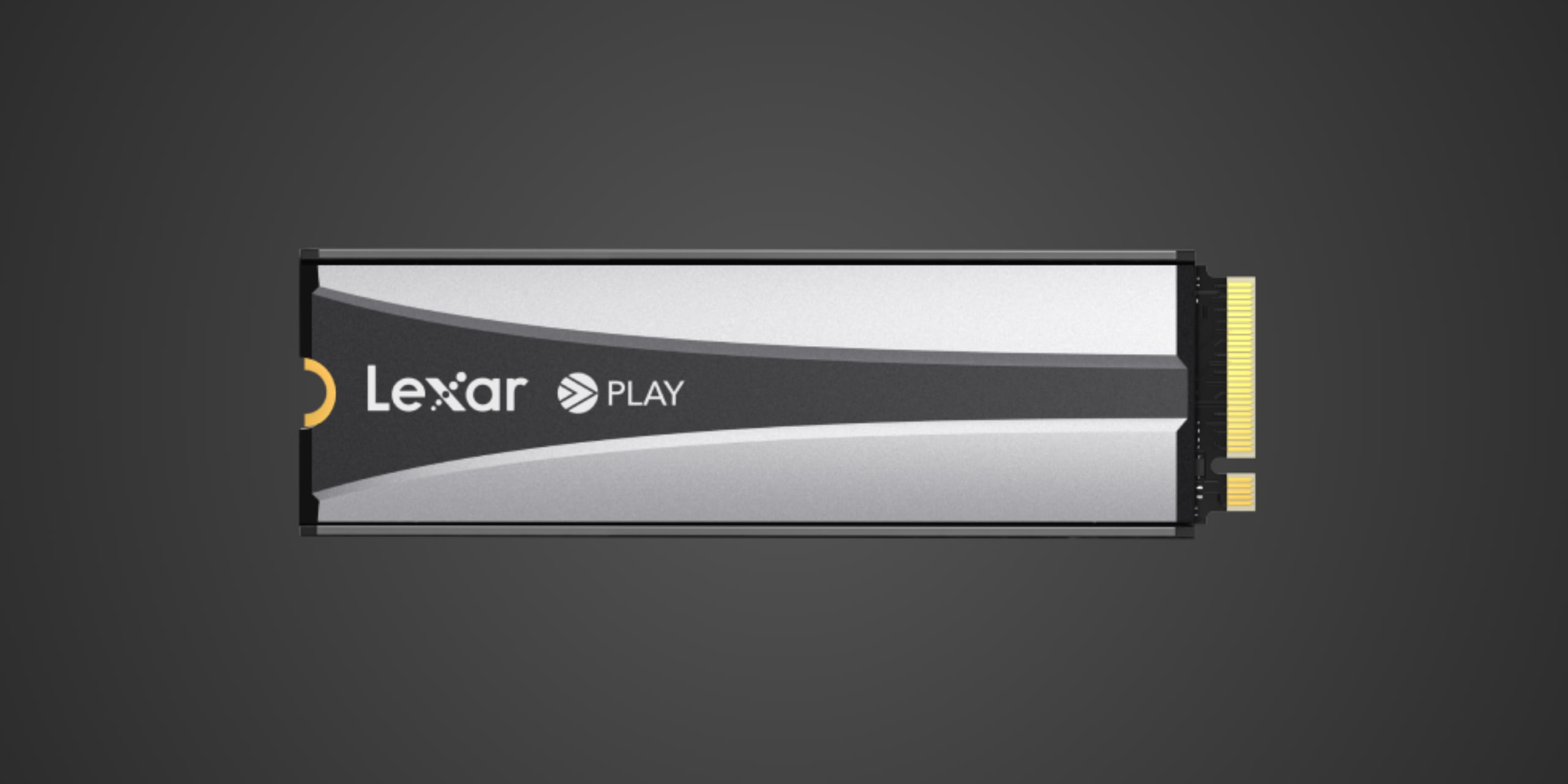
PCIe 4.0 NVMe with 7400MB/s Reads | 2TB to 8TB Capacities | Pre-Attached PS5 Heatsink
photo of lexar play 2280 solid state drive | diySSD
/* Global reset for consistent box-sizing */ * { box-sizing: border-box; } /* Container for the entire TOC component */ .toc-embed-wrapper .toc-container { max-width: 800px; margin: 40px auto; } /* Individual collapsible item styling */ .toc-embed-wrapper .toc-item { background: #fff; border-radius: 16px; box-shadow: 0 4px 12px rgba(0, 0, 0, 0.1); margin-bottom: 18px; overflow: hidden; /* Prevents content from breaking border radius */ transition: box-shadow 0.2s ease; /* Smooth hover effect */ } /* Hover effect for entire item */ .toc-embed-wrapper .toc-item:hover { box-shadow: 0 6px 20px rgba(0, 0, 0, 0.15); } /* Toggle button styling - removes default button appearance */ .toc-embed-wrapper .toc-toggle { background: none; border: none; width: 100%; display: flex; justify-content: space-between; align-items: center; font-size: 1.15rem; font-weight: 500; cursor: pointer; padding: 24px 28px; outline: none; color: #1a1a1a; transition: background-color 0.2s ease; } /* Button hover state */ .toc-embed-wrapper .toc-toggle:hover { background-color: #e2e1df; } /* Keyboard focus accessibility - only visible when navigating with tab */ .toc-embed-wrapper .toc-toggle:focus-visible { outline: 2px solid #007acc; outline-offset: -2px; } /* Question text styling */ .toc-embed-wrapper .toc-question { flex: 1; /* Takes up remaining space */ font-weight: 400; text-align: left; margin: 0; } /* Plus/minus icon styling */ .toc-embed-wrapper .toc-icon { font-size: 1.8rem; font-weight: 300; transition: transform 0.3s ease, color 0.2s ease; /* Smooth rotation and color change */ margin-left: 20px; color: #666; flex-shrink: 0; /* Prevents icon from shrinking */ width: 24px; text-align: center; } /* Icon state when expanded - rotates 45deg to create X from + */ .toc-embed-wrapper .toc-toggle[aria-expanded="true"] .toc-icon { transform: rotate(45deg); color: #28a745; /* Green color when open */ } /* Answer content container - hidden by default */ .toc-embed-wrapper .toc-answer { padding: 0 28px 24px 28px; font-size: 1rem; color: #444; line-height: 1.6; display: none; /* Hidden by default */ animation: slideDown 0.3s ease-out; /* Smooth entrance animation */ } /* Show class for JavaScript toggle */ .toc-embed-wrapper .toc-answer.show { display: block; } /* Slide down animation for smooth reveal */ @keyframes slideDown { from { opacity: 0; transform: translateY(-10px); } to { opacity: 1; transform: translateY(0); } } /* Main ordered list styling (1, 2, 3...) */ .toc-embed-wrapper .toc-answer ol { list-style-type: none; /* Remove default numbering */ padding-left: 0; /* Remove default padding */ margin: 0.8em 0; /* Vertical spacing */ counter-reset: main-counter; /* Counter for main items */ } /* Main list items (h2 headers) */ .toc-embed-wrapper .toc-answer > ol > li { counter-increment: main-counter; position: relative; } .toc-embed-wrapper .toc-answer > ol > li::before { content: counter(main-counter) ". "; color: #007acc; font-weight: 600; margin-right: 0.5em; } /* Nested ordered list styling (x.1, x.2, x.3...) */ .toc-embed-wrapper .toc-answer ol ol { list-style-type: none; /* Remove default lettering */ padding-left: 2.2em; /* Additional indentation for hierarchy */ margin: 0.6em 0; /* Tighter spacing for nested items */ counter-reset: sub-counter; /* Counter for sub-items */ } /* Sub-list items (h3 headers) */ .toc-embed-wrapper .toc-answer ol ol li { counter-increment: sub-counter; position: relative; } .toc-embed-wrapper .toc-answer ol ol li::before { content: counter(main-counter) "." counter(sub-counter) " "; color: #28a745; font-weight: 500; margin-right: 0.5em; } /* Main list item spacing */ .toc-embed-wrapper .toc-answer li { margin: 0.6em 0; padding-left: 0.3em; /* Small padding for better text alignment */ } /* Nested list item spacing - tighter than main items */ .toc-embed-wrapper .toc-answer ol ol li { margin: 0.4em 0; } /* TOC link styling */ .toc-embed-wrapper .toc-answer a { text-decoration: none; color: #444; transition: color 0.2s ease; } .toc-embed-wrapper .toc-answer a:hover { color: #007acc; text-decoration: underline; } /* Remove default list marker styling since we're using custom numbering */ /* Empty state styling */ .toc-embed-wrapper .toc-empty { padding: 20px 28px; color: #888; font-style: italic; text-align: center; } /* Responsive design for mobile devices */ @media (max-width: 768px) { .toc-embed-wrapper .toc-container { margin: 20px auto; padding: 0 16px; /* Side padding on mobile */ } .toc-embed-wrapper .toc-toggle { padding: 20px 22px; /* Reduced padding on mobile */ font-size: 1.1rem; /* Slightly smaller font */ } .toc-embed-wrapper .toc-answer { padding: 0 22px 20px 22px; /* Matched reduced padding */ font-size: 0.95rem; /* Smaller text on mobile */ } .toc-embed-wrapper .toc-icon { font-size: 1.6rem; /* Smaller icon on mobile */ margin-left: 16px; } } /* Scroll offset for sticky header - adjust -80px to match your menubar height */ .toc-embed-wrapper .toc-answer a[href^="#"] { scroll-margin-top: 76px; /* Adjust this value to match your sticky menubar height */ } /* Alternative: Add offset to the target headers themselves */ h2, h3 { scroll-margin-top: 76px; /* Adjust this value to match your sticky menubar height */ }
Advertisement

Introduction

If you own a PlayStation 5, you've probably already bumped into the console's most frustrating limitation—that measly 667GB of usable storage disappears faster than you can say "Call of Duty update." The Lexar PLAY 2280 PCIe 4.0 SSD arrives as Lexar's answer to this universal frustration, a PS5-optimized M.2 drive that promises to expand your gaming library without the astronomical price tags that have plagued compatible storage since the console's launch. This isn't just another generic PCIe 4.0 drive slapped with gaming branding—it's specifically engineered to meet Sony's exacting requirements while undercutting many competitors on price. Available in 2TB, 4TB, and 8TB capacities, the PLAY 2280 targets gamers who refuse to play the constant shuffle game of uninstalling titles to make room for new releases, particularly those juggling massive modern games that routinely consume 100GB or more of precious storage space.

Product Overview

The Lexar PLAY 2280 is built around a PCIe 4.0 NVMe SSD in the standard M.2 2280 form factor, which is the specification Sony requires for PS5 expansion storage. Measuring 80 x 24 x 10mm, this drive is roughly the size of a stick of gum laid flat, though the included heatsink adds necessary bulk to keep temperatures in check during extended gaming sessions. Lexar wraps this storage solution in a PS5-matched aesthetic with a white and black heatsink design that coordinates with Sony's console styling—a thoughtful touch that shows attention to the target platform, even though you'll rarely see the drive once it's installed inside the console's M.2 slot.

The drive ships with a pre-attached heatsink featuring a rugged bumper design that provides both thermal management and physical protection, eliminating the common headache of sourcing a compatible heatsink separately. This isn't just any heatsink slapped onto a standard drive—it's specifically optimized for the PS5's internal airflow and thermal characteristics, ensuring the drive maintains peak performance without throttling during marathon gaming sessions. Lexar offers the PLAY 2280 in three capacities with staggered pricing—2TB at $209.99, 4TB at $379.99, and 8TB at $749.99—positioning it competitively against established players in the PS5-compatible storage market. The drive comes backed by a five-year limited warranty and carries endurance ratings of 1600TBW for the 2TB model, 3200TBW for 4TB, and 6400TBW for the 8TB variant, which translates to roughly 320GB, 640GB, and 1280GB of data written per day for five years respectively—more than sufficient for gaming workloads where data is primarily read rather than constantly rewritten.

Performance & Real World Speed

Lexar claims up to 7400MB/s sequential read speeds and 6500MB/s sequential write speeds for the PLAY 2280, which comfortably exceeds Sony's minimum requirement of 5500MB/s read performance for PS5 expansion drives. These aren't just theoretical numbers designed to look good on spec sheets—they represent genuine headroom above Sony's baseline, ensuring the drive won't become a performance bottleneck as games increasingly leverage the console's custom I/O architecture. The PS5's decompression hardware and DirectStorage implementation mean that raw sequential speeds tell only part of the performance story, but having that extra bandwidth provides insurance against future game engines that might push storage subsystems harder.

In real-world PS5 usage, the PLAY 2280 delivers performance that's functionally indistinguishable from the console's internal SSD during actual gameplay. Game load times from the expansion drive match or come within seconds of loading from the built-in storage, and once you're actually playing, there's no perceptible difference in streaming performance, texture pop-in, or any other gameplay metrics. Installing games to the PLAY 2280 happens at the same speeds you'd experience with the internal drive, and the Quick Resume feature that allows rapid switching between multiple suspended games works identically regardless of whether titles are stored internally or on the expansion drive. The drive maintains sustained performance during large file transfers without the thermal throttling that plagues some competitors lacking adequate heatsink solutions, thanks to that pre-attached cooling hardware designed specifically for the PS5's thermal environment.

For PC users considering the PLAY 2280 as a general-purpose boot or gaming drive, the implementation of Host Memory Buffer and SLC Dynamic Cache technologies delivers improved performance and system responsiveness compared to DRAM-less drives without these optimizations. While the drive's PS5-specific heatsink design and pricing don't make it the most cost-effective choice for PC builds where you can find equivalent or faster Gen 4 drives without gaming branding premiums, it remains a perfectly competent performer if you're building a dual-purpose rig or simply prefer Lexar's ecosystem.

Build Quality & Durability

Lexar approaches the PLAY 2280's physical design with the same consumer-friendly philosophy that defines their broader product lineup—prioritizing practical durability over flashy aesthetics that serve no functional purpose. The pre-attached heatsink features a two-tone white and black color scheme that deliberately coordinates with PS5's industrial design, though this matters little given the drive's permanent residence inside the console's expansion bay. What matters more is the heatsink's construction quality—it's substantial enough to provide legitimate thermal management with integrated bumper protection that guards against impacts during installation or if you ever need to remove the drive for troubleshooting.

The heatsink attaches securely without the wobble or flex that characterizes cheaper solutions, suggesting tight manufacturing tolerances and a solid connection between the cooling hardware and the drive's NAND and controller components. Lexar's decision to ship the drive with this cooling already installed represents genuine consumer value—you're not hunting for compatible heatsinks, gambling on thermal pad thickness, or risking installation mistakes that could damage the drive or violate warranty terms. The installation process in the PS5 involves removing a single screw, sliding the drive into the M.2 slot at an angle, then securing it with the retention mechanism Sony provides—a process so straightforward that even users uncomfortable with hardware installation can complete it confidently in under ten minutes.

The five-year warranty serves as Lexar's statement of confidence in long-term reliability, backed by endurance ratings that dramatically exceed typical gaming workloads. Even the 2TB model's 1600TBW rating would allow you to write the drive's entire capacity over 800 times before reaching the manufacturer's endurance threshold, and gaming workloads are overwhelmingly read-intensive rather than write-heavy. All Lexar products undergo testing in their Quality Labs with thousands of different devices to ensure compatibility and reliability, though skeptics might rightfully note that such claims are standard marketing language across the storage industry. Still, Lexar's established reputation and the concrete warranty terms provide reasonable assurance that this isn't a fly-by-night product that will fail catastrophically after the return window closes.

Compatibility

The Lexar PLAY 2280 is specifically and primarily designed for PlayStation 5 consoles running firmware that supports M.2 expansion storage—a feature Sony added via system update rather than including at launch. This drive meets all of Sony's technical requirements for PS5 expansion including the critical 5500MB/s minimum read speed threshold, M.2 2280 form factor specification, and PCIe 4.0 interface compatibility, while the pre-attached heatsink ensures it fits within Sony's strict dimensional constraints for the expansion bay. Installation requires opening the PS5's removable side panel, accessing the dedicated M.2 slot, and securing the drive with Sony's provided retention mechanism—a process Sony designed to be user-accessible rather than requiring professional installation.

Once installed and formatted by the PS5 system software, the PLAY 2280 functions as native expansion storage where you can install and play PS5 games directly without any performance compromises or compatibility issues. The console treats expansion storage identically to internal storage for PS5-native titles, meaning games stored on the PLAY 2280 launch with the same speed, support the same features including Quick Resume and Activity Cards, and deliver identical gameplay experiences to titles installed on the built-in SSD. You can freely move games between internal and expansion storage through the PS5's storage management interface, and the system allows you to configure default installation locations to suit your preferences.

The PLAY 2280 is absolutely compatible with PC systems featuring M.2 slots and PCIe 4.0 support, where it functions as a standard NVMe drive for Windows, Linux, or other operating systems. You can use this drive as boot storage, game storage, or general-purpose file storage in desktop PCs or laptops with compatible M.2 slots, though the PS5-specific heatsink design and gaming branding mean you're likely paying a premium over comparably performing drives marketed specifically for PC use. For users building gaming PCs or productivity workstations, there's nothing technically preventing the PLAY 2280 from serving effectively in these roles, but price-conscious builders should compare against non-gaming-branded alternatives that might offer better value per gigabyte.

Critically, you need to understand what this drive cannot do. The PLAY 2280 cannot store or play PS4 games in the PS5's M.2 expansion slot—Sony restricts backward-compatible PS4 titles to either the internal SSD or external USB storage, a limitation imposed by system software rather than drive capabilities. This means your PS4 library must live elsewhere if you're running low on space, though you can connect a standard external USB hard drive for this purpose at significantly lower cost per terabyte. The drive also won't work with PlayStation 4 consoles, Xbox systems, Nintendo Switch, or other gaming platforms—this is Sony's proprietary PS5 expansion solution, full stop.

Strengths & Weaknesses

The Lexar PLAY 2280's greatest strength lies in its combination of robust performance and increasingly competitive pricing in the PS5 expansion market. Transfer speeds comfortably exceed Sony's requirements without venturing into the overbuilt territory where you're paying premiums for speeds the console can't fully utilize, and the pre-attached heatsink eliminates the compatibility guesswork and additional expense that plagued early PS5 storage upgraders. The plug-and-play nature is beautifully simple—buy the drive, install it in under ten minutes, let the PS5 format it, and immediately start loading games without performance compromises or compatibility concerns. Lexar's five-year warranty provides peace of mind uncommon in consumer storage where manufacturers often limit coverage to three years, and the endurance ratings dramatically exceed realistic gaming workloads even for users installing and uninstalling hundreds of gigabytes monthly.

The drive's aesthetic coordination with PS5's design language demonstrates thoughtful product development even if the heatsink remains hidden during use, and Lexar's established presence in the consumer storage market provides confidence that warranty support and firmware updates will remain available throughout the product's lifespan. For users considering the 4TB or 8TB capacities, the PLAY 2280 offers genuinely useful expansion potential that approaches or exceeds the PS5's internal storage, eliminating storage anxiety for gamers who maintain large libraries of simultaneously accessible titles. The pricing at $209.99 for 2TB and $379.99 for 4TB positions the PLAY 2280 competitively against established competitors like Samsung's 980 Pro and WD Black SN850, particularly when these alternatives require separate heatsink purchases.

However, the PLAY 2280 isn't without notable limitations. The fundamental weakness affecting all PS5-compatible M.2 drives—Lexar's PLAY 2280 included—is cost compared to standard PCIe 4.0 drives marketed for general PC use. A standard 2TB PCIe Gen 4.0 NVMe M.2 drive for PC can often be found for $120-160, while the PLAY 2280's 2TB model sits at $209.99. You're paying a premium for the pre-attached PS5-optimized heatsink, gaming branding, and Sony compatibility validation, but budget-conscious users who don't mind sourcing their own heatsink can potentially save $40-50 by purchasing generic drives and compatible cooling separately. The counterargument is that pre-validated compatibility and included heatsink justify the premium for users who value convenience over maximum cost efficiency, but value-seekers will still balk at the gaming branding markup.

The 2TB capacity, while adequate for many users, feels limiting given modern game sizes—a handful of flagship titles can easily consume 600-800GB, making even the base model fill faster than you might expect. The 4TB option at $379.99 provides more breathing room but represents a significant investment that approaches the cost of a budget gaming PC GPU, and the 8TB model at $749.99 ventures into enthusiast territory where the cost-per-gigabyte proposition becomes harder to justify. For users who primarily play a rotating selection of three to five games simultaneously, the 2TB capacity suffices, but those maintaining larger simultaneously accessible libraries will find themselves eyeing the pricier 4TB option almost immediately.

Verdict: Should You Buy It?

Buy this if: you own a PlayStation 5 and regularly find yourself uninstalling games to make room for new downloads, particularly if you play multiple large modern titles that demand 70-100GB each and value the convenience of keeping your library accessible without constant storage shuffling, you want a PS5 expansion solution with validated Sony compatibility and pre-attached heatsink that eliminates installation guesswork, you're willing to pay a reasonable premium over generic PC drives for the assurance of Sony-certified compatibility and included cooling hardware, you're considering the 4TB or 8TB models where the cost-per-gigabyte becomes more palatable and provides genuine long-term storage headroom, or you want the security of a five-year warranty from an established storage manufacturer with proven quality labs testing and broad market presence.

Skip this if: you only play a handful of games simultaneously and don't mind uninstalling and reinstalling titles as needed since the PS5's built-in storage management makes this process relatively painless with reasonable re-download speeds on fast internet connections, you're extremely budget-conscious and comfortable sourcing a generic PCIe 4.0 M.2 drive plus compatible heatsink separately to save $30-50 on the 2TB capacity, you primarily play PS4 backward-compatible titles that must be stored on external USB drives anyway due to Sony's software restrictions, you're hoping for massive Black Friday discounts since PS5-compatible drives rarely see the dramatic price drops common with standard PC storage, or you're building a PC rather than expanding PS5 storage where non-gaming-branded alternatives offer better value without sacrificing performance.

Advertisement
About
Privacy
Terms
© 2024, 2025 - All Rights Reserved
Brand Logo Icon | DIY SSD