
Crucial P310 2230
Compact Powerhouse for Handheld Gaming
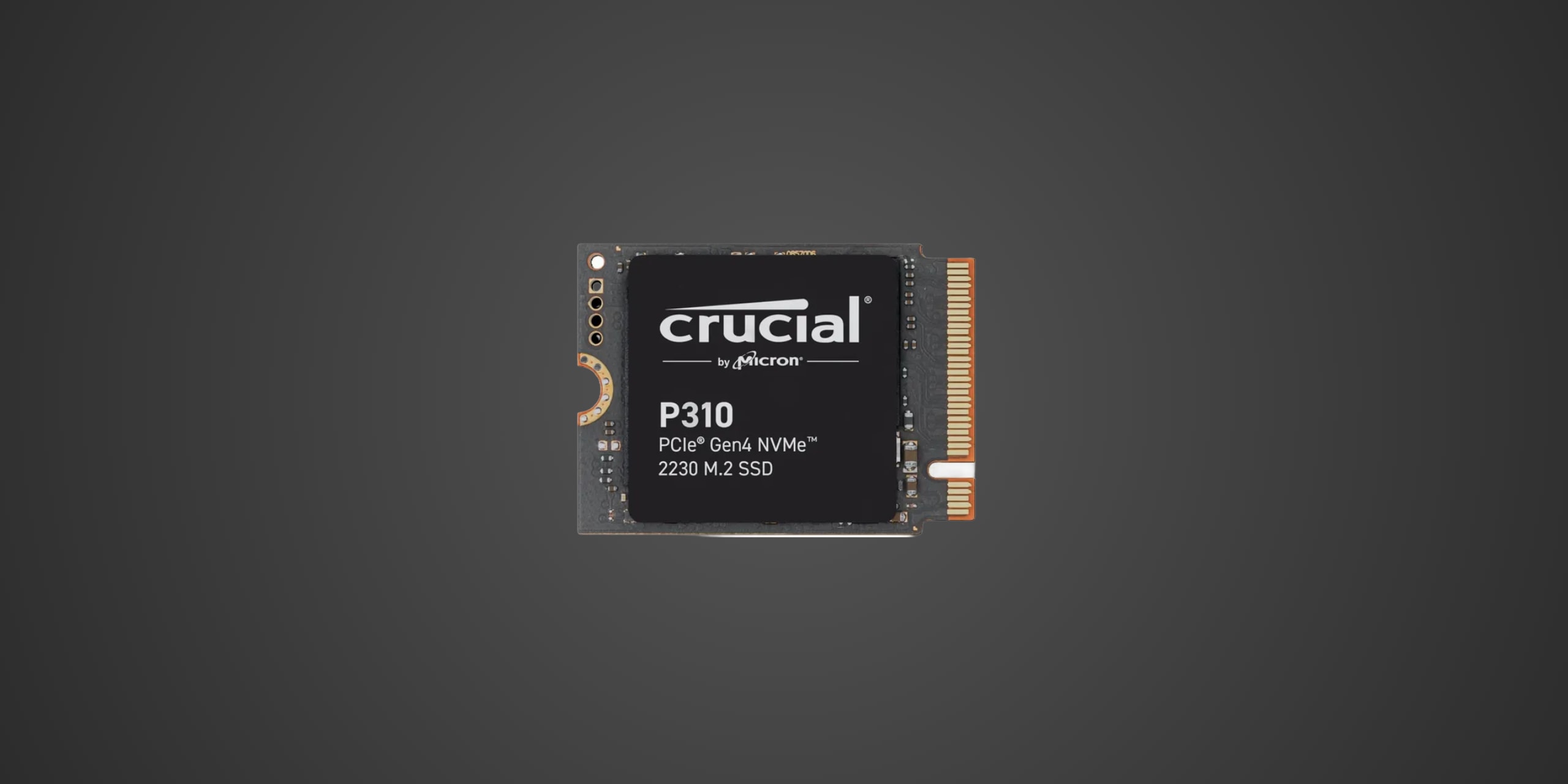
Table of Contents
Introduction
If you're gaming on a Steam Deck, ROG Ally, or any portable PC gaming device that's running out of storage, you've probably discovered that M.2 2230 SSDs are in a league of their own when it comes to both space constraints and pricing. The Crucial P310 2230 enters this niche battlefield with a compelling proposition: legitimate PCIe 4.0 performance wrapped in the tiny 2230 form factor, all powered by QLC flash that doesn't completely fall apart under pressure. This drive specifically targets handheld gaming enthusiasts, portable gaming PC owners, and select laptop users running Microsoft Surface or Dell systems that utilize the compact 2230 form factor. At a time when 2TB of game storage has become the sweet spot for serious gamers juggling modern AAA titles that can easily consume 100GB or more per installation, the P310 offers high capacity without requiring you to delete your library every time a new release drops.
Product Overview
The Crucial P310 is a single-sided M.2 2230 NVMe SSD built on the PCIe 4.0 x4 interface and supporting the NVMe 2.0 protocol. Under the compact label sits Phison's E27T controller, a DRAM-less design that compensates by leveraging Host Memory Buffer, or HMB, which borrows a small portion of your system's RAM to maintain snappy performance without the cost and power draw of dedicated cache chips. This controller represents a significant upgrade from previous-generation DRAM-less chips, delivering PCIe 4.0 bandwidth efficiency that older designs simply couldn't match.
The flash memory deserves special attention here because Crucial equipped the P310 with Micron's 232-layer QLC, or Quad-Level Cell NAND. QLC stores four bits per cell rather than the three found in TLC flash, which allows manufacturers to pack more capacity into the same physical space at lower cost. The trade-off historically has been slower sustained write speeds and reduced endurance, but Micron's implementation uses a quad-plane design with smaller block sizes and more spare data per page, theoretically offering better endurance characteristics than competing QLC implementations. The drive ships in 1TB and 2TB capacities, with both models sharing identical rated performance specifications.
Security-conscious users will appreciate TCG Pyrite support, which provides basic hardware encryption for data-at-rest protection, though it falls short of the full TCG Opal implementation found on enterprise drives. The compact single-sided design measures exactly 22mm wide by 30mm long, keeping all components on one side of the PCB to ensure compatibility with tight clearances inside gaming handhelds and ultraportable laptops.
Performance & Real World Speed
Crucial rates the P310 at up to 7,100 MB/s sequential read and 6,000 MB/s sequential write speeds regardless of capacity, with random performance hitting up to 1,000K read IOPS and 1,200K write IOPS. These numbers represent legitimate PCIe 4.0 performance that would have been unthinkable for DRAM-less drives just a couple of years ago, and they translate directly into tangible user benefits for gaming applications.
Game installations become notably faster compared to SATA SSDs or older PCIe 3.0 drives, with large titles copying from your PC to the portable device in minutes rather than the quarter-hour waits common with previous-generation storage. Windows boot times shrink to single-digit seconds, and level loads in DirectStorage-compatible games leverage the full NVMe bandwidth to stream high-resolution textures without stuttering. When you're managing a 2TB library filled with Cyberpunk 2077, Baldur's Gate 3, and Call of Duty installations, those peak speeds matter for keeping your gaming sessions flowing smoothly.
The controller's sophisticated SLC caching strategy allocates approximately 400GB of pseudo-SLC cache on the 2TB model, which covers the vast majority of typical gaming workloads. Installing a 150GB game or recording extended gameplay sessions stays comfortably within that cache zone, maintaining blistering transfer speeds throughout. Post-cache sustained writes settle at around 336 MB/s according to testing data, which represents solid performance for QLC flash even if it doesn't match the 700+ MB/s sustained rates achievable with TLC alternatives using the same controller. For gaming handhelds where you're primarily reading game data rather than writing massive video projects, this characteristic proves far less limiting than it might seem on paper.
Random performance characteristics show the E27T controller's prowess at handling small file operations, which directly impacts game loading performance when engines stream thousands of small texture and asset files simultaneously. The million-plus IOPS capabilities ensure snappy responsiveness even when your Steam library decides to update three games simultaneously in the background.
Thermal Management
Heat management becomes critically important in the M.2 2230 form factor because portable gaming devices pack components into impossibly tight spaces with minimal airflow. The P310 draws up to 6.30W at peak load according to SMART data, which represents reasonable power consumption for a PCIe 4.0 drive but still generates significant heat when stuffed inside a Steam Deck or ROG Ally enclosure. The compact form factor concentrates thermal output in an even smaller area than standard 2280 drives, and there's simply no room for substantial heatsinks in most handheld installations.
Crucial's implementation doesn't include any pre-installed cooling solution beyond the basic label, leaving thermal management entirely to the host device. Gaming handhelds typically rely on passive thermal transfer to the device chassis, which works adequately for moderate gaming sessions but can lead to thermal throttling during extended play in demanding titles. Testing shows the drive manages thermal loads reasonably well compared to other 2230 options, though sustained write operations will eventually trigger throttling as temperatures climb past the controller's comfort zone.
The good news for Steam Deck and ROG Ally owners is that typical gaming workloads involve far more reading than writing, and burst read operations generate less heat than sustained writes. Your device's existing thermal solution should keep the P310 happy during normal gaming sessions, though marathon play sessions in thermally demanding games might see occasional performance dips if the drive gets particularly toasty. For devices with better internal airflow or chassis thermal management, like certain Dell laptops, thermal concerns diminish significantly.
If you're particularly concerned about temperatures or planning intensive workloads, consider that the compact 2230 form factor inherently limits cooling options. There are no aftermarket heatsinks designed for this form factor, and the tight clearances inside portable devices leave no room for improvisation. Your best bet involves ensuring adequate ventilation for your device and taking occasional breaks during extended gaming sessions to let components cool down.
Compatibility
The P310's compact M.2 2230 form factor specifically targets devices that require this exact size, as standard 2280 drives simply won't fit. The drive uses a single-sided design that places all components on one face of the PCB, which ensures compatibility with devices having tight vertical clearance restrictions. The key M slot configuration and PCIe 4.0 x4 interface work with any modern motherboard or device supporting NVMe SSDs, though you'll only see PCIe 4.0 speeds if your host device supports that generation. Backward compatibility means the drive functions perfectly fine in PCIe 3.0 slots, albeit with performance capped at roughly 3,500 MB/s sequential reads.
For PC compatibility, the drive requires a motherboard or device with an M.2 slot configured for NVMe operation rather than SATA-only mode. Modern systems universally support NVMe, though some older machines might require BIOS updates to recognize NVMe boot drives. The DRAM-less architecture using HMB requires your operating system to support this feature, which Windows 10 and later, Linux distributions from recent years, and macOS all handle natively. Power requirements remain modest enough that any device providing standard M.2 slot power will run the P310 without issues.
Gaming handheld compatibility represents the P310's primary use case, with explicit support for Steam Deck, Steam Deck OLED, Asus ROG Ally, and MSI Claw devices. These systems use M.2 2230 slots for storage expansion, making the P310 a drop-in upgrade that requires nothing more than removing the back panel, swapping drives, and reinstalling your operating system or cloning your existing installation. The single-sided design ensures perfect fit even in devices with minimal vertical clearance, and the power efficiency characteristics suit battery-powered operation well.
Microsoft Surface Pro 9 and newer models utilize M.2 2230 drives and work beautifully with the P310, though earlier Surface Pro generations experienced compatibility issues with PCIe 4.0 drives and should stick with PCIe 3.0 alternatives to avoid stability problems. Certain Dell laptop models also employ 2230 drives for space efficiency, making the P310 an ideal upgrade path if you've confirmed your specific model uses this form factor.
For console compatibility, the situation gets straightforward but limiting. The P310 cannot serve as internal storage expansion for PlayStation 5 or Xbox Series X|S consoles. PlayStation 5 requires M.2 2280 form factor drives with heatsinks for its internal expansion bay, while Xbox Series X|S exclusively supports proprietary Seagate Storage Expansion Cards for internal storage expansion. You could theoretically use the P310 as external storage via a USB enclosure for storing PS4 or Xbox One games, but that represents an inefficient use of high-performance NVMe storage that would be better served in a portable gaming device.
Strengths & Weaknesses
The Crucial P310 brings remarkable sequential performance to the M.2 2230 segment, with its 7,100 MB/s reads and 6,000 MB/s writes representing some of the fastest speeds available in this compact form factor. The Phison E27T controller proves itself a capable performer that extracts impressive throughput from QLC flash, delivering responsiveness that competes favorably with TLC alternatives in real-world gaming scenarios. Power efficiency stands out as another genuine strength, with the 6.30W peak draw and lower idle consumption translating directly to longer battery life in portable gaming devices compared to hungrier alternatives. The five-year warranty provides peace of mind even though the 220TB per terabyte endurance rating falls well below TLC offerings.
Capacity options hitting 2TB in the 2230 form factor represent a significant achievement, as cramming that much storage into such a tiny package wasn't possible with earlier flash generations. This capacity sweet spot eliminates the constant storage juggling that plagued early Steam Deck owners stuck with 512GB drives, letting you maintain a respectable game library without daily deletion decisions. The drive's sophisticated SLC caching with 400GB of buffer on the 2TB model covers the vast majority of gaming workloads effectively, keeping performance snappy during game installations and updates that would cripple less intelligent implementations.
However, the QLC foundation reveals its limitations in sustained write scenarios, where post-cache performance drops to 336 MB/s compared to the 700+ MB/s achievable with TLC alternatives using identical controllers. This characteristic matters less for gaming workloads that emphasize reading over writing, but creative users planning to edit video projects or frequently transfer massive file collections should take note. The endurance rating of 220TB per terabyte translates to 440TB total for the 2TB model, which sounds substantial but represents only 0.12 drive writes per day over the five-year warranty period. For typical gaming use cases involving primarily reading game data with occasional installations and updates, this endurance proves more than adequate, but power users hammering the drive with constant writes should consider TLC alternatives.
Pricing presents perhaps the most significant weakness, with the 2TB model launching at $214.99 compared to QLC competitors available for $140 and TLC alternatives around $230. The value proposition depends heavily on your specific use case and whether you prioritize the P310's performance advantages over cheaper but slower QLC options or pony up slightly more for TLC alternatives with better sustained write performance and endurance. Competition from the Corsair MP600 Mini with E27T controller and TLC flash currently priced at $229.99 for 2TB puts pressure on the P310's positioning, though we expect street prices to correct downward once initial launch premium fades. The Western Digital SN740 and SN770M both offer TLC alternatives with strong sustained performance, though they sacrifice some of the P310's impressive sequential speeds for better post-cache characteristics.
Verdict: Should You Buy It?
Buy this if:
-
You own a Steam Deck, ROG Ally, or similar gaming handheld desperately needing storage expansion beyond cramped 512GB or 1TB capacities
-
You're upgrading a compatible Dell laptop or Microsoft Surface Pro 9+ and want maximum performance in the M.2 2230 form factor
-
Gaming represents your primary use case with mostly read operations and occasional game installations rather than constant large file writes
-
You value peak sequential performance for fast game installations and level loading over sustained write capabilities
-
The combination of 2TB capacity, strong burst performance, and reasonable power efficiency fits your specific portable device needs better than alternatives
Skip this if:
-
Your device accepts M.2 2280 drives, opening access to dozens of superior options with better pricing, performance, and endurance characteristics
-
Sustained write performance matters critically for your workload, such as regular video editing or constant large file transfers
-
The launch pricing seems excessive compared to cheaper QLC alternatives that would serve basic gaming needs adequately
-
You're willing to spend slightly more for TLC-based 2230 drives offering better sustained performance and higher endurance ratings
-
Your use case involves write-intensive workloads that would burn through the 440TB endurance rating prematurely