
Sabrent PCIe Dual Docking Station
The NVMe Swiss Army Knife You Didn't Know You Needed
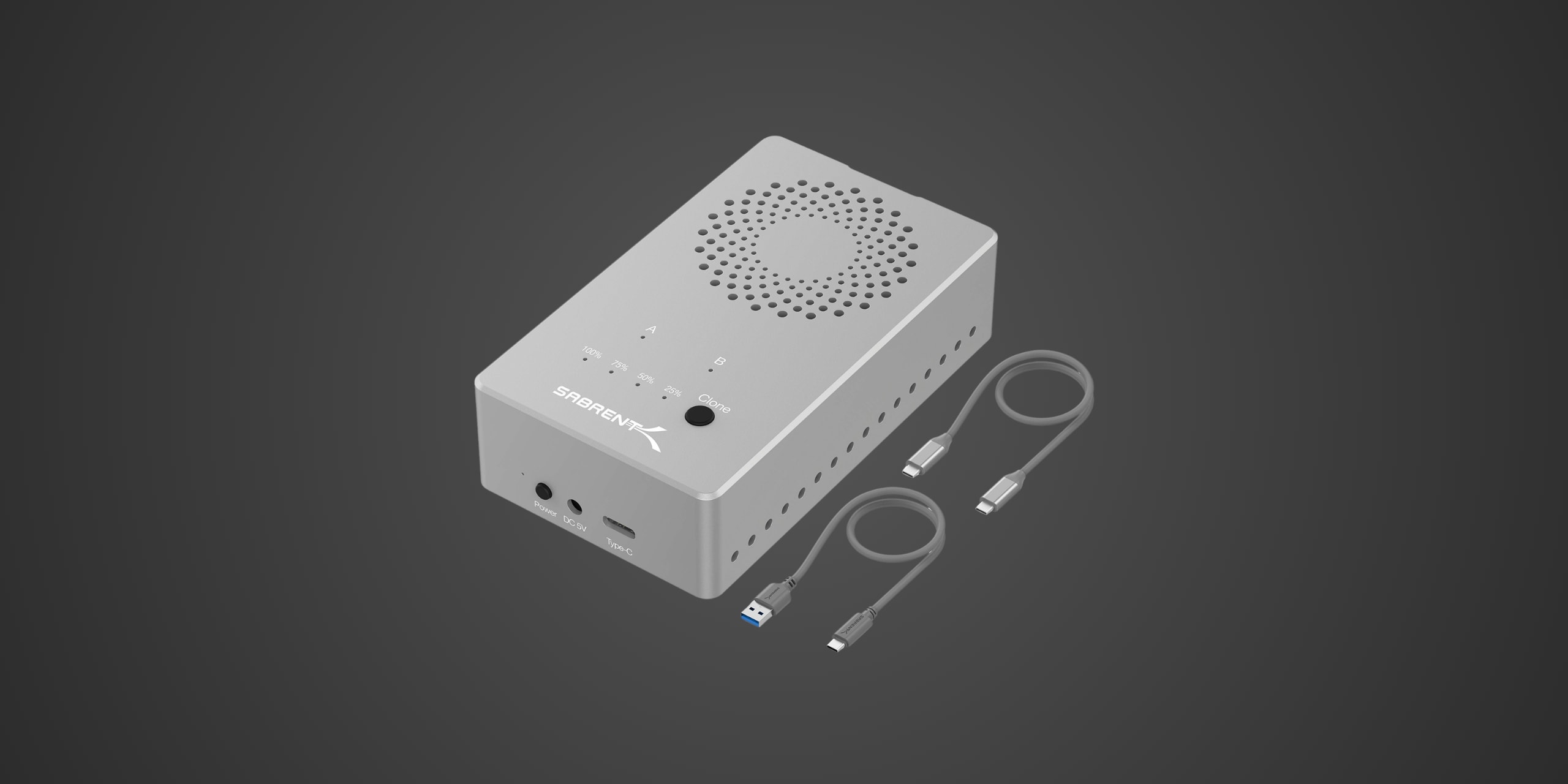
Table of Contents
Introduction
If you've got a drawer full of M.2 NVMe SSDs collecting dust—maybe leftovers from laptop upgrades, old gaming rig builds, or that impulse purchase during a Black Friday sale—you've probably already bumped into the frustration of trying to access their data without cracking open a computer case or fumbling with delicate USB adapters that feel like they'll snap if you breathe on them wrong. The Sabrent EC-SSD2 arrives as the company's answer to this universal problem, packaging dual-drive NVMe access, offline cloning capability, and active cooling into a single aluminum enclosure that actually makes sense for tech professionals, content creators, and hardware enthusiasts who refuse to play the constant shuffle game of installing and reinstalling drives every time they need to move data around.
This tool-free USB Type-C dual docking station supports PCIe NVMe M.2 SSDs in all the standard form factors—2230, 2242, 2260, and 2280—with USB 3.2 Gen 2 connectivity delivering theoretical speeds up to 10Gbps. At its original MSRP of $199.99, the EC-SSD2 positioned itself as a premium solution in the dual NVMe enclosure market, though current pricing typically hovers around $115 to $120, making it considerably more accessible than it was at launch. Available through major retailers including Amazon, B&H Photo, and Newegg, the EC-SSD2 targets power users who need simultaneous dual-drive access or frequent offline cloning capabilities without the hassle of software-based solutions or the limitations of single-drive enclosures.
Product Overview
The Sabrent EC-SSD2 is built around dual ASMedia bridge chips—specifically an ASMedia 2362 PCIe-to-USB controller paired with an ASMedia 2806A PCIe switch—which enables independent access to both installed M.2 drives simultaneously while connected to a host computer. This isn't just any pair of NVMe slots slapped into a metal box—it's specifically engineered to handle the thermal demands and bandwidth requirements of running two high-performance SSDs in parallel without throttling during sustained workloads.
The enclosure measures 4.5 inches long by 2.5 inches wide by 1 inch tall, roughly the size of a classic Sony Walkman or a slightly oversized stack of playing cards, and weighs approximately 200 grams once you factor in the aluminum construction. That aluminum housing isn't just for show—Sabrent wraps this dual-drive powerhouse in a thick 2mm aluminum alloy shell that serves double duty as both structural protection and a passive heat sink, working in concert with the active cooling system to keep drive temperatures in the comfort zone even during extended read/write operations.
The design philosophy here leans heavily toward functionality over flash. The flat silver aluminum exterior features spiral ventilation holes across the top surface that aren't merely decorative—these precisely machined perforations provide intake for the integrated 50mm cooling fan positioned inside the enclosure, creating an airflow pattern that pulls cool air in from the top and exhausts it out the sides through additional ventilation slots. The front panel is minimalist but informative, displaying two LED indicators labeled A and B that illuminate when drives are installed and active in each respective slot, plus a four-stage progress bar composed of individual LEDs that provide visual feedback during offline cloning operations.
Accessing the drives requires sliding off the top cover, which operates on a simple friction-fit mechanism secured by internal clips—press the release button on the front edge, and the lid slides back to reveal the two M.2 slots positioned side by side. Sabrent's tool-free installation system uses rubber fasteners that slot into the notches on M.2 drives and anchor into corresponding holes on the baseboard, completely eliminating the need for tiny screws that inevitably end up rolling under your desk. This isn't revolutionary technology, but it's executed well enough that drive swaps become a genuinely quick operation rather than a frustrating exercise in precision screwdriver work.
The connectivity options are straightforward—USB Type-C port, external 5V/4A power adapter port, and power button, all positioned on the front edge for easy access. Sabrent includes both USB Type-C to Type-C and Type-C to Type-A cables in the package, each measuring 18 inches in length, which represents a significant improvement over the frustratingly short cables that plague many similar products. The external power supply is mandatory for operation, as the EC-SSD2 needs stable power delivery to run two NVMe drives simultaneously plus the active cooling fan, and USB bus power alone won't cut it for this application.
The included one-year warranty can be extended to two years through product registration with Sabrent, which represents a reasonable confidence signal from the manufacturer, though it's worth noting that competitors like ORICO and ACASIS offer similar warranty terms in this product category. Sabrent markets this device with multiple compatibility claims—Windows, macOS, and Linux support across the board—and emphasizes the offline cloning functionality as a primary differentiator, positioning the EC-SSD2 as not just a docking station but a comprehensive drive management tool for professionals who need reliable data migration capabilities without software dependencies.
Performance & Real World Speed
Sabrent claims USB 3.2 Gen 2 speeds up to 10Gbps for the EC-SSD2, which translates to theoretical maximum sequential throughput around 1,250 MB/s in perfect conditions—though real-world performance inevitably falls short of theoretical maximums due to protocol overhead, controller limitations, and bandwidth sharing when both drive bays are populated. In single-drive operation with a high-performance NVMe SSD like the Sabrent Rocket 4 Plus, independent testing conducted by multiple reviewers consistently achieved sequential read speeds around 1,045 MB/s and write speeds near 992 MB/s in CrystalDiskMark, which represents roughly 85% of the theoretical ceiling and aligns closely with what you'd expect from a well-implemented 10Gbps USB interface.
The sustained write performance tells a more nuanced story. When pushing a continuous 200GB transfer through a single drive in the EC-SSD2, reviewers observed sustained write speeds settling around 700 MB/s, completing the entire operation in approximately 4 minutes and 30 seconds. This represents a reasonable balance between peak burst performance and thermal management—the active cooling system prevents aggressive throttling that would otherwise tank speeds after the first few gigabytes, but you're still looking at roughly 30% reduction from peak sequential speeds during marathon data transfers. For practical applications like cloning a 256GB drive to a larger capacity target, users can expect completion times around 4 to 5 minutes, while a full 1TB clone typically requires 35 to 45 minutes depending on the specific drives installed and how much data actually needs copying.
The bandwidth sharing characteristics become relevant when you're reading from or writing to both drives simultaneously, which the EC-SSD2 supports as a core feature. The 10Gbps interface gets divided between the two drives in this scenario, with each drive receiving roughly 500-550 MB/s of available bandwidth in balanced operations. This makes the EC-SSD2 less suitable for scenarios where you need maximum performance from both drives at once—like simultaneously editing 4K video from one drive while backing up to the second—but perfectly adequate for more typical dual-drive use cases like data migration or temporary access to archived project files stored on multiple SSDs.
Transfer speeds when connected to a computer via the included USB cables depend on which connection type your system supports. The Type-C to Type-C cable delivers the full 10Gbps bandwidth when connected to a proper USB 3.2 Gen 2 or Thunderbolt port, while the Type-C to Type-A cable limits you to USB 3.0 or 3.1 speeds depending on your specific USB-A port generation, potentially dropping to 5Gbps if you're stuck with older USB 3.0 connectivity. This isn't a limitation of the EC-SSD2 itself but rather a reminder that your host system's I/O capabilities directly determine real-world performance ceilings—plug this into a five-year-old laptop with USB 3.0 ports, and you'll be waiting twice as long for large file transfers compared to using a modern system with native USB 3.2 Gen 2 support.
Build Quality & Durability
The Sabrent EC-SSD2's construction quality sits firmly in premium territory for this product category, with the thick aluminum chassis providing both rigidity and a substantial feel that inspires confidence when you're handling it. The 2mm aluminum alloy shell doesn't flex or creak when you apply pressure, and the manufacturing tolerances are tight enough that the sliding top cover engages cleanly without any slop or rattling—you get a satisfying click when the internal clips engage, confirming the lid is properly secured. The spiral ventilation holes are precisely machined rather than stamped, with smooth edges and consistent spacing that suggests attention to manufacturing detail rather than cost-cutting measures.
The tool-free drive installation mechanism works considerably better than it has any right to at this price point. Those rubber fasteners that lock M.2 drives in place feel substantial enough to provide secure retention without being so stiff that you'll struggle to remove drives when you need to swap them out. The baseboard features clearly labeled size markings for each supported form factor—2230, 2242, 2260, and 2280—eliminating any guesswork about where to position the rubber anchors for different drive lengths. Multiple reviewers have noted that drives stay firmly planted during operation without any of the concerning movement or poor contact issues that plague cheaper enclosures, and the quick-release lid mechanism holds up to repeated opening and closing cycles without degrading.
The integrated 50mm cooling fan represents both the EC-SSD2's greatest thermal management success and its most significant acoustic compromise. On the positive side, the fan does exactly what it needs to do—multiple testing scenarios involving extended high-load operations confirmed that the enclosure stays cool to the touch and drives maintain safe operating temperatures even during sustained transfers that would typically trigger thermal throttling in fanless designs. Independent temperature monitoring showed NVMe drives running 15 to 20 degrees Celsius cooler in the EC-SSD2 compared to passive aluminum enclosures during identical workloads, which translates directly to maintained performance and reduced long-term wear on your SSDs.
The acoustic trade-off, however, is impossible to ignore. That 50mm fan produces audible white noise that multiple reviewers have compared to the distinctive whirr of a spun-up 52X CD-ROM drive from the early 2000s—not offensively loud, but definitely noticeable in quiet office environments. If you're working in a busy open office or typically have background music playing, the fan noise blends into the ambient soundscape without issue. But if you're used to near-silent computing setups and plan to keep this enclosure running on your desk for extended periods, the constant fan hum becomes part of your daily audio landscape whether you like it or not. There's no fan speed control, no adaptive thermal management—the fan runs at a fixed RPM whenever the unit is powered on, regardless of actual drive activity or temperature.
The LED indicators on the front panel are clear and bright without being obnoxiously glaring, providing useful status information at a glance—drive A and B indicators confirm when SSDs are detected and active in each slot, while the four-segment progress bar during cloning operations gives you a rough sense of completion percentage without requiring constant monitoring. The power button provides positive tactile feedback with a satisfying click, and the USB Type-C and power adapter ports are recessed slightly into the front panel housing to reduce stress on the connectors during regular use.
Sabrent's one-year standard warranty extendable to two years through product registration falls right in line with industry norms for this type of accessory hardware—it's adequate coverage for peace of mind, though not particularly generous compared to the five-year warranties you'd expect on premium NVMe drives themselves. The warranty specifically covers manufacturing defects and hardware failures, with the usual exclusions for physical damage, misuse, or attempting to clone drives with incompatible configurations. Real-world longevity reports from early adopters who purchased the EC-SSD2 near its 2021 launch suggest the enclosure holds up well to regular use, with the most common failure point being the cooling fan—which aligns with typical small-fan reliability patterns in the tech industry—though Sabrent reportedly handles warranty claims for fan failures without excessive hassle.
Compatibility
The Sabrent EC-SSD2 is exclusively designed for M.2 NVMe SSDs using the M-Key interface, period. This dual-bay docking station works with PCIe NVMe drives in all standard consumer form factors—2230, 2242, 2260, and 2280—and will accommodate drives with capacities up to 8TB per slot based on current drive technologies, though you're limited by whatever maximum capacity M.2 NVMe drives happen to exist on the market at any given time. The tool-free mounting system handles the full range of supported sizes without requiring adapter brackets or additional hardware, and both bays operate independently, meaning you can install two different capacity drives, two different generations of NVMe, or mix form factors without any compatibility concerns.
Critically, you need to understand what this docking station cannot do, and Sabrent doesn't sugarcoat it—the EC-SSD2 is absolutely not compatible with M.2 SATA SSDs. These are the drives that use B-Key or B+M-Key edge connectors, commonly found in older laptops and budget systems. The EC-SSD2's slots are physically keyed for M-Key NVMe drives only, so SATA-based M.2 drives either won't physically insert or, if you somehow force them, won't be detected by the controller chipset. This represents a common source of confusion in the M.2 ecosystem, where the same physical form factor supports multiple completely incompatible protocols, so if you've got a pile of M.2 drives and aren't sure whether they're NVMe or SATA, you'll need to check the spec sheets or look for the key notch positions before assuming they'll work with the EC-SSD2.
The docking station also doesn't support M.2 PCIe AHCI SSDs, which represent a transitional interface technology between SATA and NVMe that appears in some older enterprise hardware and early PCIe-based consumer drives. These are rare enough in 2024 that most users won't encounter them, but it's worth mentioning for completeness—if your M.2 drive predates the widespread NVMe adoption around 2016-2017, there's a chance it uses the AHCI protocol over PCIe rather than NVMe, and the EC-SSD2 won't recognize it.
Operating system compatibility is refreshingly broad—the EC-SSD2 works as a plug-and-play device with Windows 7 and later, macOS 10.5 and later, and Linux kernel 2.4 and later, covering essentially any modern computing platform you're likely to encounter. No driver installation required, no proprietary software to manage—just connect the enclosure to your computer via USB, power it on, and the operating system sees each installed drive as a separate logical volume. This makes the EC-SSD2 equally useful whether you're managing drives on a Windows desktop, a MacBook Pro, or a Linux workstation, though the offline cloning functionality works identically regardless of what operating system you're using since it operates completely independently of the host computer.
The offline cloning feature has its own compatibility requirements that deserve careful attention. When using the EC-SSD2 as a standalone duplicator without a computer connection, you must install the source drive in slot A and the target drive in slot B—the cloning process only works in this specific direction. More importantly, the target drive must have equal or greater capacity than the source drive, as the EC-SSD2 performs sector-by-sector copying that doesn't understand partition tables or file systems. If you try to clone a 1TB source drive to a 512GB target drive, the process will fail. This "dumb" cloning approach represents both a limitation and a feature—it's simple and reliable for creating exact copies of drives including boot partitions and hidden recovery partitions, but it can't intelligently resize partitions or handle mismatched drive sizes the way sophisticated cloning software like Macrium Reflect or Clonezilla can manage.
The cloning speed during offline operations is functional but not particularly impressive compared to software-based alternatives. Multiple reviewers noted that cloning a 256GB drive with actual data took approximately 4 to 5 minutes in the EC-SSD2, while cloning a full 1TB drive required 40 to 45 minutes—reasonable performance, but noticeably slower than using dedicated cloning software on a computer with the same two drives connected. The sector-by-sector approach means the EC-SSD2 copies empty space along with actual data, so cloning times are determined by drive capacity rather than how much data is actually stored, which can feel inefficient when you're cloning a 1TB drive that only contains 200GB of files.
Strengths & Weaknesses
The EC-SSD2's greatest strength lies in its versatility as a dual-purpose tool that genuinely delivers on both core functions—simultaneous dual-drive access and offline cloning—without forcing you to compromise one capability for the other. Transfer speeds when connected to a computer are legitimately impressive for USB 3.2 Gen 2 connectivity, consistently achieving those 1,045 MB/s read and 992 MB/s write speeds that represent the realistic ceiling for 10Gbps interfaces. The sustained write performance at 700 MB/s over extended operations demonstrates that Sabrent's active cooling solution actually works as intended rather than just existing as marketing theater—drives don't throttle during the kinds of prolonged transfers that would cripple passively cooled enclosures, and that 200GB sustained write test completing in just over 4 minutes proves the thermal management keeps pace with real-world workloads.
The tool-free design is beautifully simple in practice, transforming drive swaps from a delicate screwdriver operation into a quick push-and-pull process that takes seconds rather than minutes. The aluminum construction feels premium without being unnecessarily heavy, and the inclusion of both Type-C to Type-C and Type-C to Type-A cables means you're not immediately forced to buy additional accessories just to connect the thing to your existing hardware. The offline cloning functionality, despite its limitations, provides genuine value for users who need to duplicate drives regularly—IT professionals provisioning identical system drives, content creators maintaining redundant backups, or hardware enthusiasts upgrading to larger capacity SSDs without reinstalling operating systems all benefit from the ability to initiate a clone with a single button press and walk away without tying up a computer for 40 minutes.
Current pricing around $115 to $120 represents a substantial improvement over the original $199.99 MSRP, positioning the EC-SSD2 as competitively priced against alternatives like the ACASIS M03 and ORICO dual-bay models that occupy the same market segment. That price reduction was necessary—at $200, this felt like an expensive luxury for a relatively simple USB adapter, but at $120, the value proposition becomes considerably more defensible, especially considering the active cooling, solid construction, and dual functionality that cheaper single-drive enclosures obviously can't match.
However, the EC-SSD2 isn't without notable limitations that affect its utility for certain use cases. The most immediately apparent weakness is that 50mm cooling fan, which produces constant audible noise whenever the unit is powered on—not deafeningly loud, but definitely present in the kind of "gentle whirr that becomes white noise after fifteen minutes but will absolutely bug you if you're sensitive to computer fan sounds" way. The fan runs at a fixed speed with no thermal modulation, meaning it makes the same noise whether you're hammering both drives with sustained writes or the enclosure is sitting idle with no active transfers happening, which feels like a missed opportunity for smarter thermal management that could have reduced acoustic impact during light workloads.
The offline cloning functionality's sector-by-sector approach, while simple and reliable for creating exact drive copies, lacks the intelligence of software-based cloning solutions that can handle different-sized drives or optimize cloning speed by only copying actual data rather than empty sectors. Multiple reviewers specifically noted that using Macrium Reflect or similar desktop cloning software completed identical cloning operations several minutes faster than the EC-SSD2's offline mode, which raises the question of how often you'll actually use the standalone cloning feature versus just connecting the enclosure to a computer and using proper cloning software that gives you more control and better performance. The need for equal or larger capacity on the target drive is particularly limiting if you're trying to clone a partially-full 2TB drive to a smaller but sufficient 1TB target—software solutions can handle this scenario gracefully, but the EC-SSD2 flatly refuses.
The 10Gbps USB 3.2 Gen 2 interface, while adequate for single-drive operations, starts feeling limiting when you're trying to use both bays simultaneously for active workloads rather than just temporary storage access. Splitting that 10Gbps bandwidth between two drives means each drive gets roughly half the available throughput during concurrent operations, which might feel restrictive if you've grown accustomed to the blistering speeds of direct PCIe Gen 4 NVMe drives in modern desktop systems. Competitors like ORICO have recently introduced 20Gbps USB 3.2 Gen 2x2 models and even 40Gbps Thunderbolt 4 versions that provide significantly more bandwidth headroom, making the EC-SSD2 feel slightly behind the curve in terms of interface technology despite being barely three years old. For users who prioritize maximum possible performance and don't mind paying premium prices, those newer high-bandwidth alternatives offer compelling advantages that the EC-SSD2 simply can't match with its Gen 2 connectivity.
Verdict: Should You Buy It?
Buy this if:
- You regularly work with multiple M.2 NVMe SSDs that need temporary access for data migration, backup operations, or project archival, particularly if you value the offline cloning capability for creating drive duplicates without tying up a computer for extended periods
- You're an IT professional, content creator, or hardware enthusiast who frequently swaps between different drives and appreciates the tool-free installation that makes drive changes genuinely quick rather than a tedious screw-and-unscrew operation
- Current pricing around $115-120 represents reasonable value for a dual-bay enclosure with active cooling and solid aluminum construction that won't thermal throttle during sustained workloads
Skip this if:
- You only occasionally need to access M.2 drives and would be better served by a simple single-bay enclosure that costs half as much and doesn't include cloning features you'll never use
- You have M.2 SATA drives rather than NVMe drives since the EC-SSD2 explicitly doesn't support SATA-based M.2 storage
- You work in a noise-sensitive environment where the constant 50mm fan whirr will drive you up the wall regardless of how good the thermal management happens to be
- You need the absolute maximum bandwidth possible and would prefer investing in newer 20Gbps or 40Gbps alternatives from ORICO or other manufacturers that provide significantly more headroom for dual-drive concurrent operations
- You already own sophisticated cloning software like Macrium Reflect and recognize that the offline cloning feature offers more convenience than performance compared to software-based alternatives