Addlink AddGame A95
Lightning-Fast Gen 4 Gaming Performance Built for PS5
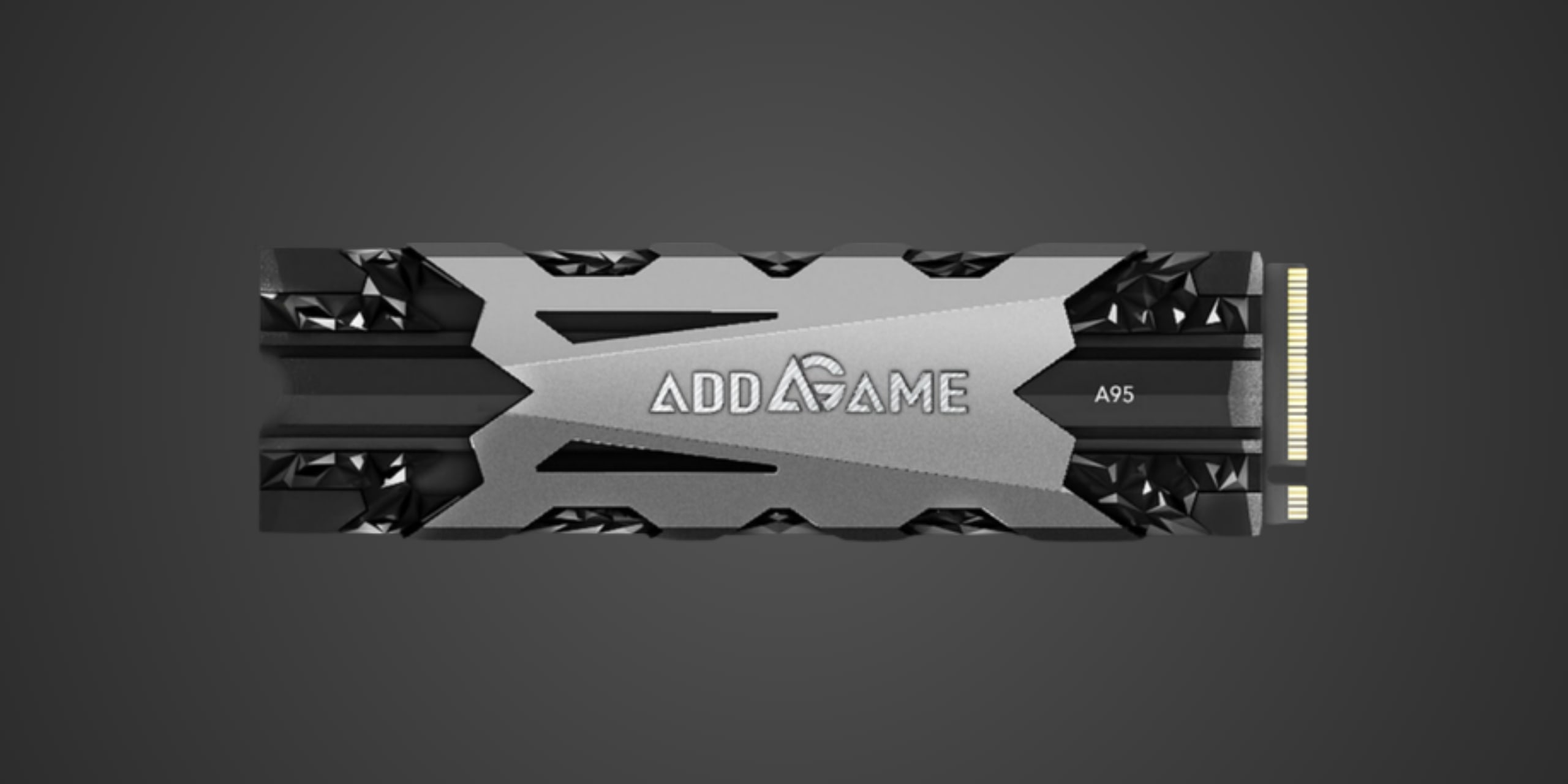
Table of Contents
Introduction
If you're among the millions of PlayStation 5 owners looking to break free from Sony's stingy internal storage, or if you're a PC gamer chasing top-tier Gen 4 speeds without emptying your wallet, the Addlink AddGame A95 deserves your attention. This PCIe 4.0 NVMe drive positions itself squarely in the high-performance gaming segment, delivering sequential read speeds that hit 7400 MB/s—faster than many household-name competitors and well above Sony's 5500 MB/s minimum requirement for PS5 internal expansion.
Addlink isn't exactly a mainstream brand you'll find splashed across gaming influencer channels, but this relative anonymity works in your favor. The AddGame A95 brings flagship-class performance from established components (Phison's proven E16 controller paired with 3D TLC NAND) without the brand premium that Samsung, Western Digital, or Corsair typically command. Whether you're installing this in a gaming rig to slash load times or expanding your PS5's woefully limited internal storage, the A95 promises the kind of raw throughput that makes waiting for games to load feel like ancient history.
Product Overview
The AddGame A95 arrives in the standard M.2 2280 form factor, making it compatible with virtually every modern motherboard and the PS5's internal expansion slot. This drive leverages a PCIe 4.0 x4 interface to deliver maximum bandwidth—a crucial specification that separates it from older PCIe 3.0 drives still lingering on store shelves.
Under the hood, you'll find Phison's PS5016-E16 controller, a well-established workhorse in the high-performance SSD world that's proven itself across dozens of different drives from various manufacturers. This controller handles the complex choreography of managing NAND flash, and it's paired here with 3D TLC NAND memory, which strikes the sweet spot between endurance, performance, and cost. TLC (Triple-Level Cell) NAND stores three bits per cell, offering better longevity than cheaper QLC alternatives while remaining affordable compared to premium MLC technology.
The drive includes DRAM cache—a critical component that acts as a high-speed buffer for frequently accessed data, significantly improving performance in real-world multitasking scenarios. Many budget drives skip DRAM to cut costs, resulting in stuttering performance when the drive juggles multiple operations simultaneously. The A95's DRAM presence puts it in a higher performance class than DRAMless competitors.
Capacity options span 1TB, 2TB, and 4TB, giving you flexibility based on your storage needs and budget. The drive ships with an aluminum heat spreader featuring a 9.1mm z-height profile, designed specifically to meet Sony's dimensional requirements for PS5 internal installation while providing adequate thermal management for sustained performance.
Performance & Real World Speed
Addlink rates the A95 for sequential read speeds up to 7400 MB/s and write speeds up to 7000 MB/s for the 4TB model, with the 1TB and 2TB variants clocking in slightly lower at 7300-7400 MB/s read speeds. These aren't just marketing numbers plucked from thin air—they represent legitimate PCIe 4.0 performance that competes directly with drives costing significantly more.
What does this translate to in actual gaming scenarios? If you're upgrading from a SATA SSD, you're looking at game load times cut by half or better in many titles. A game that took 45 seconds to load on your old drive might drop to 20 seconds or less. Compared to older PCIe Gen 3 drives maxing out around 3500 MB/s, you'll see 15-25 percent improvements in load times for games that can actually leverage the bandwidth.
For PS5 owners specifically, this drive not only meets but exceeds Sony's recommended specifications. While Sony mandates a minimum of 5500 MB/s, the A95's 7400 MB/s capability provides substantial headroom, ensuring you won't experience any performance bottlenecks compared to the console's internal drive. PS5 games designed to leverage the console's ultra-fast I/O architecture will load seamlessly, and you might even see marginally faster performance in some scenarios.
Windows boot times will drop noticeably if you're using this as your primary drive in a PC build. Expect cold boots to complete in 10-15 seconds on a properly configured system. Large file transfers—think copying 50GB of video footage from one folder to another—will cruise along at speeds that make older drives look positively glacial.
The drive supports DirectStorage API for gaming, meaning Windows 11 users running compatible titles can benefit from GPU-accelerated decompression that reduces CPU overhead and further improves load times. While DirectStorage adoption remains limited as of early 2025, the A95 is ready for when more developers embrace the technology.
Random read/write performance, while not explicitly detailed by Addlink, should reach hundreds of thousands of IOPS given the Phison E16 controller's capabilities. This matters more than you might think for everyday computing—random performance dictates how snappy your system feels when launching applications, opening browser tabs, or multitasking across several programs simultaneously.
Thermal Management
PCIe 4.0 drives generate significant heat under sustained workloads, and thermal throttling can devastate performance if cooling isn't adequate. The A95 addresses this with its pre-installed aluminum heat spreader, which covers the drive with adequate surface area to dissipate heat through passive convection.
The 9.1mm total height was clearly engineered with Sony's PS5 requirements in mind. Sony explicitly states that drives installed in the console's internal expansion slot must not exceed 11.25mm in total height including any heatsink, and the A95's dimensions provide comfortable clearance while still offering meaningful thermal management. This is non-negotiable for PS5 installation—without a heatsink, your drive won't function properly in the console, and Sony's firmware may even prevent the drive from working entirely.
For PC installations, the included heatsink should prove adequate in most scenarios, particularly if your motherboard's M.2 slot has decent airflow or if you're using your motherboard's own M.2 heatsink. Many modern motherboards include robust cooling solutions for M.2 drives, and you may find yourself removing the A95's heatsink to use your board's solution instead. This is perfectly acceptable and often preferable, as motherboard heatsinks frequently offer better thermal performance with more substantial heat spreaders and direct mounting pressure.
Under heavy sustained writes—think transferring several hundred gigabytes of data in one go—the drive will get warm, potentially hitting 70-75°C or higher without adequate airflow. This is normal for high-performance Gen 4 drives. The aluminum spreader helps, but don't expect miracles if you're installing this in a cramped small form factor build with poor ventilation. In such scenarios, consider pointing a case fan toward the drive or using a more substantial aftermarket M.2 cooler.
For most gaming workloads, which involve relatively short bursts of activity rather than continuous heavy writing, temperatures should remain well within safe operating parameters. The drive's controller will throttle performance if temperatures climb too high, protecting the hardware but temporarily reducing speeds. Proper cooling ensures you get the full 7400 MB/s performance you paid for.
Compatibility
PC Compatibility
The AddGame A95 works with any motherboard featuring an M.2 slot that supports PCIe NVMe drives, which encompasses virtually every motherboard released in the past five years. The drive requires a PCIe 4.0 x4 slot to achieve its rated speeds, but it's backward compatible with PCIe 3.0 slots—you'll just be limited to Gen 3 speeds (around 3500 MB/s maximum).
Your motherboard BIOS must support NVMe booting if you intend to use this as your primary system drive. Again, this is standard on any remotely modern board, but if you're working with hardware from 2015 or earlier, verify compatibility before purchasing.
Operating system support is universal. Windows 10 and 11 both recognize NVMe drives natively, as do current Linux distributions and macOS (when used in compatible Mac hardware or Hackintosh builds). No special drivers required—plug it in, format it, and you're ready to go.
Power requirements are minimal. Even high-performance NVMe drives typically draw less than 10 watts under full load, well within what any standard power supply can deliver through the motherboard. This isn't a concern unless you're running an extremely underpowered system.
Console Compatibility
PlayStation 5 Internal Expansion: The AddGame A95 is fully compatible with PS5 internal storage expansion. It meets all of Sony's requirements including PCIe 4.0 NVMe interface, exceeds the 5500 MB/s minimum read speed requirement with its 7400 MB/s capability, arrives in the required M.2 2280 form factor, and includes the mandatory heatsink within Sony's dimensional limits. Installation is straightforward—remove the PS5's side panel, unscrew the expansion slot cover, insert the drive, secure it with the included screw, and replace the cover. Sony's firmware will detect and format the drive on next boot.
Xbox Series X/S Internal Expansion: This drive is NOT compatible with Xbox Series X/S internal storage expansion. Microsoft's consoles require proprietary Seagate Storage Expansion Cards exclusively for internal expansion—standard M.2 NVMe drives like the A95 cannot be used for this purpose. However, you can use the A95 for external storage of Xbox One games by installing it in a USB NVMe enclosure, though you cannot play Xbox Series X/S optimized games directly from external storage.
External Storage for Consoles: If you place the A95 in a USB NVMe enclosure, you can use it for external storage on both PlayStation and Xbox consoles. On PS4 and PS5, you can store and play PS4 games from external storage, though PS5 games can only be stored externally, not played. On Xbox One and Series X/S, you can store and play Xbox One games from external storage, while Series X/S optimized games can only be stored externally.
Strengths & Weaknesses
The AddGame A95's most compelling advantage is its combination of flagship-class speeds with more accessible pricing than household gaming brands. When you're getting 7400 MB/s read speeds that match or beat drives costing 20-30 percent more, the value proposition becomes immediately clear. This is performance that would have cost three times as much just a couple years ago, now available at prices that make sense for mainstream gamers.
The drive's use of 3D TLC NAND paired with DRAM cache represents sound engineering choices. TLC offers excellent endurance ratings—while Addlink doesn't publish specific TBW (terabytes written) numbers, comparable drives with the Phison E16 controller typically rate for 600-1200 TBW depending on capacity, translating to years of heavy use before wearing out. The DRAM cache ensures consistent performance across varying workloads rather than the stuttering behavior you'd see from DRAMless budget drives when handling multiple operations.
PS5 compatibility with the pre-installed heatsink is a major convenience factor. Many competing drives require you to purchase a separate heatsink or remove an existing one to fit Sony's dimensional constraints, adding cost and complexity. The A95 arrives ready to install straight out of the box, with thermal management that meets Sony's requirements without exceeding the 11.25mm height limit.
The Phison E16 controller's proven track record offers peace of mind. This isn't some untested or sketchy off-brand controller—it's the same silicon powering respected drives from Sabrent, Corsair, and other established manufacturers. Phison has refined this controller through multiple revisions, and its reliability and performance characteristics are well-documented.
However, the AddGame brand recognition problem cuts both ways. While the underlying components are solid, Addlink doesn't have the customer support infrastructure or warranty reputation of Samsung, Western Digital, or Crucial. If something goes wrong, you're dealing with a smaller company that may have slower support response times. The five-year warranty is industry-standard and reassuring, but the process of actually claiming that warranty may prove more frustrating than with larger manufacturers.
Performance, while excellent, doesn't quite reach the absolute bleeding edge. Newer Gen 4 drives using more recent controllers can hit 7400-7600 MB/s or higher, and Gen 5 drives now exceed 10,000 MB/s (though at substantially higher prices). For gaming specifically, these differences matter very little—game load times show diminishing returns beyond about 5000 MB/s—but professionals working with massive uncompressed video files might benefit from even faster alternatives.
The aluminum heatsink, while adequate, isn't particularly impressive compared to the chunky thermal solutions shipping with premium drives. Under sustained heavy workloads in poorly ventilated cases, this drive will get toasty. Most users won't encounter scenarios that truly stress the cooling, but content creators rendering projects or moving terabytes of data regularly might want more robust thermal management.
Competition is fierce at this performance tier. The Samsung 990 Pro, WD Black SN850X, and Crucial P5 Plus all occupy similar price points with comparable specs, and they bring superior brand recognition and support infrastructure. The A95 needs to undercut these rivals on price to justify choosing a lesser-known brand, and whether that discount exists varies by retailer and current market conditions.
Verdict: Should You Buy It?
Buy this if:
-
You're upgrading from a SATA SSD or older PCIe Gen 3 drive and want dramatic performance gains in game load times and system responsiveness
-
You're expanding your PS5's internal storage and want a drive that exceeds Sony's specifications without paying premium brand pricing
-
You're building a new gaming or workstation PC and value strong price-to-performance over absolute maximum speeds
-
You need high endurance for write-intensive workloads and prefer TLC NAND with DRAM cache over cheaper DRAMless alternatives
-
You're comfortable with a lesser-known brand when underlying components and specifications check out
Skip this if:
-
You already own a comparable Gen 4 drive—the upgrade would deliver marginal improvements that don't justify the cost
-
Better deals are available from competing brands at similar capacity points, particularly from manufacturers with stronger support reputations
-
You need Gen 5 speeds for specific professional workflows involving massive uncompressed files where the bandwidth truly matters
-
You lack adequate cooling in your system and need a drive with more substantial thermal management
-
You prioritize brand recognition and customer support infrastructure over raw performance per dollar
-
You're installing in a system with only PCIe 3.0 slots, negating the Gen 4 speed advantage